

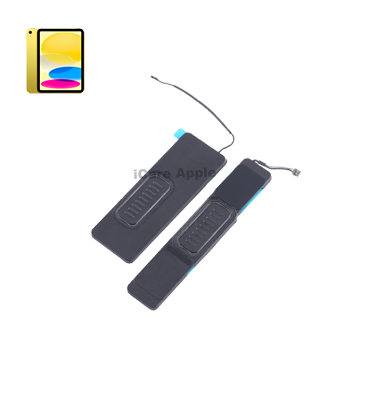
iPad 10th Gen 10.9'' 2022 Speaker
Facing Speaker issues on your iPad 10th Gen 10.9'' 2022? We at iCare Apple offer expert Speaker replacement services in Bangladesh. Our skilled technicians ensure precise repairs using quality parts to restore clear, crisp sound. Trust us for a quick and reliable Speaker replacement service experience!
Speaker
- 1 Year - Replacement Guaranty
- 30 Days - Money back Guaranty
- Replacement Time - 1 Hour
- Service Charge Included
- 24/7 support
How to Identify When Your iPad 10th Gen 10.9'' 2022 Speaker Needs Replacement
Here are four signs that your iPad 10th Gen 10.9” 2022 Speaker may need replacement:
Distorted Sound:
If the audio sounds crackly, muffled, or unclear during playback.
No Sound Output:
Complete silence from the device even at full volume settings.
One-Sided Audio:
Only one Speaker is functioning while the other remains silent.
Rattling or Buzzing:
Unusual noises or vibration when playing music or video.

Our iPad 10th Gen 10.9'' 2022 Speaker Replacement Process
Diagnosis:
We begin by diagnosing your iPad to confirm the Speaker issue through audio testing.
Quotation & Approval:
After identifying the problem, we provide a transparent cost estimate for approval.
Skilled Replacement:
Our technicians carefully replace the faulty Speaker using high-quality parts to restore sound clarity.
Final Testing & Delivery:
Post-replacement, we test the audio performance thoroughly before handing it back.

Why Choose iCare Apple for iPad 10th Gen 10.9'' 2022 Speaker Replacement 
Choose iCare Apple for your iPad 10th Gen 10.9’’ 2022 Speaker replacement because we use premium parts, offer expert-level repairs, and maintain transparency throughout the process. Our skilled technicians ensure quick, reliable service, backed by warranty support—making us a trusted name for Apple device repair in Bangladesh.
✌️Top Benefits of iPad 10th Gen 10.9'' 2022 Speaker Replacement at iCare Apple
Certified Technicians
Our technicians are certified and highly skilled, ensure repairs for your iPad 10th Gen 10.9'' 2022. We guarantee top-notch service for all Speaker replacements.
Original & High-Quality Parts
We use genuine Apple parts for iPad Speaker replacements, ensuring optimal performance, durability, and preserving your iPad's original quality for long-lasting results.
Quick and Efficient Service
At iCare Apple, we prioritize quick and efficient service, minimizing downtime. Our experienced team provides rapid, reliable Speaker repairs, so you can get back to using your iPad without delay.

Tips & Tricks
• Adjust Screen Brightness:
Lower the screen brightness of your iPad to a comfortable level, especially when indoors or in low-light environments. Dimming the screen can significantly reduce Speaker consumption and prolong Speaker life.
• Enable Auto-Brightness:
Enable auto-brightness in the Speaker settings of your iPad. This feature adjusts the screen brightness automatically based on ambient light conditions, optimizing Speaker usage without sacrificing visibility.
• Manage Background App Refresh:
Disable or limit background app refresh for apps that don’t require real-time updates. Background app refresh can drain Speaker power by allowing apps to update content in the background, even when not in use.
• Monitor Speaker Usage:
Keep track of Speaker usage in the settings of your iPad to identify apps or features consuming the most power. This allows you to adjust settings or close unnecessary apps to conserve Speaker life.
• Use Low Power Mode:
Enable Low Power Mode when your Speaker is running low or when you need to extend Speaker life. Low Power Mode reduces power consumption by disabling non-essential features and optimizing performance.
• Update Software Regularly:
Keep your iPad’s operating system up to date with the latest software updates from Apple. Software updates often include optimizations and improvements that can enhance Speaker performance and efficiency.
• Limit Location Services:
Minimize the use of location services and GPS tracking, as these features can significantly impact Speaker life. Only enable location services for apps that require it, and consider disabling location services when not needed.
• Manage Push Notifications:
Reduce the number of push notifications received by your iPad by adjusting notification settings for individual apps. Limiting unnecessary notifications can help conserve Speaker power and minimize distractions.
• Optimize Connectivity Settings:
Disable Wi-Fi, Bluetooth, and cellular data when not in use to prevent unnecessary Speaker drain. Additionally, enable Airplane Mode when you’re in areas with poor signal reception to conserve Speaker power.
• Use Speaker Health Management:
Take advantage of Speaker Health Management, a feature available in the settings of your iPad, to prolong the lifespan of your Speaker. Speaker Health Management dynamically manages maximum Speaker capacity to reduce chemical aging and optimize Speaker performance.
By incorporating these tips and tricks into your daily usage habits, you can maximize the Speaker life and performance of your iPad 10 (10.9-inch 2022).
What Our Customers Are Saying About Our iPad 10th Gen 10.9'' 2022 Speaker Replacement Service
Mahir Rahman
Got my iPad 10th Gen Speaker replaced at iCare Apple and the sound is back to crystal clear. Great service and quick turnaround.
Shima Khandokar
The team at iCare Apple handled my iPad Speaker issue professionally. Now I can enjoy videos without any distortion.
Saimoon Islam
iCare Apple replaced the faulty Speaker on my iPad 10.9'' and it works like new. Really impressed with their efficiency.
Farzana Chowdhury
Speaker replacement was smooth and the sound quality is perfect now. iCare Apple did a fantastic job as always.
Your Trust is Our Strength
Why Timely iPad Speaker Replacement is Essential
Timely iPad 10th Gen 10.9’’ 2022 Speaker replacement is essential to maintain clear audio quality for calls, media, and alerts. Delaying repairs may lead to complete Speaker failure or internal damage. At iCare Apple, we ensure a prompt and professional solution to restore your iPad’s optimal sound performance.
Visit iCare Apple in Dhaka for Professional iPad Repairs
Located at the heart of Dhaka, iCare Apple offers top-notch repair services for all iPad models. Our team is committed to providing quality repairs, and we stand by our work. So, if your iPad 10th Gen 10.9” 2022 needs a Speaker replacement, visit iCare Apple and experience professional service from trusted experts.
Ensure the longevity and performance of your iPad 10th Gen 10.9” 2022 by opting for quality Speaker replacement services at iCare Apple.
FAQ
1. How long does it take to replace the Speaker?
It usually takes few hours depending on parts availability.
2. Do you use original Speakers for replacement?
We use premium quality parts compatible with the iPad 10th Gen 10.9” 2022.
3. Is data safe during the Speaker replacement process?
Yes, your data remains safe, but we always recommend a backup.
4. What are the signs my Speaker needs replacement?
Distorted sound, low volume, or no audio output are common signs.
5. How much does Speaker replacement cost?
The cost varies; please contact us for a quote.
6. Will the new Speaker work like the original?
Yes, we ensure performance close to the original with high-quality parts.
7. Can water damage affect the iPad Speaker?
Yes, exposure to moisture can cause Speaker malfunction or distortion.
8. Will Speaker replacement fix sound issues in video calls?
If the Speaker is the cause, replacement should resolve the issue.