

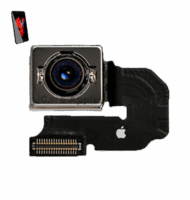
iPhone 6s Back Camera
At iCare Apple in Bangladesh, we offer expert iPhone XS Back Camera replacement services. Our skilled technicians ensure high-quality repairs using genuine parts, restoring your camera’s performance. Whether it’s blurry photos or a cracked lens, we provide fast, reliable solutions to get your iPhone XS back to perfect condition.
Main Camera
- 1 Year - Replacement Guaranty
- 30 Days - Money back Guaranty
- Replacement Time - 1 Hour
- Service Charge Included
- 24/7 support
How to Identify When Your iPhone XS Back Camera Needs Replacement
Here are four signs that your iPhone XS Back Camera may need replacement:
Blurry or Distorted Images:
If your photos are consistently blurry or have visible distortions, it could be a sign of a faulty camera.
Cracked or Damaged Lens:
Physical damage to the camera lens can lead to poor photo quality or prevent the camera from functioning.
Camera App Malfunctions:
If the camera app freezes, crashes, or fails to open, your camera might need attention.
Dark or Black Screen:
A completely black screen when using the camera app can indicate hardware failure that requires repair.

Our iPhone XS Back Camera Replacement Process
Diagnosis:
We start by thoroughly diagnosing your iPhone XS to confirm the camera issue.
Part Sourcing:
We use genuine, high-quality replacement parts to ensure long-lasting performance.
Replacement:
Our expert technicians carefully replace the damaged Back Camera with precision and care.
Testing:
After the replacement, we test the camera to ensure it functions perfectly, capturing clear, sharp images.

Choose iCare Apple for iPhone XS Back Camera replacement for our expert technicians, genuine parts, and quick, reliable service. We prioritize quality and customer satisfaction, ensuring your camera is restored to perfect condition. Trust us for affordable, efficient repairs that bring your iPhone XS back to life.
✌️Top Benefits of iPhone XS Back Camera Replacement at iCare Apple
Certified Technicians
Our certified technicians are highly skilled and trained to handle iPhone repairs, ensuring your device gets the best care possible. We use advanced tools and techniques to replace Back Camera.
Original & High-Quality Parts
At iCare Apple, we use Original & OEM compatible parts for Back Camera replacements. This ensures your iPhone’s performance remains optimal, and the repair meets Apple’s strict standards.
Quick and Efficient Service
Our team prioritizes speed without compromising quality. We understand the importance of your device, and most Back Camera replacements are completed on the same day.

Tips & Tricks
• Use Portrait Mode:
Take advantage of Portrait mode to capture photos with a blurred background (bokeh effect), which emphasizes the subject. Tap on “Portrait” at the bottom of the Camera app and adjust the depth effect to enhance your photos.
• Adjust Exposure Manually:
Tap on the screen where you want to set the focus and exposure. Slide your finger up or down to manually adjust the exposure level, especially in challenging lighting conditions.
• HDR (High Dynamic Range):
Enable HDR for photos that require balanced exposure in high-contrast scenes. HDR helps retain detail in both highlights and shadows. Tap on the HDR icon (looks like a sun) in the Camera app to toggle HDR on or off.
• Grid Lines:
Enable Grid lines in the Camera settings (Settings > Camera > Grid) to help you compose your shots using the rule of thirds or aligning horizons. This can improve the overall balance and composition of your photos.
• Use Burst Mode:
Hold down the shutter button to activate Burst mode, which captures a rapid series of photos. This is useful for capturing fast-moving subjects or ensuring you get the perfect shot in dynamic scenes.
• Live Photos:
Capture Live Photos by tapping on the Live Photos icon (circle with concentric rings) in the Camera app. Live Photos capture a few seconds of video and audio before and after you take a photo, adding movement and sound to your images.
• Panorama Mode:
Swipe to Panorama mode and follow the on-screen instructions to capture panoramic views. Move your iPhone XS steadily in one direction to create seamless panoramic photos of landscapes or wide scenes.
• Night Mode:
In low-light conditions, the iPhone XS automatically activates Night mode for improved low-light photography. Hold the iPhone steady for a few seconds while the camera captures multiple exposures to create a brighter, clearer image.
• Edit Photos in Photos App:
After capturing photos, use the editing tools in the Photos app to enhance your images. Adjust lighting, color, and apply filters to achieve the desired look before sharing or saving your photos.
• Third-Party Apps:
Explore third-party camera apps available on the App Store to access additional features such as manual controls, advanced filters, or specific shooting modes that may not be available in the native Camera app.
By incorporating these tips and exploring the capabilities of the Back Camera on your iPhone XS, you can capture high-quality photos and explore creative possibilities in various shooting scenarios.
What Our Customers Are Saying About Our iPhone XS Back Camera Replacement Service
Abdullah Al Amin
The iCare Apple team replaced my iPhone XS back camera quickly and efficiently. They used genuine parts, and now my camera works perfectly. Highly recommend their service!
Mostafa Kamal
I had a great experience at iCare Apple. My iPhone XS camera was fixed in no time, and the picture quality is amazing now. Professional and reliable service!
Ahsan Ali
iCare Apple did an excellent job replacing my iPhone XS back camera. The team was friendly, and the repair process was smooth. Very satisfied with the service.
Shamsul Alam
I trust iCare Apple for all my iPhone repairs. They replaced my XS back camera, and now my photos are as clear as new. Fast and dependable service!
Your Trust is Our Strength
Why Timely iPhone Back Camera Replacement is Essential
Timely iPhone XS Back Camera replacement is essential to maintain photo quality and device functionality. Delaying repairs can lead to worsened issues, such as distorted images or a completely non-functional camera. Addressing the problem promptly ensures your iPhone performs optimally, preventing further damage and preserving your device’s value.
Visit iCare Apple in Dhaka for Professional iPhone Repairs
Located at the heart of Dhaka, iCare Apple offers top-notch repair services for all iPhone models. Our team is committed to providing quality repairs, and we stand by our work. So, if your iPhone XS needs a Back Camera replacement, visit iCare Apple and experience professional service from trusted experts.
Ensure the longevity and performance of your iPhone XS by opting for quality Back Camera replacement services at iCare Apple.
FAQ
1. How long does the iPhone XS Back Camera replacement take?
The replacement typically takes 30-60 minutes, depending on the complexity of the issue.
2. Do you use original parts for the replacement?
Yes, we use genuine, high-quality parts to ensure your iPhone XS camera functions like new.
3. Is the iPhone XS Back Camera replacement covered by warranty?
Yes, we offer a warranty on the replacement part and the service for added peace of mind.
4. What if my camera issue is caused by something other than a faulty camera?
Our technicians will diagnose the issue and advise you on the best solution if it’s caused by other factors.
5. How much does the iPhone XS Back Camera replacement cost?
The cost depends on the nature of the damage. We offer affordable pricing and can provide a quote after inspection.
6. Will my photos be restored to normal quality after the replacement?
Yes, once the Back Camera is replaced, your photos should return to their original clarity and sharpness.
7. Do I need to make an appointment for a camera replacement?
While appointments are not necessary, we recommend scheduling one to minimize wait time during busy hours.
8. Can I trust iCare Apple with my data during the repair?
Absolutely. We prioritize your privacy and ensure that no data is accessed or compromised during the repair process.