
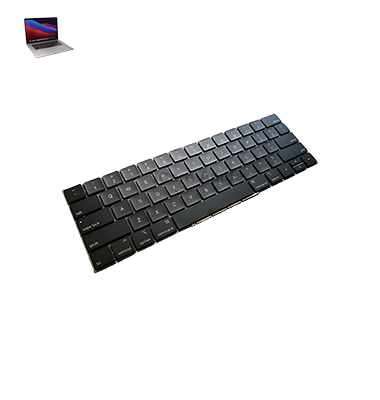
MacBook Pro (2018) A1990 Keyboard
At iCare Apple, we provide expert MacBook Pro (2018) A1990 KeyBoard replacement services in Bangladesh. Our skilled technicians ensure quick and reliable repairs, using high-quality parts to restore your MacBook’s functionality. Visit us for a seamless, professional KeyBoard replacement experience with guaranteed satisfaction.
How to Identify When Your MacBook Pro (2018) A1990 KeyBoard Needs Replacement
Here are four signs that indicate your MacBook Pro (2018) A1990 KeyBoard might need replacement:
Unresponsive Keys:
If some keys don’t register when pressed or stop working entirely, it may be time for a replacement.
Sticky or Jammed Keys:
Keys that feel stuck or require excessive pressure to press could signal internal damage.
Repeated Key Inputs:
If keys type multiple characters with a single press, it might indicate malfunctioning switches or circuits.
Visible Damage:
Physical damage like cracked or worn-out keys suggests the need for replacement to restore functionality.
Our MacBook Pro (2018) A1990 KeyBoard Replacement Process
1. Diagnosis:
Our technicians assess your KeyBoard for issues like unresponsive or sticky keys and confirm the need for replacement.
2. Estimate & Approval:
We provide an estimate and get your approval before starting the replacement process.
3. Replacement:
We carefully remove the old KeyBoard and install a high-quality replacement, ensuring proper fit and functionality.
4. Testing:
After installation, we test all keys to ensure they work smoothly and perform a quality check before returning your MacBook.

Choose iCare Apple for MacBook Pro (2018) A1990 KeyBoard replacement for our expert technicians, high-quality parts, and fast service. We ensure your KeyBoard functions like new, providing reliable and affordable solutions in Bangladesh with a focus on customer satisfaction and precision repairs.
✌️Top Benefits of MacBook Pro (2018) A1990 KeyBoard Replacement at iCare Apple
Certified Technicians
Our technicians are certified and highly skilled, ensure repairs for your MacBook Pro (2018) A1990. We guarantee top-notch service for all KeyBoard replacements.
Original & High-Quality Parts
We use genuine Apple parts for MacBook KeyBoard replacements, ensuring optimal performance, durability, and preserving your MacBook's original quality for long-lasting results.
Quick and Efficient Service
At iCare Apple, we prioritize quick and efficient service, minimizing downtime. Our experienced team provides rapid, reliable KeyBoard repairs, so you can get back to using your MacBook without delay.

Tips & Tricks for MacBook Pro (2018) A1990 KeyBoard
👍 Regular Cleaning:
Keep your Keyboard clean by regularly removing dust, crumbs, and other debris using compressed air or a soft brush. This helps prevent keys from sticking and ensures smooth operation.
👍 Adjust Keyboard Settings:
Customize Keyboard settings in System Preferences to suit your preferences. You can adjust Keyboard repeat rate, modifier key behavior, and Keyboard backlight brightness to optimize your typing experience.
👍 Use Keyboard Shortcuts:
Take advantage of Keyboard shortcuts to perform common tasks quickly and efficiently. macOS offers a wide range of Keyboard shortcuts for navigating the system, launching applications, and executing commands.
👍 Familiarize with Touch Bar:
Familiarize yourself with the Touch Bar located above the Keyboard, which provides context-sensitive shortcuts and controls. Customize the Touch Bar to include your favorite shortcuts and applications for easier access.
👍 Enable Touch ID:
Use the Touch ID sensor integrated into the power button for secure authentication and quick access to your MacBook Pro. Set up Touch ID to unlock your device, authorize purchases, and log in to apps securely.
👍 Practice Touch Typing:
Improve your typing speed and accuracy by practicing touch typing techniques. Learn to type without looking at the Keyboard to increase productivity and reduce strain on your hands and wrists.
👍 Explore Accessibility Features:
Explore accessibility features such as Sticky Keys, Slow Keys, and Keyboard Navigation to customize Keyboard behavior according to your needs. These features can enhance usability for users with mobility or dexterity impairments.
👍 Utilize Emoji and Special Characters:
Easily insert emojis, special characters, and symbols using the built-in emoji picker and Character Viewer. Press Command + Control + Spacebar to access the emoji picker and browse through available characters.
👍 Enable Key Repeat:
Adjust key repeat settings to control how quickly characters repeat when holding down a key. Customize key repeat delay and rate in Keyboard preferences to match your typing speed and preferences.
👍 Keep Software Updated:
Regularly update macOS and Keyboard firmware to ensure compatibility, stability, and performance improvements. Software updates may also address known issues and vulnerabilities, enhancing the overall reliability of your MacBook Pro’s Keyboard.
By following these tips and incorporating them into your Keyboard usage habits, you can optimize your typing experience and make the most of the features offered by the MacBook Pro (2018) A1990 Keyboard.
What Our Customers Are Saying About Our MacBook Pro (2018) A1990 KeyBoard Replacement Service
Anika Islam
The KeyBoard replacement on my MacBook Pro was done quickly and efficiently. Highly impressed with the quality and service.
Shakib Ali
iCare Apple replaced my MacBook’s KeyBoard with great precision. Fast service and excellent customer care.
Farah Naz
I’m very satisfied with the MacBook Pro KeyBoard replacement. The team at iCare Apple did a fantastic job.
Rimon Hossain
The KeyBoard on my MacBook Pro was fixed in no time. Professional and reliable service from iCare Apple!
Your Trust is Our Strength
Why Timely MacBook KeyBoard Replacement is Essential
Timely MacBook Pro (2018) A1990 KeyBoard replacement is essential to prevent further damage, improve productivity, and avoid additional repair costs. A malfunctioning KeyBoard can hinder your work and affect your MacBook’s overall performance, so prompt replacement ensures smooth functionality, restoring your device to optimal condition.
Visit iCare Apple in Dhaka for Professional MacBook Repairs
Located at the heart of Dhaka, iCare Apple offers top-notch repair services for all MacBook models. Our team is committed to providing quality repairs, and we stand by our work. So, if your MacBook Pro (2018) A1990 needs a KeyBoard replacement, visit iCare Apple and experience professional service from trusted experts.
Ensure the longevity and performance of your MacBook Pro (2018) A1990 by opting for quality KeyBoard replacement services at iCare Apple.
FAQ
1. How long does the MacBook Pro (2018) A1990 KeyBoard replacement take?
It typically takes 18-21 business days for replacement.
2. Can you replace the KeyBoard if the MacBook has liquid damage?
Yes, we can replace the KeyBoard, but the extent of the damage may affect the repair process.
3. Will my data be lost during the KeyBoard replacement?
No, your data remains safe as the KeyBoard replacement doesn’t affect storage.
4. How much does the KeyBoard replacement cost?
The cost varies; please contact us for an accurate estimate.
5. Do you use original parts for the KeyBoard replacement?
We use high-quality, reliable parts to ensure optimal performance.
6. Can you replace the KeyBoard while keeping the existing MacBook case?
Yes, we can replace the KeyBoard without affecting the outer casing of your MacBook.
7. Is there a warranty for the KeyBoard replacement?
Yes, we offer a limited warranty on the replaced KeyBoard and service.
8. Can you replace a specific key on the KeyBoard?
We generally replace the entire KeyBoard for better performance and longevity.