

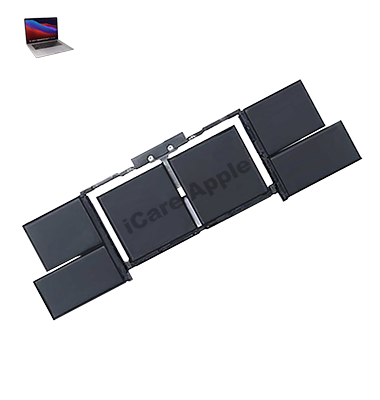
MacBook Pro (2019) A1990 Battery
We offer professional MacBook Pro (2019) A1990 Battery replacement service in Bangladesh. If your Battery drains fast or doesn’t hold charge, visit us for a reliable solution. Our expert technicians ensure a quick, high-quality replacement using premium parts, restoring your MacBook’s Battery life efficiently. Visit iCare Apple for hassle-free service!
How to Identify When Your MacBook Pro (2019) A1990 Battery Needs Replacement
Here are four signs that your MacBook Pro (2019) A1990 Battery may need replacement:
Rapid Battery Drain
Your MacBook Battery depletes quickly, even with minimal usage.
Charging Issues
The Battery does not charge or takes excessively long to reach full capacity.
Overheating
The MacBook becomes unusually hot, even during light tasks.
Service Warning
macOS shows a “Service Battery” or “Replace Soon” notification in Battery Health.
Our MacBook Pro (2019) A1990 Battery Replacement Process
1. Diagnosis
We assess your MacBook’s Battery health to confirm if a replacement is needed.
2. Genuine Battery Installation
Our experts carefully replace the old Battery with a high-quality, compatible one.
3. Testing & Calibration
We ensure the new Battery functions properly by running performance and charging tests.
4. Final Inspection & Delivery
After a thorough quality check, we hand over your MacBook in optimal condition.

At iCare Apple, we provide professional MacBook Pro (2019) A1990 Battery replacement with high-quality parts, expert technicians, and fast service. We ensure a safe and efficient Battery replacement, restoring your MacBook’s performance. Trust us for reliable repairs at competitive prices with customer satisfaction as our top priority.
✌️Top Benefits of MacBook Pro (2019) A1990 Battery Replacement at iCare Apple
Certified Technicians
Our technicians are certified and highly skilled, ensure repairs for your MacBook Pro (2019) A1990. We guarantee top-notch service for all Battery replacements.
Original & High-Quality Parts
We use genuine Apple parts for MacBook Battery replacements, ensuring optimal performance, durability, and preserving your MacBook's original quality for long-lasting results.
Quick and Efficient Service
At iCare Apple, we prioritize quick and efficient service, minimizing downtime. Our experienced team provides rapid, reliable Battery repairs, so you can get back to using your MacBook without delay.

Tips & Tricks for MacBook Pro (2019) A1990 Battery
👍 Optimize Energy Settings:
Adjust energy settings in System Preferences to optimize Battery performance on your MacBook Pro (2019) A1990. Customize settings such as display brightness, sleep mode duration, and automatic power-saving features to conserve Battery power.
👍 Monitor Battery Usage:
Keep an eye on Battery usage patterns using the Battery menu in System Preferences. This provides insights into apps and processes consuming the most Battery power, allowing you to adjust usage habits or close unnecessary applications to extend Battery life.
👍 Enable Battery Health Management:
Enable Battery Health Management in System Preferences to extend the lifespan of your MacBook Pro (2019) A1990 Battery. This feature adjusts charging patterns to minimize Battery aging and maintain optimal performance over time.
👍 Use Power-Saving Mode:
Activate Power-Saving Mode when running low on Battery to prioritize energy efficiency and prolong Battery life. Power-Saving Mode reduces system performance and adjusts background processes to conserve power during critical usage periods.
👍 Calibrate Battery Regularly:
Calibrate the Battery of your MacBook Pro (2019) A1990 periodically to ensure accurate Battery readings and optimal performance. Fully charge the Battery, then use the laptop until the Battery drains completely before recharging to recalibrate the Battery gauge.
👍 Avoid Extreme Temperatures:
Protect the Battery of your MacBook Pro (2019) A1990 from exposure to extreme temperatures, as high heat or cold can degrade Battery performance and lifespan. Store and operate your laptop in a cool, dry environment to maintain Battery health.
👍 Limit Background Processes:
Minimize background processes and unnecessary applications running on your MacBook Pro (2019) A1990 to reduce Battery drain. Close unused apps, disable automatic updates, and limit multitasking to conserve Battery power during prolonged usage.
👍 Opt for Battery-Saving Browsing:
Use Battery-saving browsing modes or extensions in web browsers to reduce power consumption while browsing the internet on your MacBook Pro (2019) A1990. Features such as ad blockers and tab suspension can help minimize CPU and Battery usage.
👍 Manage Screen Brightness:
Adjust screen brightness manually or enable automatic brightness adjustment to optimize Battery life on your MacBook Pro (2019) A1990. Lowering screen brightness when operating on Battery power can significantly extend Battery runtime.
👍 Plan Ahead for Charging:
Plan ahead for charging opportunities when using your MacBook Pro (2019) A1990 away from power sources. Carry a portable power bank or charger to replenish Battery power on the go and ensure uninterrupted usage when needed.
What Our Customers Are Saying About Our MacBook Pro (2019) A1990 Battery Replacement Service
Rakib Hasan
The Battery replacement service was quick and efficient. My MacBook Pro (2019) A1990 now holds a charge like new.
Shimanto Basak
Excellent service from iCare Apple. My MacBook’s Battery was replaced professionally, and the performance has improved significantly.
Sifat Nazrul
Highly satisfied with the Battery replacement. The process was smooth, and my device is working perfectly without any overheating issues.
Tamanna Shimu
Great experience at iCare Apple. The new Battery is giving excellent backup, and the service was done faster than expected.
Your Trust is Our Strength
Why Timely MacBook Battery Replacement is Essential
Timely MacBook Pro (2019) A1990 Battery replacement is essential to prevent sudden shutdowns, overheating, and performance issues. A degraded Battery can affect productivity and damage internal components. Replacing it on time ensures longer Battery life, optimal performance, and a safer user experience, keeping your MacBook running smoothly without interruptions.
Visit iCare Apple in Dhaka for Professional MacBook Repairs
Located at the heart of Dhaka, iCare Apple offers top-notch repair services for all Macbook models. Our team is committed to providing quality repairs, and we stand by our work. So, if your MacBook Pro (2019) A1990
needs a Battery replacement, visit iCare Apple and experience professional service from trusted experts.
Ensure the longevity and performance of your MacBook Pro (2019) A1990
by opting for quality Battery replacement services at iCare Apple.
FAQ
1. When should I replace my MacBook Pro (2019) A1990 Battery?
Replace it if you experience rapid draining, overheating, or Battery health below 80%.
2. How long does the battery replacement take?
Battery replacement typically takes a few hours, depending on availability and issue.
3. Do I need to book an appointment for battery replacement?
While not required, an appointment ensures faster service.
4. Are original parts used for the replacement?
Yes, we use genuine Apple parts for all battery replacements.
5. How much does the battery replacement cost?
The cost varies; please contact us for a detailed quote based on your device.
6. Will my data be affected during the replacement?
No, your data will remain intact during the battery replacement process.
7. Do you offer a warranty for battery replacements?
Yes, we offer a warranty on the replacement battery and service.
8. Can I replace the battery myself?
It’s recommended to have a professional handle the replacement to avoid damage.