

MacBook Pro (2020) A2141 KeyBoard
At iCare Apple, we offer expert MacBook Pro (2020) A2141 Keyboard replacement services in Bangladesh. Our skilled technicians ensure quick, reliable, and quality replacements to restore your MacBook’s performance. Visit us at Concept Tower, Green Road, Dhaka for a hassle-free service experience!
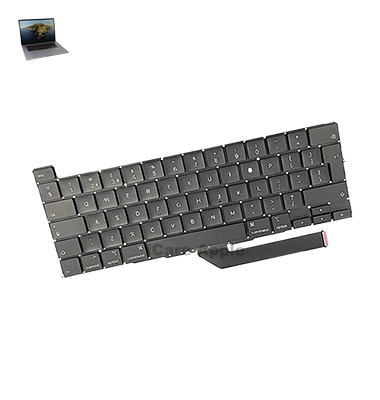
How to Identify When Your MacBook Pro (2020) A2141 Keyboard Needs Replacement
Here are four signs that your MacBook Pro (2020) A2141 Keyboard may need replacement:
Unresponsive Keys:
Some keys may not register when pressed or require multiple presses.
Sticky Keys:
Keys may feel sticky or get stuck after typing.
Erratic Typing:
Letters, numbers, or symbols may appear randomly or fail to type consistently.
Physical Damage:
Visible cracks, dents, or spills affecting the Keyboard’s functionality.
Our MacBook Pro (2020) A2141 Keyboard Replacement Process
1. Diagnosis:
Our technicians thoroughly examine the Keyboard to assess the damage and ensure a replacement is necessary.
2. Component Sourcing:
We source high-quality, compatible replacement parts to maintain your MacBook’s performance.
3. Replacement:
The damaged Keyboard is carefully removed, and the new one is installed with precision.
4. Testing:
After installation, we conduct thorough testing to ensure all keys function perfectly before handing your MacBook back.

Choose iCare Apple for your MacBook Pro (2020) A2141 Keyboard replacement for expert service, quick turnaround, and high-quality parts. Our skilled technicians ensure precise replacements, restoring your device’s performance. We prioritize customer satisfaction, offering reliable solutions in Bangladesh with a focus on quality and affordability.
✌️Top Benefits of MacBook Pro (2020) A2141 Keyboard Replacement at iCare Apple
Certified Technicians
Our technicians are certified and highly skilled, ensure repairs for your MacBook Pro (2020) A2141. We guarantee top-notch service for all Keyboard replacements.
Original & High-Quality Parts
We use genuine Apple parts for MacBook Keyboard replacements, ensuring optimal performance, durability, and preserving your MacBook's original quality for long-lasting results.
Quick and Efficient Service
At iCare Apple, we prioritize quick and efficient service, minimizing downtime. Our experienced team provides rapid, reliable Keyboard repairs, so you can get back to using your MacBook without delay.

Tips & Tricks for MacBook Pro (2020) A2141 Keyboard
👍 Regularly Clean the Keyboard:
Keep the keyboard clean by regularly removing dust, crumbs, and debris using compressed air or a soft brush. This helps prevent keys from sticking or jamming and maintains optimal typing performance.
👍 Use a Keyboard Cover:
Consider using a keyboard cover to protect the MacBook Pro 2020 A2141 keyboard from spills, dust, and scratches. A keyboard cover can help extend the lifespan of the keyboard and keep it looking new.
👍 Adjust Keyboard Sensitivity:
Customize keyboard sensitivity settings in System Preferences to adjust key repeat rate and delay. This allows you to fine-tune typing responsiveness according to your preferences and typing style.
👍 Learn Keyboard Shortcuts:
Familiarize yourself with keyboard shortcuts for common tasks and applications to increase productivity. macOS offers a wide range of keyboard shortcuts for navigating, editing, and managing files, saving time and reducing reliance on the mouse or trackpad.
👍 Enable Key Repeat:
Enable key repeat functionality in System Preferences to allow keys to repeat when held down, making it easier to type repeated characters or words. Adjust key repeat rate and delay to suit your typing speed and preferences.
👍 Use Keyboard Viewer:
Use the Keyboard Viewer feature in macOS to visualize keyboard layout, modifier key combinations, and special characters. This can be useful for learning keyboard shortcuts or troubleshooting key mapping issues.
👍 Check for Software Updates:
Regularly check for software updates for macOS and installed applications to ensure compatibility and stability with the MacBook Pro 2020 A2141 keyboard. Software updates may include bug fixes and improvements related to keyboard functionality.
👍 Avoid Eating or Drinking Near the Keyboard:
Avoid eating or drinking near the MacBook Pro 2020 A2141 keyboard to prevent spills and food debris from entering the keys. Liquid spills can cause damage to the keyboard and may require professional repair.
👍 Test Keyboard Functionality:
Periodically test the functionality of all keys on the MacBook Pro 2020 A2141 keyboard to ensure they register input correctly. Use built-in macOS utilities or third-party keyboard testing software to identify and troubleshoot any issues.
👍 Seek Professional Assistance if Necessary:
If you encounter persistent issues with the MacBook Pro 2020 A2141 keyboard, such as unresponsive keys or hardware defects, seek assistance from an authorized Apple service provider or technician for diagnosis and repair.
What Our Customers Are Saying About Our MacBook Pro (2020) A2141 Keyboard Replacement Service
Irfan Khan
The Keyboard replacement at iCare Apple was quick and flawless. My MacBook works perfectly now, thank you!
Shahrin Tasnim
Excellent service and fast turnaround! My MacBook Pro’s Keyboard feels brand new after the replacement.
Naseer Hossain
iCare Apple’s team did a great job with the Keyboard replacement. Smooth process and professional service.
Kaelen Idris
Very satisfied with the Keyboard replacement! iCare Apple’s team ensured everything was done right and quickly.
Your Trust is Our Strength
Why Timely MacBook Keyboard Replacement is Essential
Timely MacBook Pro (2020) A2141 Keyboard replacement is essential to maintain your device’s performance and productivity. Delaying repairs can lead to more significant issues, such as further damage or data loss. Replacing a malfunctioning Keyboard promptly ensures smooth typing, reduces frustration, and extends the lifespan of your MacBook.
Visit iCare Apple in Dhaka for Professional MacBook Repairs
Located at the heart of Dhaka, iCare Apple offers top-notch repair services for all Macbook models. Our team is committed to providing quality repairs, and we stand by our work. So, if your MacBook Pro (2020) A2141 needs a Keyboard replacement, visit iCare Apple and experience professional service from trusted experts.
Ensure the longevity and performance of your MacBook Pro (2020) A2141 by opting for quality Keyboard replacement services at iCare Apple.
FAQ
1. How long does the Keyboard replacement take?
The replacement usually takes a few hours, depending on the complexity.
2. Is the replacement process covered by a warranty?
Yes, we offer a warranty on our Keyboard replacement service.
3. Do I need to book an appointment?
While not required, booking an appointment ensures faster service.
4. Are the replacement parts original?
Yes, we use high-quality, compatible parts for the replacement.
5. Can I get my MacBook Pro Keyboard replaced on the same day?
Yes, we strive to complete most replacements the same day.
6. Will my data be affected during the replacement?
No, your data remains safe as we only replace the Keyboard.
7. How much does the Keyboard replacement cost?
The cost depends on the extent of the damage; contact us for an estimate.
8. What should I do if my Keyboard is not working?
Visit iCare Apple for a diagnosis to determine if a replacement is needed.