

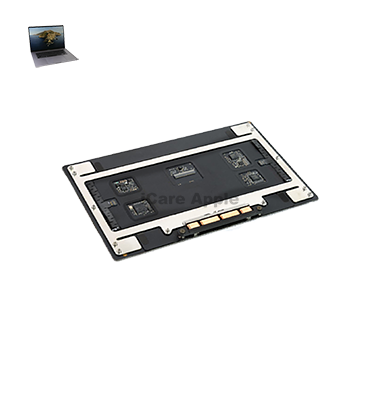
MacBook Pro (2020) A2141 Track Pad
At iCare Apple, we provide expert MacBook Pro (2020) A2141 Track Pad replacement services in Bangladesh. Our skilled technicians ensure precise, high-quality replacements to restore your Track Pad’s functionality. Visit us in Dhaka for quick, reliable service and get your MacBook working like new again with our professional care!
How to Identify When Your MacBook Pro (2020) A2141 Track Pad Needs Replacement
Here are four signs your MacBook Pro (2020) A2141 Track Pad may need replacement:
Unresponsive or Inconsistent Touch:
The Track Pad doesn’t register clicks or gestures reliably.
Physical Damage:
Visible cracks, dents, or damage on the Track Pad surface.
Sticky or Hard to Press:
The Track Pad feels stiff or sticky when pressed.
Erratic Cursor Movement:
The cursor moves randomly or gets stuck during use.
Our MacBook Pro (2020) A2141 Track Pad Replacement Process
1. Diagnosis:
We begin by diagnosing the Track Pad issue to confirm if a replacement is necessary.
2. Part Sourcing:
We use high-quality, compatible replacement Track Pads for optimal performance.
3. Replacement:
Our technicians carefully remove the damaged Track Pad and install the new one with precision.
4. Testing:
After installation, we rigorously test the new Track Pad to ensure smooth, responsive functionality.

Choose iCare Apple for your MacBook Pro (2020) A2141 Track Pad replacement for expert service, high-quality parts, and fast turnaround. Our skilled technicians ensure precise repairs that restore full functionality, providing you with a smooth and responsive Track Pad. Trust iCare Apple for reliable, affordable MacBook repairs in Bangladesh.
✌️Top Benefits of MacBook Pro (2020) A2141 Track Pad Replacement at iCare Apple
Certified Technicians
Our technicians are certified and highly skilled, ensure repairs for your MacBook Pro (2020) A2141. We guarantee top-notch service for all Track Pad replacements.
Original & High-Quality Parts
We use genuine Apple parts for MacBook Track Pad replacements, ensuring optimal performance, durability, and preserving your MacBook's original quality for long-lasting results.
Quick and Efficient Service
At iCare Apple, we prioritize quick and efficient service, minimizing downtime. Our experienced team provides rapid, reliable Track Pad repairs, so you can get back to using your MacBook without delay.

Tips & Tricks for MacBook Pro M2 (2022) A2338 Display
👍 Customize Gestures:
Explore the gesture customization options in System Preferences to tailor the Track Pad experience to your preferences. Adjust settings for scrolling direction, swipe gestures, and three-finger drag to optimize navigation.
👍 Master Multi-Touch Gestures:
Familiarize yourself with multi-touch gestures such as two-finger scrolling, three-finger swiping, and pinch-to-zoom to navigate efficiently and intuitively on the Track Pad of the MacBook Pro 2020 A2141.
👍 Enable Tap to Click:
Enable the “Tap to Click” option in System Preferences to perform mouse clicks by tapping on the Track Pad surface. This can reduce strain on your fingers and provide a more natural clicking experience.
👍 Use Force Click:
Experiment with Force Click, a pressure-sensitive gesture available on the MacBook Pro 2020 A2141 Track Pad. Use Force Click to access additional functionality, such as previewing files, looking up definitions, and activating contextual menus.
👍 Adjust Tracking Speed:
Fine-tune the tracking speed of the cursor in System Preferences to achieve the ideal balance between responsiveness and precision. Adjust the tracking speed to match your preferred cursor movement speed.
👍 Practice Palm Rejection:
Practice proper palm rejection techniques to prevent accidental cursor movements while typing on the MacBook Pro 2020 A2141 Track Pad. Keep your palms lifted slightly above the Track Pad surface to minimize interference.
👍 Keep Track Pad Clean:
Regularly clean the Track Pad surface with a soft, lint-free cloth to remove fingerprints, oils, and debris. A clean Track Pad surface ensures smooth and accurate tracking, enhancing the overall user experience.
👍 Utilize Accessibility Features:
Explore Accessibility features such as Touch Accommodations and AssistiveTouch to customize Track Pad behavior according to your specific needs. These features provide additional support and flexibility for users with disabilities.
👍 Use Two-Handed Gestures:
Take advantage of two-handed gestures, such as pinch-to-zoom with two fingers, for precise control and manipulation of content on the MacBook Pro 2020 A2141 Track Pad. Experiment with different hand positions to find what works best for you.
👍 Update Software Regularly:
Keep macOS and Track Pad-related software up to date by installing the latest updates and patches from Apple. Software updates may include improvements to Track Pad performance, compatibility enhancements, and bug fixes.
What Our Customers Are Saying About Our MacBook Pro (2020) A2141 Track Pad Replacement Service
Inaya Rahman
The Track Pad replacement at iCare Apple was quick and professional. My MacBook works perfectly now!
Sarfraj Shopnil
I’m very happy with the Track Pad replacement service. The team at iCare Apple did an amazing job!
Palash Sen
Fast, efficient service with a flawless Track Pad replacement. Highly recommend iCare Apple for MacBook repairs!
Sharmin Sumaiya
Excellent service! The Track Pad replacement was done swiftly, and my MacBook feels like new again.
Your Trust is Our Strength
Why Timely MacBook Track Pad Replacement is Essential
Timely MacBook Pro (2020) A2141 Track Pad replacement is essential to ensure smooth functionality and prevent further damage. Ignoring Track Pad issues can lead to more severe problems, affecting productivity and overall device performance. Prompt replacement guarantees a responsive, functional Track Pad, enhancing your user experience and extending your MacBook’s lifespan.
Visit iCare Apple in Dhaka for Professional MacBook Repairs
Located at the heart of Dhaka, iCare Apple offers top-notch repair services for all Macbook models. Our team is committed to providing quality repairs, and we stand by our work. So, if your MacBook Pro (2020) A2141
needs a Track Pad replacement, visit iCare Apple and experience professional service from trusted experts.
Ensure the longevity and performance of your MacBook Pro (2020) A2141
by opting for quality Track Pad replacement services at iCare Apple.
FAQ
1. How long does the Track Pad replacement take?
The replacement typically takes a few hours, depending on the service load.
2. Is the Track Pad replacement covered by a warranty?
Yes, we offer a warranty on the Track Pad replacement service.
3. Do I need an appointment for Track Pad replacement?
While an appointment is not required, booking ensures quicker service.
4. Are the replacement Track Pads original?
We use high-quality, compatible replacement Track Pads for optimal performance.
5. Can the Track Pad be replaced the same day?
Yes, we aim to complete Track Pad replacements on the same day.
6. Will my data be affected during the replacement?
No, your data remains unaffected as only the Track Pad is replaced.
7. How much does the Track Pad replacement cost?
The cost varies based on the issue; contact us for an estimate.
8. What should I do if my Track Pad is not responding?
Bring your MacBook to iCare Apple for a diagnosis and repair recommendation.