

MacBook Pro M1 (2021) A2485 Battery
At iCare Apple, we provide expert MacBook Pro M1 (2021) A2485 Battery replacement services in Bangladesh. Our skilled technicians ensure a fast and reliable replacement using high-quality batteries. Restore your MacBook’s Battery life and performance with our professional service. Visit us for a hassle-free and efficient repair experience!
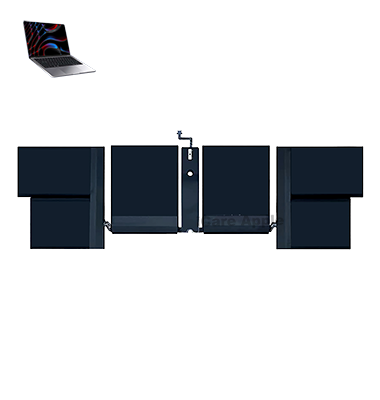
How to Identify When Your MacBook Pro M1 (2021) A2485 Battery Needs Replacement
Here are four signs that your MacBook Pro M1 (2021) A2485 Battery may need replacement:
Reduced Battery Life
If your MacBook drains quickly or doesn’t hold a charge, the Battery may be failing.
Overheating Issues
An aging Battery can cause excessive heat, affecting overall performance.
Battery Service Warning
macOS may display a “Service Recommended” message in Battery settings.
Unexpected Shutdowns
If your MacBook turns off suddenly even with charge left, the Battery may be faulty.
Our MacBook Pro M1 (2021) A2485 Battery Replacement Process
1. Diagnosis
Our technicians check Battery health and confirm the need for replacement.
2. Safe Disassembly
We carefully open the MacBook Pro, ensuring no damage to internal components.
3. Battery Replacement
A high-quality, compatible Battery is installed with precision.
4. Testing & Quality Check
We verify Battery performance, charging efficiency, and system stability before returning your device.

Why Choose iCare Apple for MacBook Pro M1 (2021) A2485 Battery Replacement 
Choose iCare Apple for MacBook Pro M1 (2021) A2485 Battery replacement for expert service, high-quality batteries, and quick turnaround. Our skilled technicians ensure safe and precise installation, restoring your MacBook’s performance. Trust us for reliable, professional repairs and exceptional customer care in Bangladesh. Visit us today!
✌️Top Benefits of MacBook Pro M1 (2021) A2485 Battery Replacement at iCare Apple
Certified Technicians
Our technicians are certified and highly skilled, ensure repairs for your MacBook Pro M1 (2021) A248. We guarantee top-notch service for all Battery replacements.
Original & High-Quality Parts
We use genuine Apple parts for MacBook Battery replacements, ensuring optimal performance, durability, and preserving your MacBook's original quality for long-lasting results.
Quick and Efficient Service
At iCare Apple, we prioritize quick and efficient service, minimizing downtime. Our experienced team provides rapid, reliable Battery repairs, so you can get back to using your MacBook without delay.

Tips & Tricks for MacBook Pro M1 (2021) A2485 Battery
👍 Optimize Energy Settings:
Adjust your MacBook Pro’s energy settings to optimize battery life. Use the Energy Saver preferences in System Preferences to customize settings such as display sleep, system sleep, and automatic graphics switching to conserve battery power when not in use.
👍 Monitor Battery Usage:
Keep an eye on battery usage by accessing the Battery menu in the menu bar. This allows you to track which applications and processes are consuming the most power, enabling you to make informed decisions about optimizing usage.
👍 Enable Battery Saving Mode:
macOS includes a Battery Saving Mode that reduces system performance and background activity to extend battery life. Activate this mode when your battery is running low or when you need to conserve power for extended usage periods.
👍 Use Safari for Web Browsing:
Safari is optimized for energy efficiency on macOS and consumes less power compared to other web browsers. Use Safari as your primary browser to minimize battery drain during web browsing sessions.
👍 Close Unused Applications:
Close unnecessary applications and tabs to reduce system resource usage and extend battery life. Background processes and open applications can consume valuable battery power, even when not actively in use.
👍 Reduce Screen Brightness:
Lowering the screen brightness can significantly reduce power consumption and extend battery life. Adjust the brightness level according to your surroundings to strike a balance between visibility and energy efficiency.
👍 Disconnect Unused Peripherals:
Disconnect external devices and peripherals when not in use to minimize power draw from the MacBook Pro’s battery. USB devices, external displays, and other peripherals can drain battery power even when idle.
👍 Update macOS Regularly:
Keep your MacBook Pro’s operating system up to date with the latest macOS updates and security patches. Apple frequently releases updates that include optimizations for battery performance and efficiency.
👍 Calibrate the Battery:
Periodically calibrate the battery of your MacBook Pro to ensure accurate reporting of battery status and maximum capacity. Follow Apple’s recommended calibration procedure to maintain optimal battery health and longevity.
👍 Avoid Extreme Temperatures:
Protect your MacBook Pro from exposure to extreme temperatures, as both high heat and cold can negatively impact battery performance and lifespan. Avoid leaving your laptop in direct sunlight or extreme cold environments for prolonged periods.
By following these tips and tricks, you can optimize the Battery performance of your MacBook Pro M1 (2021) A2485 with the Battery, ensuring prolonged usage times and maintaining overall Battery health for years to come.
What Our Customers Are Saying About Our MacBook Pro M1 (2021) A2485 Battery Replacement Service
Md Fahim
iCare Apple replaced my MacBook Pro M1 Battery quickly and professionally. Now my laptop lasts much longer!
Faraz Chowdhury
Excellent service and a smooth replacement process. My MacBook Battery performance feels brand new again!
Shayan Ahmed
The team at iCare Apple did a fantastic job with my Battery replacement. Quick, reliable, and affordable!
Nitu Islam
My MacBook kept shutting down unexpectedly, but iCare Apple fixed it with a perfect Battery replacement. Highly recommend!
Your Trust is Our Strength
Why Timely MacBook Battery Replacement is Essential
Timely MacBook Pro M1 (2021) A2485 Battery replacement is essential to maintain performance, prevent sudden shutdowns, and avoid potential damage to internal components. A failing Battery can cause overheating and reduce efficiency. Replacing it on time ensures a longer lifespan for your device and a smooth, uninterrupted workflow.
Visit iCare Apple in Dhaka for Professional MacBook Repairs
Located at the heart of Dhaka, iCare Apple offers top-notch repair services for all Macbook models. Our team is committed to providing quality repairs, and we stand by our work. So, if your MacBook Pro M1 (2021) A2485 needs a Battery replacement, visit iCare Apple and experience professional service from trusted experts.
Ensure the longevity and performance of your MacBook Pro M1 (2021) A2485 by opting for quality Battery replacement services at iCare Apple.
FAQ
1. How long does the MacBook Pro M1 A2485 Battery replacement take?
It usually takes 1-2 hours, depending on the condition of the device.
2. Do you use original batteries for replacement?
We use high-quality compatible batteries to ensure optimal performance.
3. What is the cost of the Battery replacement?
The cost varies; please contact us for the latest pricing details.
4. Will replacing the Battery erase my data?
No, Battery replacement does not affect your data.
5. How do I know if my MacBook Pro Battery needs replacement?
If your Battery drains quickly, overheats, or shows a service warning, it may need replacement.
6. Is there a warranty on the new Battery?
Yes, we provide a warranty on the replacement Battery and service.
7. Do I need to book an appointment for Battery replacement?
Appointments are recommended, but walk-ins are also welcome.
8. Can I wait while my MacBook Pro Battery is being replaced?
Yes, the replacement process is quick, and you can wait in our service area.