

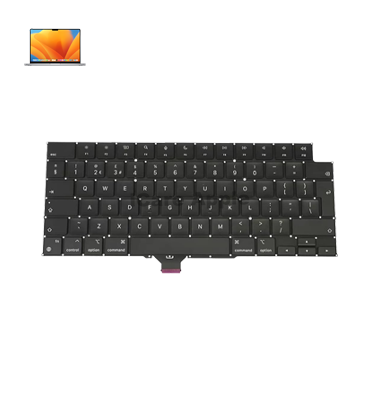
MacBook Pro M2 (2023) A2779 Keyboard
We offer professional MacBook Pro M2 (2023) A2779 Keyboard replacement service in Bangladesh. If your Keyboard has unresponsive, sticky, or damaged keys, our expert technicians ensure quick and efficient replacement with high-quality parts. Trust iCare Apple for reliable service and restore your MacBook’s smooth typing experience.
How to Identify When Your MacBook Pro M2 (2023) A2779 Keyboard Needs Replacement
Here are four signs that your MacBook Pro M2 (2023) A2779 Keyboard may need replacement:
Unresponsive Keys:
Some or all keys fail to register when pressed.
Sticky Keys:
Keys become difficult to press or feel sticky and unresponsive.
Physical Damage:
Visible cracks, dents, or damage to the Keyboard surface.
Frequent Errors:
Unexpected characters or incorrect inputs while typing.
Our MacBook Pro M2 (2023) A2779 Keyboard Replacement Process
1. Diagnosis:
We inspect the Keyboard to identify any issues and confirm the need for replacement.
2. Cost Estimate:
We provide a transparent cost estimate for the replacement, including parts and labor.
3. Keyboard Replacement:
Our skilled technicians carefully remove the damaged Keyboard and install a genuine replacement.
4. Testing and Final Checks:
We test the new Keyboard to ensure all keys are responsive and functioning properly.

Why Choose iCare Apple for MacBook Pro M2 (2023) A2779 Keyboard Replacement 
Choose iCare Apple for MacBook Pro M2 (2023) A2779 Keyboard replacement because we offer expert service, use genuine parts, and ensure fast, reliable repairs. Our skilled technicians provide high-quality solutions to restore your MacBook’s typing performance, delivering customer satisfaction with every service.
✌️Top Benefits of MacBook Pro M2 (2023) A2779 Keyboard Replacement at iCare Apple
Certified Technicians
Our technicians are certified and highly skilled, ensure repairs for your MacBook Pro M2 (2023) A2779. We guarantee top-notch service for all Keyboard replacements.
Original & High-Quality Parts
We use genuine Apple parts for MacBook Keyboard replacements, ensuring optimal performance, durability, and preserving your MacBook's original quality for long-lasting results.
Quick and Efficient Service
At iCare Apple, we prioritize quick and efficient service, minimizing downtime. Our experienced team provides rapid, reliable Keyboard repairs, so you can get back to using your MacBook without delay.

Tips & Tricks for MacBook Pro M2 (2023) A2779 Keyboard
• Keep it Clean:
Regularly clean the keyboard with a soft, dry cloth to prevent dust and debris buildup.
• Avoid Eating and Drinking:
Prevent food or liquid spills by keeping your MacBook away from these items.
• Use a Keyboard Cover:
Protect your keyboard from dust, dirt, and liquid spills with a silicone keyboard cover.
• Adjust Keyboard Settings:
Adjust the key repeat rate and keyboard backlighting to reduce strain on the keys.
• Be Gentle with Keypresses:
Press the keys gently and avoid excessive force to prevent wear and tear.
• Use a Soft Surface:
When typing, place your MacBook on a soft surface to prevent keyboard pressure.
• Keep Your MacBook Cool:
Avoid overheating, as it can damage the keyboard’s internal components.
• Avoid Sticky Substances:
Keep sugary or sticky substances away from the keyboard to prevent keys from sticking.
• Use Keyboard Shortcuts:
Learn keyboard shortcuts to reduce frequent physical key presses, which can cause wear.
• Store Properly:
When not in use, close the MacBook and store it in a safe, dry place to protect the keyboard.
What Our Customers Are Saying About Our MacBook Pro M2 (2023) A2779 Keyboard Replacement Service
Moynul Islam
The Keyboard replacement for my MacBook Pro M2 A2779 was fast and flawless. Great service from iCare Apple.
Shammi Akter
iCare Apple replaced my MacBook’s Keyboard quickly and professionally. Highly impressed with the quality of service.
Sajib Ahmed
Excellent experience! My MacBook’s Keyboard is as good as new after the replacement at iCare Apple.
Nurul Huda
The Keyboard replacement service at iCare Apple was seamless. My MacBook works perfectly now, highly recommended.
Your Trust is Our Strength
Why Timely MacBook Keyboard Replacement is Essential
Timely MacBook Pro M2 (2023) A2779 Keyboard replacement is essential to prevent further damage, such as unresponsive or sticky keys affecting productivity. Delaying replacement can lead to more severe issues and discomfort during typing. Early replacement ensures smooth performance and restores your MacBook’s full functionality.
Visit iCare Apple in Dhaka for Professional MacBook Repairs
Located at the heart of Dhaka, iCare Apple offers top-notch repair services for all MacBook models. Our team is committed to providing quality repairs, and we stand by our work. So, if your MacBook Pro M2 (2023) A2779 needs a Keyboard replacement, visit iCare Apple and experience professional service from trusted experts.
Ensure the longevity and performance of your MacBook Pro M2 (2023) A2779 by opting for quality Keyboard replacement services at iCare Apple.
FAQ
1. How do I know if my MacBook Pro M2 A2779 Keyboard needs replacement?
Unresponsive, sticky keys or physical damage can indicate the need for a replacement.
2. Do you use original parts for Keyboard replacement?
Yes, we use genuine parts for all Keyboard replacements to ensure optimal performance.
3. What is the cost of MacBook Pro M2 A2779 Keyboard replacement?
The cost varies; please contact us for an accurate estimate based on your issue.
4. Can you repair a specific key instead of replacing the whole Keyboard?
We recommend full Keyboard replacement for long-term reliability, especially for extensive damage.
5. Will the Keyboard work like new after replacement?
Yes, once replaced, the Keyboard will function like new with all keys responsive.
6. What should I do if I’m facing issues with the Keyboard after replacement?
Bring your MacBook back, and we will resolve any issues under warranty.
7. How do I prevent damage to my MacBook Pro Keyboard in the future?
Regularly clean the Keyboard, avoid food/liquid spills, and use a Keyboard cover for protection.
8. Is it safe to use my MacBook with a malfunctioning Keyboard?
It’s best to avoid use until repaired, as further damage could occur.