

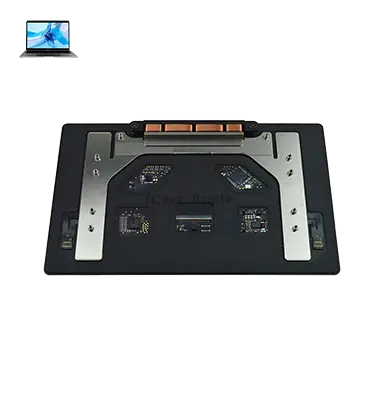
MacBook Pro M2 (2022) A2338 Track Pad
At iCare Apple, we offer expert MacBook Pro M2 (2022) A2338 Track Pad replacement services in Bangladesh. Our skilled technicians use genuine parts to ensure smooth and responsive performance. We provide fast, reliable repairs, restoring your MacBook’s Track Pad functionality at affordable prices. Trust us for quality service!
Track Pad
- 1 Year - Replacement Guaranty
- 30 Days - Money back Guaranty
- Replacement Time - 1 Hour
- Service Charge Included
- 24/7 support
How to Identify When Your MacBook Pro M2 (2022) A2338 Track Pad Needs Replacement
Here are four signs that your MacBook Pro M2 (2022) A2338 Track Pad may need replacement:
Unresponsive Areas:
If certain sections of the Trackpad fail to respond to Track, it could indicate damage.
Erratic Cursor Movement:
If the cursor moves randomly or stutters, the Track Pad might be malfunctioning.
Physical Damage:
Visible cracks, dents, or other physical damage to the Track Pad warrant replacement.
Clicking Issues:
Difficulty registering clicks or unintentional clicks can indicate the need for a new Track Pad.
Our MacBook Pro M2 (2022) A2338 Track Pad Replacement Process
1. Diagnosis:
We begin by diagnosing the Track Pad issue to confirm that a replacement is necessary.
2. Disassembly:
Our technicians carefully open the MacBook to safely remove the damaged Track Pad without affecting other components.
3. Replacement:
A genuine, high-quality replacement Track Pad is installed to restore optimal functionality.
4. Testing:
We test the new Track Pad to ensure smooth and responsive operation before performing a final quality check.

Choose iCare Apple for your MacBook Pro M2 (2022) A2338 Track Pad replacement because we offer expert service with genuine parts. Our experienced technicians ensure fast, reliable repairs, restoring full Track Pad functionality. We prioritize customer satisfaction, providing affordable, high-quality solutions for your MacBook’s Track Pad issues.
✌️Top Benefits of MacBook Pro M2 (2022) A2338 Track Pad Replacement at iCare Apple
Certified Technicians
Our technicians are certified and highly skilled, ensure repairs for your MacBook Pro M2 (2022) A2338. We guarantee top-notch service for all Track Pad replacements.
Original & High-Quality Parts
We use genuine Apple parts for MacBook Track Pad replacements, ensuring optimal performance, durability, and preserving your MacBook's original quality for long-lasting results.
Quick and Efficient Service
At iCare Apple, we prioritize quick and efficient service, minimizing downtime. Our experienced team provides rapid, reliable Track Pad repairs, so you can get back to using your MacBook without delay.

Tips & Tricks for MacBook Pro M2 (2022) A2338 Track Pad
• Adjust Track Pad Settings:
Customize Track Pad settings in macOS to optimize performance and usability. Access the Trackpad preferences pane in System Preferences to adjust tracking speed, gesture sensitivity, and other Track Pad settings according to your preferences.
• Practice Multitouch Gestures:
Familiarize yourself with multitouch gestures supported by the MacBook Pro A2485 (2021) Track Pad, such as swiping, scrolling, pinching, zooming, and rotating. Practice using these gestures to navigate macOS and perform tasks more efficiently.
• Use Force Touch:
Take advantage of Force Touch technology to access additional features and shortcuts by applying pressure to the Track Pad. Experiment with force-clicking on icons, links, files, and other elements to reveal contextual menus and actions.
• Enable Tap to Click:
Enable tap-to-click functionality in Track Pad settings to perform primary clicks by tapping on the Track Pad surface. Tap-to-click can help reduce strain on your fingers and improve comfort during extended use of the Track Pad of MacBook Pro A2485 (2021).
• Master Two-Finger Scrolling:
Practice two-finger scrolling gestures to navigate documents, web pages, and other content smoothly on the Track Pad of MacBook Pro A2485 (2021). Use two fingers to scroll vertically or horizontally with precision and control.
• Customize Three-Finger Gestures:
Customize three-finger gestures in Track Pad settings to perform actions such as switching between spaces, launching Mission Control, or opening Notification Center. Assign shortcuts or commands to three-finger swipes to streamline your workflow.
• Utilize Four-Finger Gestures:
Take advantage of four-finger gestures on the Track Pad of MacBook Pro A2485 (2021) to switch between full-screen apps, trigger Exposé, or navigate between open windows. Customize four-finger swipe gestures to suit your multitasking needs.
• Experiment with Edge Gestures:
Explore edge gestures on the Track Pad to activate features such as Launchpad, App Exposé, or the Notification Center. Swipe from the edges of the Track Pad to access these features quickly and effortlessly.
• Practice Precision Cursor Control:
Practice precision cursor control techniques on the Track Pad of MacBook Pro A2485 (2021) to navigate menus, select text, and interact with graphical interfaces with accuracy. Use gentle finger movements and adjust Track Pad sensitivity settings for fine control.
• Troubleshoot Track Pad Issues:
If you encounter Track Pad issues such as unresponsiveness, erratic behavior, or gesture recognition problems, troubleshoot the issue by restarting your MacBook Pro, updating macOS to the latest version, resetting Track Pad settings, or seeking assistance from Apple Support.
By mastering these tips and tricks, you can make the most of the Track Pad on your MacBook Pro A2485 (2021), enhancing productivity, efficiency, and ease of use in your daily computing tasks.
What Our Customers Are Saying About Our MacBook Pro M2 (2022) A2338 Track Pad Replacement Service
Shamma Saba
The Track Pad replacement at iCare Apple was quick and flawless. My MacBook feels like new again, with smooth functionality!
Zinat Ara
iCare Apple did an excellent job replacing my MacBook Track Pad. The process was seamless, and my device works perfectly now.
R A Faysal
I’m extremely satisfied with the Track Pad replacement service at iCare Apple. Fast service and great quality, highly recommend!
Tajidul Islam
iCare Apple replaced my MacBook Pro Track Pad efficiently. The entire process was smooth, and my device is working like new.
Your Trust is Our Strength
Why Timely MacBook Track Pad Replacement is Essential
Timely replacement of your MacBook Pro M2 (2022) A2338 Touch Pad is essential to maintain smooth, responsive functionality. Delaying repairs can lead to further issues, such as poor performance or difficulty navigating. Addressing Touch Pad problems promptly ensures optimal user experience, preventing potential damage to other components.
Visit iCare Apple in Dhaka for Professional MacBook Repairs
Located at the heart of Dhaka, iCare Apple offers top-notch repair services for all Macbook models. Our team is committed to providing quality repairs, and we stand by our work. So, if your MacBook Pro M2 (2022) A2338
needs a Track Pad replacement, visit iCare Apple and experience professional service from trusted experts.
Ensure the longevity and performance of your MacBook Pro M2 (2022) A2338
by opting for quality Track Pad replacement services at iCare Apple.
FAQ
1. How long does the MacBook Pro A2338 M2 Track Pad replacement take at iCare Apple?
The replacement typically takes a few hours, depending on service complexity.
2. Is the Track Pad replaced with genuine parts?
Yes, we use genuine, high-quality replacement parts.
3. What signs indicate my MacBook Pro A2338 M2 Track Pad needs replacement?
Unresponsive areas, erratic cursor movement, and clicking issues are common signs.
4. Is the Track Pad replacement covered by a warranty?
Yes, we provide a warranty for all Track Pad replacement services.
5. Can I get my MacBook Pro A2338 M2 Track Pad replaced on the same day?
Same-day replacement is possible, depending on part availability and service complexity.
6. Do I need to make an appointment for the Track Pad replacement?
Appointments are recommended, but walk-ins are accepted based on availability.
7. Should I back up my data before bringing in my MacBook for Track Pad replacement?
Though Track Pad replacement doesn’t affect data, it’s always wise to back up.
8. Are your technicians experienced in replacing MacBook Pro A2338 M2 Track Pads?
Yes, our technicians are skilled and experienced in Track Pad replacements.