

MacBook Pro M1 (2021) A2485 Keyboard
At iCare Apple, we offer expert MacBook Pro M1 (2021) A2485 Keyboard replacement services in Bangladesh. Whether your keys are unresponsive or damaged, our skilled technicians provide quick, reliable solutions. We use high-quality parts to restore your Keyboard’s functionality, ensuring your MacBook works like new again!
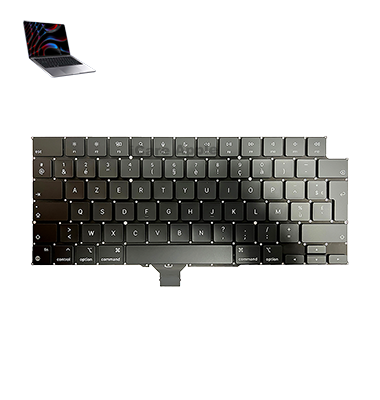
How to Identify When Your MacBook Pro M1 (2021) A2485 Keyboard Needs Replacement
Here are four signs that your MacBook Pro M1 (2021) A2485 Keyboard may need replacement:
Unresponsive Keys
If certain keys don’t register when pressed, it may indicate a malfunction.
Sticky or Jammed Keys
Keys that stick or don’t return to their normal position could require replacement.
Frequent Typing Errors
If typing leads to multiple incorrect characters, it could be a sign of a failing Keyboard.
Physical Damage
Visible cracks, liquid spills, or other damage can affect the Keyboard’s performance and may need a replacement.
Our MacBook Pro M1 (2021) A2485 Keyboard Replacement Process
1. Diagnosis:
We inspect the Keyboard to confirm the issue and determine if a replacement is needed.
2. Safe Disassembly:
Our technicians carefully open the MacBook Pro, ensuring no internal components are damaged.
3. Keyboard Replacement:
We install a high-quality, compatible replacement Keyboard.
4. Testing & Quality Check:
After installation, we thoroughly test the new Keyboard to ensure all keys are responsive and functioning perfectly.

Why Choose iCare Apple for MacBook Pro M1 (2021) A2485 Keyboard Replacement 
Choose iCare Apple for MacBook Pro M1 (2021) A2485 Keyboard replacement for expert service, high-quality replacement parts, and quick turnaround. Our skilled technicians ensure precise installation, restoring your Keyboard’s full functionality. Trust us for reliable, professional repairs and exceptional customer care, all backed by a warranty!
✌️Top Benefits of MacBook Pro M1 (2021) A2485 Keyboard Replacement at iCare Apple
Certified Technicians
Our technicians are certified and highly skilled, ensure repairs for your MacBook Pro M1 (2021) A2485. We guarantee top-notch service for all Keyboard replacements.
Original & High-Quality Parts
We use genuine Apple parts for MacBook Keyboard replacements, ensuring optimal performance, durability, and preserving your MacBook's original quality for long-lasting results.
Quick and Efficient Service
At iCare Apple, we prioritize quick and efficient service, minimizing downtime. Our experienced team provides rapid, reliable KeyBoard repairs, so you can get back to using your MacBook without delay.

Tips & Tricks for MacBook Pro M1 (2021) A2485 Keyboard
👍 Regular Cleaning:
Keep your Keyboard of MacBook Pro A2485 (2021) clean by regularly removing dust, debris, and crumbs that may accumulate between the keys. Use compressed air or a soft brush to gently clean the Keyboard and prevent keys from sticking or jamming.
👍 Adjust Keyboard Settings:
Customize Keyboard settings in macOS to suit your typing preferences. Access the Keyboard preferences pane in System Preferences to adjust key repeat rate, Keyboard backlight brightness, and other settings to your liking.
👍 Use Keyboard Shortcuts:
Take advantage of Keyboard shortcuts to increase productivity and streamline your workflow. Learn commonly used shortcuts for tasks such as copying, pasting, undoing, and navigating between applications to save time and effort.
👍 Enable Key Repeat:
Adjust the key repeat rate to your preferred speed in Keyboard preferences to control how quickly a key repeats when held down. Customize the delay before key repeat starts to match your typing style and preferences.
👍 Practice Touch Typing:
Improve your typing speed and accuracy by practicing touch typing techniques. Familiarize yourself with the layout of the Keyboard and learn to type without looking at the keys to increase efficiency and reduce errors.
👍 Use Keyboard Covers:
Consider using a Keyboard cover or skin to protect your Keyboard of MacBook Pro A2485 (2021) from dust, spills, and debris. Keyboard covers provide an additional layer of protection while preserving the tactile feel of the keys.
👍 Customize Touch Bar (if applicable):
Customize the Touch Bar (if your model has one) with shortcuts and functions tailored to your workflow. Use the Touch Bar customization options in System Preferences to add or remove buttons, widgets, and app-specific controls for quick access.
👍 Practice Ergonomic Typing:
Maintain proper posture and ergonomic typing habits to prevent strain and discomfort during extended typing sessions. Position your MacBook Pro at eye level and use an external Keyboard or ergonomic stand if necessary to reduce wrist and arm strain.
👍 Remap Keys:
Customize Keyboard shortcuts and remap keys to suit your specific needs and preferences. Use third-party software or built-in macOS features to remap keys for easier access to frequently used functions or to accommodate special Keyboard layouts.
👍 Enable Accessibility Features:
Explore accessibility features in macOS to enhance Keyboard usability for users with special needs or preferences. Enable features such as Sticky Keys, Slow Keys, and Key Repeat to customize Keyboard behavior and improve accessibility.
By following these tips and tricks, you can maximize the usability, comfort, and efficiency of the Keyboard on your MacBook Pro A2485 (2021), enhancing your overall typing experience and productivity.
What Our Customers Are Saying About Our MacBook Pro M1 (2021) A2485 Keyboard Replacement Service
Abdur Rashid
iCare Apple replaced my MacBook Pro Keyboard efficiently. Now all the keys work perfectly, and I’m typing smoothly again!
Shahed Sikder
Excellent service at iCare Apple! The Keyboard replacement was done quickly, and the quality is top-notch.
Imam Hossain
iCare Apple provided fast and professional Keyboard replacement. My MacBook Pro feels like it’s working at full capacity again!
Shamim Hossain
I had issues with sticky keys, but iCare Apple resolved it in no time. My MacBook Keyboard feels brand new!
Your Trust is Our Strength
Why Timely MacBook Keyboard Replacement is Essential
Timely MacBook Pro M1 (2021) A2485 Keyboard replacement is essential to maintain productivity and prevent further damage. Unresponsive or damaged keys can hinder typing efficiency and lead to more severe issues. Replacing the Keyboard promptly ensures smooth functioning, preventing potential complications and enhancing your overall user experience.
Visit iCare Apple in Dhaka for Professional MacBook Repairs
Located at the heart of Dhaka, iCare Apple offers top-notch repair services for all Macbook models. Our team is committed to providing quality repairs, and we stand by our work. So, if your MacBook Pro M1 (2021) A2485 needs a Keyboard replacement, visit iCare Apple and experience professional service from trusted experts.
Ensure the longevity and performance of your MacBook Pro M1 (2021) A2485 by opting for quality Keyboard replacement services at iCare Apple.
FAQ
1. How long does the MacBook Pro M1 A2485 Keyboard replacement take?
It usually takes 1-2 hours to replace the Keyboard.
2. Do you use original Keyboard parts?
We use high-quality, compatible Keyboard parts for the replacement.
3. What is the cost of Keyboard replacement?
The cost varies, so please contact us for an accurate quote.
4. Will replacing the Keyboard affect my data?
No, Keyboard replacement does not affect your data.
5. How do I know if my MacBook Keyboard needs replacement?
If keys are unresponsive, sticky, or damaged, it may need replacement.
6. Can I walk in for Keyboard replacement?
Yes, walk-ins are accepted, but appointments are recommended for faster service.
7. Is there a warranty on the new Keyboard?
Yes, we provide a warranty on both the replacement Keyboard and service.
8. Can I wait while my MacBook Keyboard is being replaced?
Yes, the process is quick, and you can wait in our service area.