

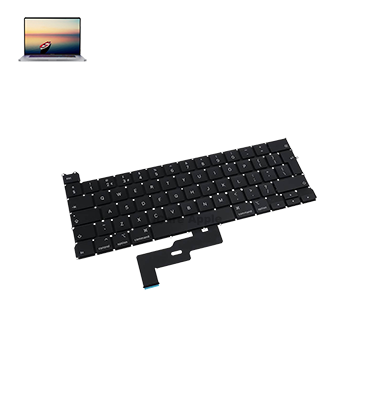
MacBook Pro (2020) A2289 KeyBoard
We offer professional MacBook Pro (2020) A2289 Keyboard replacement services at iCare Apple in Bangladesh. If your keys are unresponsive, sticky, or malfunctioning, our skilled technicians provide fast, reliable replacements using high-quality parts. Visit us for efficient service to restore your MacBook’s typing experience.
How to Identify When Your MacBook Pro (2020) A2289 Keyboard Needs Replacement
Here are four signs that your MacBook Pro (2020) A2289 Keyboard may need replacement:
Unresponsive Keys
If certain keys don’t register when pressed, it may be time for a replacement.
Sticky Keys
When keys become difficult to press or stick after typing, it’s a sign of damage.
Repeated Inputs
Keys that type multiple characters with a single press indicate a malfunction.
Physical Damage
Visible cracks, dents, or other damage to the Keyboard can affect its functionality.
Our MacBook Pro (2020) A2289 Keyboard Replacement Process
1. Diagnosis
Our technicians diagnose the Keyboard issue and provide a detailed solution.
2. Part Selection
We use high-quality, compatible replacement parts for optimal performance.
3. Replacement Process
The damaged Keyboard is carefully removed, and the new one is installed.
4. Testing & Quality Check
After installation, we test all keys to ensure proper functionality and a flawless typing experience.

Choose iCare Apple for MacBook Pro (2020) A2289 Keyboard replacement because we offer fast, expert service with high-quality replacement parts. Our skilled technicians ensure a precise installation, restoring your Keyboard to optimal performance. Enjoy reliable, professional repairs with excellent customer support at affordable prices.
✌️Top Benefits of MacBook Pro (2020) A2289 Keyboard Replacement at iCare Apple
Certified Technicians
Our technicians are certified and highly skilled, ensure repairs for your MacBook Pro (2020) A2289. We guarantee top-notch service for all Keyboard replacements.
Original & High-Quality Parts
We use genuine Apple parts for MacBook Keyboard replacements, ensuring optimal performance, durability, and preserving your MacBook's original quality for long-lasting results.
Quick and Efficient Service
At iCare Apple, we prioritize quick and efficient service, minimizing downtime. Our experienced team provides rapid, reliable Keyboard repairs, so you can get back to using your MacBook without delay.

Tips & Tricks for MacBook Pro (2020) A2289 Keyboard
👍 Regular Cleaning:
Keep your MacBook Pro A2289 Keyboard clean by regularly removing dust, crumbs, and other debris using compressed air or a soft brush. Gently shake the laptop upside down to dislodge any loose particles, then wipe the keys with a damp cloth for deeper cleaning.
👍 Use Keyboard Shortcuts:
Take advantage of Keyboard shortcuts to navigate macOS and perform common tasks more efficiently. Learn popular shortcuts for actions such as copy, paste, undo, and switch between applications to streamline your workflow and save time.
👍 Customize Function Keys:
Customize the function keys (F1-F12) on the MacBook Pro 2020 – A2289 Keyboard to suit your preferences and workflow. Use macOS System Preferences to assign custom functions or shortcuts to the function keys for quick access to frequently used commands.
👍 Enable Keyboard Viewer:
Enable the Keyboard Viewer tool in macOS to visualize Keyboard layouts and access special characters, symbols, and emoji. Keyboard Viewer can be useful for typing in different languages or inserting uncommon characters without memorizing key combinations.
👍 Adjust Keyboard Brightness:
Adjust the brightness of the Keyboard backlighting to suit your environment and preferences. Use the Keyboard brightness controls (usually located in the top row of the Keyboard) or adjust settings in macOS System Preferences to increase or decrease backlight intensity.
👍 Practice Touch Typing:
Improve your typing speed and accuracy by practicing touch typing techniques. Keep your fingers on the home row keys (ASDF for the left hand, and JKL; for the right hand) and use proper finger placement to type without looking at the Keyboard.
👍 Utilize Touch Bar (if equipped):
If your MacBook Pro A2289 is equipped with a Touch Bar, explore its functionality and customize it to display useful shortcuts and controls for different applications. Customize the Touch Bar to access frequently used tools, settings, and functions within apps for enhanced productivity.
👍 Enable Key Repeat and Delay:
Adjust the Keyboard key repeat rate and delay settings in macOS System Preferences to customize how quickly keys repeat when held down and the delay before they start repeating. Fine-tune these settings to match your typing speed and preferences.
👍 Use Accessibility Features:
Explore accessibility features in macOS, such as Sticky Keys, Slow Keys, and Key Repeat, to accommodate users with mobility or dexterity impairments. Customize these features to make typing more comfortable and accessible for individuals with specific needs.
👍 Protect Your Keyboard:
Use a Keyboard cover or protective skin to shield the MacBook Pro 2020 – A2289 Keyboard from spills, dust, and debris. A Keyboard cover can help prevent liquid damage and reduce the need for frequent cleaning, preserving the longevity of your Keyboard.
Incorporate these tips and tricks into your daily routine to maximize the efficiency, comfort, and durability of the Keyboard on your MacBook Pro 2020 – A2289, enhancing your overall typing experience and productivity.
What Our Customers Are Saying About Our MacBook Pro (2020) A2289 Keyboard Replacement Service
Yahtasham Reezvi
The Keyboard replacement at iCare Apple was quick and efficient. My MacBook is as good as new now!
Md. Arafath Hossain
Excellent service! The technicians replaced my MacBook's Keyboard flawlessly, and it's working perfectly.
Md. Shoriful Alam
Very professional service. The Keyboard replacement was done in no time, and everything functions smoothly now.
Palash Dey
I’m very happy with the Keyboard replacement. iCare Apple provided excellent service and restored my MacBook.
Your Trust is Our Strength
Why Timely MacBook Keyboard Replacement is Essential
Timely MacBook Pro (2020) A2289 Keyboard replacement is crucial to avoid further damage. Prolonged issues like unresponsive or sticky keys can lead to more severe problems, affecting productivity. Replacing the Keyboard promptly ensures smooth typing, prevents additional wear, and maintains the overall performance and longevity of your MacBook.
Visit iCare Apple in Dhaka for Professional MacBook Repairs
Located at the heart of Dhaka, iCare Apple offers top-notch repair services for all Macbook models. Our team is committed to providing quality repairs, and we stand by our work. So, if your MacBook Pro (2020) A2289 needs a Keyboard replacement, visit iCare Apple and experience professional service from trusted experts.
Ensure the longevity and performance of your MacBook Pro (2020) A2289 by opting for quality Keyboard replacement services at iCare Apple.
FAQ
1. How long does the MacBook Pro (2020) A2289 Keyboard replacement take?
It typically takes a few hours depending on the issue.
2. Do you use original parts for the replacement?
Yes, we use high-quality, compatible replacement parts for optimal performance.
3. How much does the Keyboard replacement service cost?
The cost varies; please contact us for a detailed quote.
4. Is the replacement process guaranteed?
Yes, we provide a warranty on the replaced Keyboard and our services.
5. Can you replace individual keys on the Keyboard?
We usually replace the entire Keyboard for better durability and functionality but we also replace individual keys.
6. Will replacing the Keyboard affect my MacBook's performance?
No, the new Keyboard will restore full functionality without affecting overall performance.
7. Do I need to book an appointment for the replacement?
While not mandatory, booking an appointment can ensure quicker service.
8. Can I get my MacBook back the same day?
Yes, we offer quick services, and many replacements are completed within the same day.