

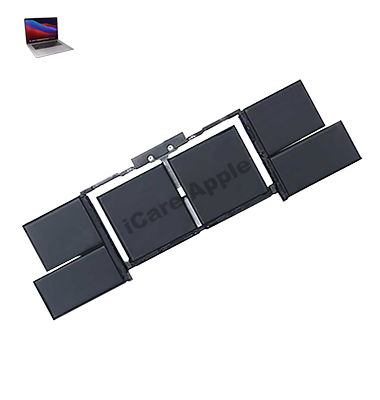
MacBook Pro (2018) A1990 Battery
We offer reliable MacBook Pro (2018) A1990 Battery replacement service in Bangladesh. If your MacBook’s Battery drains quickly or fails to charge, we provide expert diagnosis and quality replacement with care. Trust us for efficient service and restored Battery performance.
How to Identify When Your MacBook Pro (2018) A1990 Battery Needs Replacement
Here are four signs that your MacBook Pro (2018) A1990 Battery may need replacement:
Rapid Battery Drain:
The Battery loses charge quickly despite minimal usage.
Unexpected Shutdowns:
Your MacBook shuts down suddenly, even when the Battery shows charge.
Battery Health Warning:
macOS displays a “Service Battery” or “Replace Soon” alert.
Swollen Battery:
The Battery becomes visibly swollen, causing keyboard or trackpad misalignment.
Our MacBook Pro (2018) A1990 Battery Replacement Process
1. Diagnosis:
We perform a thorough inspection to confirm Battery issues and identify any related problems.
2. Quotation:
After diagnosis, we provide a clear cost estimate for the Battery replacement.
3. Replacement:
Our expert technicians carefully replace the faulty Battery with a high-quality, compatible one.
4. Testing:
We run detailed performance tests to ensure the new Battery functions perfectly and your MacBook operates smoothly.

We offer expert MacBook Pro (2018) A1990 Battery replacement with skilled technicians, high-quality parts, and a commitment to fast, reliable service. Our thorough diagnostic process ensures accurate solutions, and we prioritize customer satisfaction with transparent pricing and professional care, making us a trusted choice for your MacBook’s Battery replacement.
✌️Top Benefits of MacBook Pro (2018) A1990 Battery Replacement at iCare Apple
Certified Technicians
Our technicians are certified and highly skilled, ensure repairs for your MacBook Pro (2018) A1990. We guarantee top-notch service for all Battery replacements.
Original & High-Quality Parts
We use genuine Apple parts for MacBook Battery replacements, ensuring optimal performance, durability, and preserving your MacBook's original quality for long-lasting results.
Quick and Efficient Service
At iCare Apple, we prioritize quick and efficient service, minimizing downtime. Our experienced team provides rapid, reliable Battery repairs, so you can get back to using your MacBook without delay.

Tips & Tricks for MacBook Pro (2018) A1990 Battery
👍 Manage Screen Brightness:
Adjust the screen brightness to an appropriate level based on your environment. Lowering the brightness can significantly reduce power consumption and extend Battery life.
👍 Use Energy Saver Preferences:
Customize Energy Saver preferences in System Preferences to optimize power usage. Enable features like “Automatic graphics switching” to conserve Battery by using integrated graphics when possible.
👍 Monitor Battery Usage:
Keep track of Battery usage using the Battery menu in the menu bar or the Battery section in System Information. Identify apps or processes that consume excessive power and close or optimize them accordingly.
👍 Enable Power Nap:
Utilize the Power Nap feature in System Preferences > Energy Saver to allow your MacBook Pro to perform tasks such as email fetching and software updates while in sleep mode, conserving energy when not in use.
👍 Limit Background Activity:
Reduce background activity by closing unnecessary apps, disabling background app refresh, and quitting resource-intensive processes. This minimizes Battery drain and improves overall performance.
👍 Optimize System Settings:
Review and adjust system settings to optimize Battery performance. Disable Bluetooth, Wi-Fi, and location services when not in use, and enable “Low Power Mode” in macOS to further conserve Battery.
👍 Use Safari for Web Browsing:
Safari is optimized for energy efficiency and consumes less power compared to other web browsers. Use Safari for web browsing to maximize Battery life when surfing the internet.
👍 Manage System Updates:
Keep your macOS and apps up to date to ensure optimal performance and Battery efficiency. Regularly check for software updates in System Preferences > Software Update and install them as needed.
👍 Avoid Extreme Temperatures:
Avoid exposing your MacBook Pro to extreme temperatures, as both extreme heat and cold can negatively impact Battery performance and lifespan. Store and use your device in a moderate temperature environment whenever possible.
👍 Calibrate the Battery:
Periodically calibrate the Battery to maintain accurate Battery readings and prolong Battery lifespan. Fully charge and then discharge the Battery to recalibrate its capacity, ideally once every few months.
By following these tips and incorporating them into your daily usage habits, you can optimize the Battery performance of your MacBook Pro (2018) A1990, ensuring longer Battery life and improved overall efficiency.
What Our Customers Are Saying About Our MacBook Pro (2018) A1990 Battery Replacement Service
Arif Hasan
The Battery replacement for my MacBook Pro (2018) A1990 was fast and hassle-free. iCare Apple’s service was outstanding.
Akash Sen
I’m very happy with the new Battery and how quickly they replaced it. My MacBook works like new again.
Shahriar Kabir
Professional and efficient service! The Battery replacement process was smooth, and my MacBook’s performance is perfect now.
Taslima Shima
iCare Apple did an amazing job replacing my MacBook Pro A1990 Battery. Excellent service and great customer care.
Your Trust is Our Strength
Why Timely MacBook Battery Replacement is Essential
Timely MacBook Pro (2018) A1990 Battery replacement is essential to prevent unexpected shutdowns and performance issues. A failing Battery can cause rapid discharge, slowdowns, and potential data loss. Replacing it promptly ensures optimal performance, extends your device’s lifespan, and helps avoid further damage to the internal components.
Visit iCare Apple in Dhaka for Professional MacBook Repairs
Located at the heart of Dhaka, iCare Apple offers top-notch repair services for all MacBook models. Our team is committed to providing quality repairs, and we stand by our work. So, if your MacBook Pro (2018) A1990 needs a Battery replacement, visit iCare Apple and experience professional service from trusted experts.
Ensure the longevity and performance of your MacBook Pro (2018) A1990 by opting for quality Battery replacement services at iCare Apple.
FAQ
1. How do I know if my MacBook Pro (2018) A1990 Battery needs replacement?
If your Battery drains quickly, shows a “Replace Battery” warning, or causes unexpected shutdowns, it’s time for a replacement.
2. How long does the Battery replacement take?
Battery replacement typically takes few hours, depending on availability.
3. Will my data be lost during the Battery replacement?
No, your data will remain safe during the replacement process.
4. Is there a warranty for the battery replacement?
Yes, we provide a warranty on the Battery replacement and installation.
5. How much does the Battery replacement cost?
The cost varies; please contact us for a detailed estimate based on the service required.
6. Do you use genuine Apple parts for Battery replacement?
Yes, we use genuine Apple parts for all Battery replacements to ensure quality and reliability.
7. How can I book a Battery replacement service at iCare Apple?
You can book the service by visiting our store, calling, or messaging us via our WhatsApp or FaceBook.
8. How do I ensure my new battery lasts longer?
Avoid extreme temperatures and use the laptop regularly to maintain Battery health.