

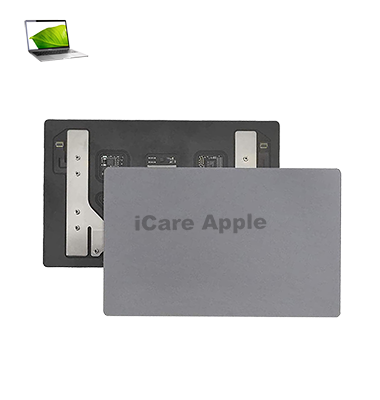
MacBook Pro (2017) A1708 Track Pad
Experiencing unresponsive or erratic Track Pad issues on your MacBook Pro (2017) A1708? We offer professional Track Pad replacement services in Bangladesh. Our skilled technicians ensure precise installation with high-quality parts for smooth performance. Visit iCare Apple for a hassle-free solution and restore your MacBook’s seamless navigation experience.
How to Identify When Your MacBook Pro (2017) A1708 Track Pad Needs Replacement
Here are four signs that your MacBook Pro (2017) A1708 Track Pad may need replacement:
Unresponsive or Delayed Response
If the Track Pad stops responding or has significant input delays, it may need replacement.
Erratic Cursor Movement
A faulty Track Pad can cause the cursor to move randomly or become difficult to control.
Physical Damage or Cracks
Visible cracks, dents, or swelling can affect Track Pad functionality.
Clicking Issues
If clicks are unresponsive, too stiff, or register multiple clicks, the Track Pad may be failing.
Our MacBook Pro (2017) A1708 Track Pad Replacement Process
1. Diagnosis
We assess the Track Pad issue, checking for unresponsiveness, erratic movement, or physical damage.
2. Genuine Part Replacement
If necessary, we replace the faulty Track Pad with a high-quality component to ensure smooth performance.
3. Professional Installation
Our skilled technicians carefully install and calibrate the new Track Pad for precise functionality.
4. Final Testing
We conduct thorough testing to ensure the Track Pad responds accurately before handing it back to you.

Choose iCare Apple for MacBook Pro (2017) A1708 Track Pad replacement in Bangladesh for expert service, genuine parts, and skilled technicians. We ensure precise installation, competitive pricing, and a quick turnaround. Get a seamless Track Pad experience with reliable repair service that restores smooth functionality to your MacBook.
✌️Top Benefits of MacBook Pro (2017) A1708 Track Pad Replacement at iCare Apple
Certified Technicians
Our technicians are certified and highly skilled, ensure repairs for your MacBook Pro (2017) A1708. We guarantee top-notch service for all Track Pad replacements.
Original & High-Quality Parts
We use genuine Apple parts for MacBook Track Pad replacements, ensuring optimal performance, durability, and preserving your MacBook's original quality for long-lasting results.
Quick and Efficient Service
At iCare Apple, we prioritize quick and efficient service, minimizing downtime. Our experienced team provides rapid, reliable Track Pad repairs, so you can get back to using your MacBook without delay.

Tips & Tricks for MacBook Pro (2017) A1708 Track Pad
👍 Customize Track Pad Settings:
Explore the touchpad settings in System Preferences > Track Pad to customize its behavior according to your preferences. Adjust settings such as tracking speed, scrolling direction, and gesture recognition to optimize your workflow.
👍 Learn Multi-Touch Gestures:
Familiarize yourself with multi-touch gestures to navigate macOS more efficiently. Experiment with gestures like swiping, pinching, rotating, and tapping to perform various tasks such as switching between applications, zooming in on content, and accessing Mission Control.
👍 Enable Tap to Click:
Enable the “Tap to Click” option in the Track Pad settings to perform clicks by tapping on the Track Pad surface. This feature allows for a more seamless and intuitive clicking experience without physically pressing down on the Track Pad.
👍 Use Force Touch:
Take advantage of Force Touch technology by applying varying levels of pressure to the Track Pad surface. Use Force Touch to access contextual menus, preview files, look up definitions, and perform other actions depending on the application and context.
👍 Practice Palm Rejection:
Practice proper palm rejection techniques to avoid unintended cursor movement or input when typing. Keep your palms slightly elevated above the Track Pad surface while typing to minimize interference and ensure accurate cursor control.
👍 Clean the Track Pad:
Regularly clean the Track Pad surface with a soft, lint-free cloth to remove dust, fingerprints, and other debris that may accumulate over time. Cleaning the Track Pad can help maintain its responsiveness and accuracy.
👍 Experiment with Accessibility Features:
Explore accessibility features in macOS that can enhance Track Pad usability for users with specific needs or preferences. Adjust settings such as pointer size, cursor color, and scrolling behavior to accommodate your individual requirements.
👍 Use Tap-and-Drag:
Enable the “Tap-and-Drag” option in the Track Pad settings to perform drag-and-drop actions by tapping and holding on an item, then dragging it to the desired location. This feature eliminates the need for physically clicking and dragging with multiple fingers.
👍 Practice Two-Finger Scrolling:
Master two-finger scrolling to navigate web pages, documents, and other content with ease. Use two fingers to scroll vertically or horizontally on the Track Pad surface to quickly navigate through long documents or webpages.
👍 Troubleshoot Calibration Issues:
If you encounter calibration issues with the Track Pad, such as erratic cursor movement or inaccurate tracking, try resetting the calibration settings in System Preferences > Track Pad. Follow the prompts to recalibrate the Track Pad for optimal performance.
By incorporating these tips and tricks into your use of the Track Pad on your MacBook Pro A1708 (2017), you can enhance navigation, productivity, and overall user experience with the device.
What Our Customers Are Saying About Our MacBook Pro (2017) A1708 Track Pad Replacement Service
Rifat Ahmed
The Track Pad replacement at iCare Apple was done professionally and quickly. Very satisfied with the service.
Shahrin Alam
Excellent service! The Track Pad on my MacBook Pro was fixed in no time, and everything works perfectly.
Nabila Rahman
I highly recommend iCare Apple for Track Pad replacement; fast, efficient, and great customer service.
Md Shanto
iCare Apple provided great assistance with my MacBook’s Track Pad replacement. It’s like new now!
Your Trust is Our Strength
Why Timely MacBook Track Pad Replacement is Essential
Timely replacement of your MacBook Pro (2017) A1708 Track Pad ensures optimal performance, prevents further damage, and enhances user experience. Delaying the replacement can lead to unresponsive or malfunctioning Track Pads, causing frustration and hindering productivity. Swift action prevents costly repairs down the line and keeps your MacBook running smoothly.
Visit iCare Apple in Dhaka for Professional MacBook Repairs
Located at the heart of Dhaka, iCare Apple offers top-notch repair services for all Macbook models. Our team is committed to providing quality repairs, and we stand by our work. So, if your MacBook Pro (2017) A1708 needs a Track Pad replacement, visit iCare Apple and experience professional service from trusted experts.
Ensure the longevity and performance of your MacBook Pro (2017) A1708 Track Pad by opting for quality Display replacement services at iCare Apple.
FAQ
1. What causes Track Pad issues on MacBook Pro (2017) A1708?
Track Pad problems can arise due to hardware failure, physical damage, or driver/software issues.
2. How long does a Track Pad replacement take at iCare Apple?
It typically takes 3-5 business days depending on parts availability.
3. Is the Track Pad replacement covered by warranty?
Replacement is covered under our service warranty for a specified period.
4. Can I use my MacBook without a functioning Track Pad?
Yes, you can use an external mouse or keyboard, but it’s less convenient.
5. Do I need to back up my data before the Track Pad replacement?
No data loss is involved, but it’s always good to back up for safety.
6. How much does MacBook Pro (2017) A1708 Track Pad replacement cost?
Costs vary depending on the part, but we provide transparent pricing upon consultation.
7. Do you provide a warranty on the replacement Track Pad?
Yes, we offer a warranty on the new Track Pad for a specific duration.
8. Is the Track Pad replacement process complex?
It is a delicate process requiring expert technicians to ensure proper functionality and alignment.