

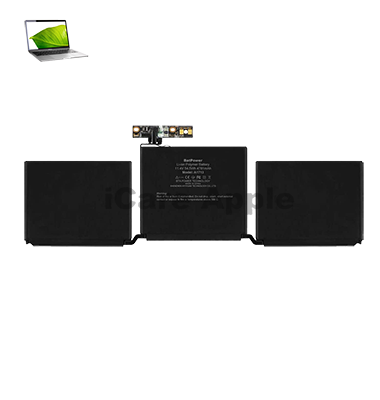
MacBook Pro (2017) A1708 Battery
We provide MacBook Pro (2017) A1708 Battery replacement services in Bangladesh with high-quality parts and expert technicians. If your Battery drains quickly or doesn’t charge, visit us for a fast and reliable solution. Our skilled team ensures efficient replacement, restoring your MacBook’s Battery life and performance.
How to Identify When Your MacBook Pro (2017) A1708 Battery Needs Replacement
Here are four signs that your MacBook Pro (2017) A1708 Battery may need replacement:
Rapid Battery Drain
Your MacBook’s Battery depletes quickly, even with minimal usage.
Charging Issues
The Battery doesn’t charge properly or takes too long to charge.
Overheating
Your MacBook gets unusually hot, even during light tasks.
Unexpected Shutdowns
The device turns off suddenly, even when the Battery shows a charge.
Our MacBook Pro (2017) A1708 Battery Replacement Process
1. Diagnosis
We assess your MacBook Pro (2017) A1708 Battery condition to confirm if a replacement is needed.
2. Battery Replacement
Our skilled technicians carefully remove the old Battery and install a premium-quality replacement.
3. Testing & Quality Check
We conduct performance tests to ensure proper charging, Battery life, and overall functionality.
4. Final Inspection & Handover
After a final review, we return your MacBook in optimal working condition.

We provide expert MacBook Pro (2017) A1708 Battery replacement with high-quality parts, skilled technicians, and fast service. Our professional approach ensures your MacBook runs efficiently again. Visit iCare Apple in Bangladesh for a reliable and hassle-free Battery replacement experience at a competitive price. Your device is in safe hands with us.
✌️Top Benefits of MacBook Pro (2017) A1708 Battery Replacement at iCare Apple
Certified Technicians
Our technicians are certified and highly skilled, ensure repairs for your MacBook Pro (2017) A1708. We guarantee top-notch service for all Battery replacements.
Original & High-Quality Parts
We use genuine Apple parts for MacBook Battery replacements, ensuring optimal performance, durability, and preserving your MacBook's original quality for long-lasting results.
Quick and Efficient Service
At iCare Apple, we prioritize quick and efficient service, minimizing downtime. Our experienced team provides rapid, reliable Battery repairs, so you can get back to using your MacBook without delay.

Tips & Tricks for MacBook Pro (2017) A1708 Battery
👍 Monitor Battery Health:
Keep an eye on your MacBook Pro’s battery health by checking the Battery menu in the macOS menu bar or by navigating to System Preferences > Energy Saver. Monitoring battery health can help you identify any degradation over time.
👍 Use Energy Saver Settings:
Adjust Energy Saver settings in System Preferences to optimize battery usage. Enable features such as “Turn display off after” and “Put hard disks to sleep when possible” to conserve battery power when your MacBook Pro is idle.
👍 Reduce Screen Brightness:
Lowering the screen brightness can significantly extend battery life. Use the brightness controls in the macOS menu bar or System Preferences to adjust the brightness level to a comfortable setting, especially when working in dimly lit environments.
👍 Manage Background Processes:
Close unnecessary applications and background processes that consume battery power unnecessarily. Use Activity Monitor to identify resource-intensive applications and quit them to conserve battery life.
👍 Enable Power Nap Sparingly:
Power Nap allows your MacBook Pro to perform certain tasks, such as fetching email and updating calendars, while asleep. Consider enabling Power Nap only when necessary to conserve battery power, especially when running on battery.
👍 Disconnect Peripherals:
Disconnect external devices and peripherals when not in use, as they can drain battery power even when idle. Unplug USB devices, external displays, and other accessories to minimize power consumption.
👍 Use Safari for Web Browsing:
Safari is optimized for energy efficiency and consumes less battery power compared to other web browsers. Use Safari for web browsing on your MacBook Pro to maximize battery life while surfing the internet.
👍 Limit Background Downloads:
Avoid downloading large files or performing bandwidth-intensive tasks while running on battery power. Limit background downloads, streaming, and file transfers to conserve battery life for essential tasks.
👍 Hibernate Instead of Sleep:
Consider hibernating your MacBook Pro instead of putting it to sleep when not in use for extended periods. Hibernation mode saves the current state of your system to disk and consumes minimal battery power, preserving battery life for longer periods of inactivity.
👍 Calibrate the Battery:
Calibrate your MacBook Pro’s battery periodically to ensure accurate battery life estimates and optimal performance. Fully charge the battery to 100%, then discharge it completely before recharging to recalibrate the battery’s capacity gauge.
By following these tips and tricks, you can optimize the Battery performance of your MacBook Pro A1708 (2017) and enjoy longer runtime on a single charge, allowing you to work, browse, and stream content without worrying about running out of Battery power.
What Our Customers Are Saying About Our MacBook Pro (2017) A1708 Battery Replacement Service
Amit Ghosh
The Battery replacement for my MacBook Pro (2017) A1708 was quick and hassle-free at iCare Apple. Now my laptop runs smoothly with excellent Battery life.
Hafizur Rahman
I had a great experience getting my MacBook Battery replaced at iCare Apple. The service was fast, and the new Battery is performing perfectly.
Arif Hasnat
My MacBook's Battery issue was fixed efficiently at iCare Apple. The replacement was high quality, and my laptop’s performance has improved significantly.
Nubaid Firoz
iCare Apple provided a professional Battery replacement service for my MacBook Pro A1708. The team was skilled, and my device now works like new.
Your Trust is Our Strength
Why Timely MacBook Battery Replacement is Essential
Timely MacBook Pro (2017) A1708 Battery replacement is essential to prevent sudden shutdowns, overheating, and reduced performance. A degraded Battery can impact productivity and even cause internal damage. Replacing it on time ensures longer device lifespan, improved efficiency, and a seamless user experience without unexpected power issues.
Visit iCare Apple in Dhaka for Professional MacBook Repairs
Located at the heart of Dhaka, iCare Apple offers top-notch repair services for all MacBook models. Our team is committed to providing quality repairs, and we stand by our work. So, if your MacBook Pro (2017) A1708 needs a Battery replacement, visit iCare Apple and experience professional service from trusted experts.
Ensure the longevity and performance of your MacBook Pro (2017) A1708 by opting for quality Battery replacement services at iCare Apple.
FAQ
1. When should I replace my MacBook Pro (2017) A1708 Battery?
If your Battery drains quickly, overheats, or shows a “Service Battery” warning, it’s time for a replacement.
2. How long does it take to replace the Battery?
Battery replacement at iCare Apple usually takes a few hours, depending on workload.
3. Do you use original batteries for replacement?
We use high-quality compatible batteries to ensure optimal performance.
4. Will replacing the Battery erase my data?
No, but we recommend backing up your data before service.
5. What is the cost of Battery replacement?
Prices vary; contact us for the latest pricing.
6. Do you provide a warranty on Battery replacement?
Yes, we offer a limited warranty on our replacement service.
7. Can I replace the Battery myself?
Battery replacement requires technical expertise; professional service is recommended.
8. How do I book a Battery replacement service?
You can visit our store, call us, or book an appointment online.