

MacBook Pro (2016) A1708 Battery
Our MacBook Pro (2016) A1708 Battery replacement service ensures top-quality care with expert technicians and genuine parts. We provide fast, efficient service, so your MacBook performs like new again. Trust us for reliable repairs and customer satisfaction in Bangladesh. Contact us today for a smooth and professional Battery replacement experience!
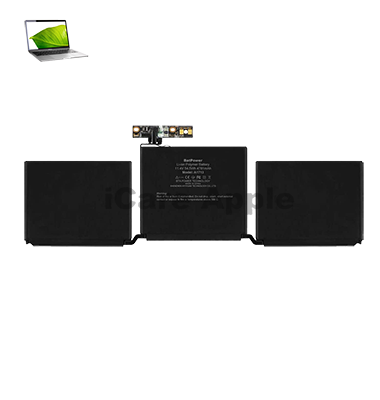
How to Identify When Your MacBook Pro (2016) A1708 Battery Needs Replacement
Here are four signs that your MacBook Pro (2016) A1708 Battery may need replacement:
Rapid Battery Drain:
The Battery loses charge much faster than usual, even with light usage.
Unexpected Shutdowns:
Your MacBook turns off suddenly, even when the Battery shows remaining charge.
Service Battery Warning:
macOS displays a “Service Battery” or “Replace Soon” alert.
Swollen Battery:
The bottom case of your MacBook appears slightly raised or deformed.
Our MacBook Pro (2016) A1708 Battery Replacement Process
1. Diagnosis:
We start with a thorough Battery health check to confirm if replacement is needed.
2. Consultation:
We discuss the issue, cost, and timeline, ensuring transparency before starting the repair.
3. Battery Replacement:
Our expert technicians carefully replace the old Battery with a high-quality one.
4. Final Testing:
We run detailed tests to ensure the new Battery works perfectly and your MacBook performs optimally.
Trust us for professional, fast, and reliable service every time!

Choose iCare Apple for MacBook Pro (2016) A1708 Battery replacement because we offer expert service, high-quality parts, and skilled technicians. We ensure fast, reliable repairs with attention to detail and customer satisfaction. Trust us for a smooth, professional experience and restore your MacBook’s performance with confidence.
✌️Top Benefits of MacBook Pro (2016) A1708 Battery Replacement at iCare Apple
Certified Technicians
Our technicians are certified and highly skilled, ensure repairs for your MacBook Pro (2016) A1708. We guarantee top-notch service for all Battery replacements.
Original & High-Quality Parts
We use genuine Apple parts for MacBook Battery replacements, ensuring optimal performance, durability, and preserving your MacBook's original quality for long-lasting results.
Quick and Efficient Service
At iCare Apple, we prioritize quick and efficient service, minimizing downtime. Our experienced team provides rapid, reliable Battery repairs, so you can get back to using your MacBook without delay.

Tips & Tricks for MacBook Pro (2016) A1708 Battery
👍 Manage Screen Brightness:
Lower the screen brightness when working indoors or in low-light environments to conserve battery power. You can adjust screen brightness in System Preferences > Displays or by using the brightness keys on the keyboard.
👍 Monitor Battery Usage:
Keep an eye on battery usage statistics in macOS to identify apps or processes that consume significant power. Use the Activity Monitor utility to view detailed information about battery usage and resource-intensive applications.
👍 Enable Battery Health Management:
Take advantage of Battery Health Management features introduced in macOS to prolong battery lifespan. Enable Battery Health Management in System Preferences > Energy Saver to optimize battery charging based on usage patterns and temperature conditions.
👍 Optimize Energy-Saving Settings:
Adjust energy-saving settings in macOS to minimize power consumption and extend battery life. Customize settings such as sleep mode, display sleep, and system hibernation in System Preferences > Energy Saver to suit your usage habits.
👍 Use Power-Saving Mode:
Enable Power-Saving Mode in macOS to automatically adjust system settings and reduce power consumption when the battery level is low. Power-Saving Mode can help extend battery life by optimizing CPU performance, background activities, and system resources.
👍 Manage Background Processes:
Close unnecessary apps and background processes to reduce CPU usage and conserve battery power. Use the Activity Monitor utility to identify and quit resource-intensive applications that may drain battery unnecessarily.
👍 Limit External Peripherals:
Disconnect external peripherals such as USB devices, external displays, and accessories when not in use to minimize power consumption. External peripherals can draw power from the MacBook Pro’s battery, reducing overall battery life.
👍 Update macOS:
Keep your MacBook Pro’s operating system up to date to ensure compatibility with the latest battery optimization features and improvements. Apple regularly releases updates that include enhancements to battery management and power-saving technologies.
👍 Avoid Extreme Temperatures:
Avoid exposing your MacBook Pro to extreme temperatures, as both heat and cold can affect battery performance and longevity. Keep your MacBook Pro within recommended temperature ranges to maintain optimal battery health.
👍 Calibrate the Battery:
Calibrate the battery of your MacBook Pro periodically to maintain accurate battery readings and optimize performance. Follow Apple’s guidelines for battery calibration, which typically involve fully charging and discharging the battery to recalibrate its capacity and charge level.
By incorporating these tips and tricks into your battery management practices, you can maximize the performance, longevity, and overall health of the Battery in your MacBook Pro (2016) A1708, ensuring reliable power and productivity whenever you need it.
What Our Customers Are Saying About Our MacBook Pro (2016) A1708 Battery Replacement Service
Shafiqur Rahman
The Battery replacement was quick, and my MacBook is working like new again. Excellent service at iCare Apple!
Rajiya Sultana
Very professional staff and efficient Battery replacement process. Highly recommended for MacBook repairs!
Rajeev Ahmed
Great experience with iCare Apple. The Battery replacement was smooth, and the team was friendly and knowledgeable.
Anika Begum
Fast and reliable service for my MacBook’s Battery replacement. I’m very satisfied with the outcome!
Your Trust is Our Strength
Why Timely MacBook Battery Replacement is Essential
Timely MacBook Pro (2016) A1708 Battery replacement is essential to maintain optimal performance, prevent sudden shutdowns, and avoid potential damage to internal components. A failing Battery can hinder productivity, cause data loss, and lead to costly repairs. Replacing it on time ensures a longer lifespan for your device.
Visit iCare Apple in Dhaka for Professional MacBook Repairs
Located at the heart of Dhaka, iCare Apple offers top-notch repair services for all MacBook models. Our team is committed to providing quality repairs, and we stand by our work. So, if your MacBook Pro (2016) A1708 needs a Battery replacement, visit iCare Apple and experience professional service from trusted experts.
Ensure the longevity and performance of your MacBook Pro (2016) A1708 by opting for quality Battery replacement services at iCare Apple.
FAQ
1. How long does the Battery replacement take?
It typically takes 2-3 hours, depending on workload.
2. Is the replacement Battery original?
Yes, we use high-quality, genuine batteries for all replacements.
3. Do I need to back up my data before the replacement?
We recommend backing up your data as a precaution.
4. Does the replacement come with a warranty?
Yes, we offer a limited warranty on the Battery replacement.
5. Can I replace the Battery myself?
We recommend professional service for safety and optimal results.
6. Will my MacBook work the same after the replacement?
Yes, your MacBook will function like new with improved Battery life.
7. How can I book a Battery replacement appointment?
You can contact us via phone, FaceBook, WhatsApp, or our website to schedule.
8. How do I know when the Battery needs replacement?
We conduct a thorough diagnostic to identify if your Battery needs replacement.