

MacBook Pro (2016) A1708 Track Pad
At iCare Apple, we offer professional MacBook Pro (2016) A1708 Track Pad replacement service in Bangladesh. Our expert technicians ensure fast, precise repairs with high-quality parts, restoring your MacBook’s smooth and responsive touch experience. Trust us for reliable service and a hassle-free repair process. Contact us today for Track Pad replacement!
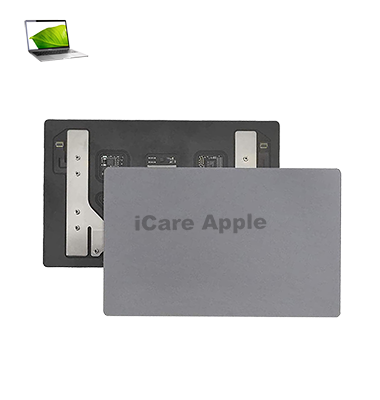
How to Identify When Your MacBook Pro (2016) A1708 Track Pad Needs Replacement
Here’s how to know when your MacBook Pro (2016) A1708 Track Pad needs replacement:
Unresponsive Areas:
Certain parts of the Track Pad don’t register touch or clicks.
Erratic Cursor Movement:
The cursor moves unpredictably or jumps around the screen.
Sticky or Hard to Press:
The Track Pad becomes difficult to press or feels sticky.
No Click or Tap Functionality:
The Track Pad fails to register taps or clicks altogether.
Our MacBook Pro (2016) A1708 Track Pad Replacement Process
1. Diagnosis:
We start with a thorough assessment to confirm if the Track Pad needs replacement.
2. Consultation:
We provide an estimate of the repair cost and time, ensuring transparency.
3. Track Pad Replacement:
Our expert technicians carefully replace the faulty Track Pad with a high-quality, compatible part.
4. Final Testing:
After installation, we perform tests to ensure the Track Pad works smoothly and is fully responsive.

Choose iCare Apple for MacBook Pro (2016) A1708 Track Pad replacement because we offer expert service, high-quality parts, and skilled technicians. We ensure fast, precise repairs that restore your MacBook’s Track Pad functionality, providing a smooth and responsive experience. Trust us for reliable, professional service every time!
✌️Top Benefits of MacBook Pro (2016) A1708 Track Pad Replacement at iCare Apple
Certified Technicians
Our technicians are certified and highly skilled, ensure repairs for your MacBook Pro (2016) A1708. We guarantee top-notch service for all Track Pad replacements.
Original & High-Quality Parts
We use genuine Apple parts for MacBook Track Pad replacements, ensuring optimal performance, durability, and preserving your MacBook's original quality for long-lasting results.
Quick and Efficient Service
At iCare Apple, we prioritize quick and efficient service, minimizing downtime. Our experienced team provides rapid, reliable Track Pad repairs, so you can get back to using your MacBook without delay.

Tips & Tricks for MacBook Pro (2016) A1708 Track Pad
👍 Customize Gesture Settings:
Explore the Track Pad settings in System Preferences to customize gesture settings according to your preferences. Adjust settings for scrolling direction, tap to click, and multiTrack gestures to enhance your productivity.
👍 Use MultiTrack Gestures:
Take advantage of multiTrack gestures such as swiping, pinching, and rotating to navigate macOS efficiently. Learn and practice common gestures to streamline tasks like switching between applications, zooming in and out of content, and navigating documents.
👍 Experiment with Force Track:
Experiment with Force Track technology to access additional features and shortcuts. Apply varying pressure to the Track Pad to trigger contextual menus, preview content, and access quick actions, enhancing your workflow.
👍 Enable Tap to Click:
Enable the “Tap to Click” option in Track Pad settings to perform mouse clicks by tapping on the Track Pad surface. This allows for faster and more intuitive clicking without physically pressing down on the Track Pad.
👍 Adjust Tracking Speed:
Fine-tune the tracking speed of the cursor in Track Pad settings to match your preferred cursor movement speed. Increase or decrease the tracking speed to achieve optimal responsiveness and precision.
👍 Practice Three-Finger Gestures:
Practice three-finger gestures such as swiping between full-screen apps, accessing Mission Control, and triggering Exposé. Mastering three-finger gestures can enhance multitasking and navigation efficiency.
👍 Utilize Track Pad Accessibility Features:
Explore accessibility features for the Track Pad, such as “Tap with Three Fingers to Drag” or “Enable Dragging,” to accommodate users with mobility impairments. Customize Track Pad settings to enable alternative input methods and improve accessibility.
👍 Apply Palm Rejection:
Adjust palm rejection settings in Track Pad preferences to prevent accidental cursor movement or input from palm rests. Fine-tune palm rejection sensitivity to minimize interference and improve usability during typing.
👍 Clean the Track Pad Surface:
Keep the Track Pad surface clean and free of debris to maintain optimal responsiveness and accuracy. Use a soft, lint-free cloth to gently clean the Track Pad surface and remove dirt, oils, and fingerprints regularly.
👍 Practice Efficient Track Pad Use:
Practice efficient Track Pad use techniques to maximize productivity and minimize strain. Use keyboard shortcuts in conjunction with Track Pad gestures to perform tasks quickly and efficiently, reducing reliance on external peripherals.
By incorporating these tips and tricks into your daily workflow, you can harness the full potential of the Track Pad on your MacBook Pro (2016) A1708 and enhance your overall computing experience.
What Our Customers Are Saying About Our MacBook Pro (2016) A1708 Track Pad Replacement Service
Ahsan Khan
iCare Apple replaced my MacBook's Track Pad quickly and efficiently. It works like new now, highly recommended!
Mahira Zaman
Fast service and great attention to detail. My MacBook’s Track Pad feels smooth and responsive after the replacement.
Rifat Ali
The Track Pad replacement was done perfectly, and my MacBook is performing better than before. Very satisfied!
Tanima Roy
Excellent service from iCare Apple! The Track Pad replacement was completed with care, and my MacBook is as good as new.
Your Trust is Our Strength
Why Timely MacBook Track Pad Replacement is Essential
Timely MacBook Pro (2016) A1708 Track Pad replacement is essential to ensure smooth navigation and productivity. A malfunctioning Track Pad can lead to frustration, decreased efficiency, and more extensive damage if ignored. Replacing it on time restores proper functionality, preventing further issues and enhancing the overall performance of your MacBook.
Visit iCare Apple in Dhaka for Professional MacBook Repairs
Located at the heart of Dhaka, iCare Apple offers top-notch repair services for all Macbook models. Our team is committed to providing quality repairs, and we stand by our work. So, if your MacBook Pro (2016) A1708
needs a Track Pad replacement, visit iCare Apple and experience professional service from trusted experts.
Ensure the longevity and performance of your MacBook Pro (2016) A1708
by opting for quality Track Pad replacement services at iCare Apple.
FAQ
1. How long does the Track Pad replacement take?
It typically takes 2-3 hours depending on the availability.
2. Is the replacement Track Pad original?
We use high-quality, compatible Track Pads for all replacements.
3. Do I need to back up my data before the replacement?
While not mandatory, we recommend backing up your data as a precaution.
4. How can I book a Track Pad replacement appointment?
You can book an appointment via phone, WhatsApp, or our website.
5. Does the replacement come with a warranty?
Yes, we offer a limited warranty on all Track Pad replacements.
6. What are the signs that my Track Pad needs replacement?
Unresponsiveness, erratic cursor movement, and difficulty pressing or tapping.
7. Can I replace the Track Pad myself?
We recommend professional service for the best results and to avoid damage.
8. Will my MacBook perform better after the replacement?
Yes, your Track Pad will function like new, enhancing overall performance.