

MacBook Pro (2017) A1707 Keyboard
At iCare Apple in Bangladesh, we specialize in MacBook Pro (2017) A1707 Keyboard replacement. Our skilled technicians ensure precise installation of high-quality Keyboards, restoring your device’s functionality. Whether keys are unresponsive or damaged, trust us to provide fast, reliable service for your MacBook Pro.
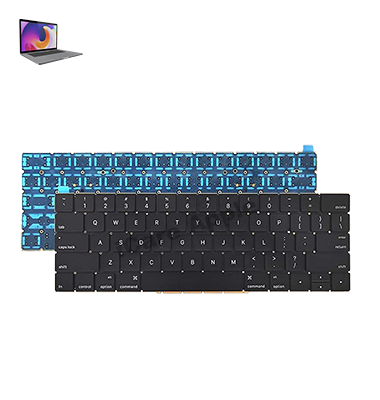
How to Identify When Your MacBook Pro (2017) A1707 Keyboard Needs Replacement
Here are four signs that indicate your MacBook Pro (2017) A1707 Keyboard may need replacement:
Unresponsive Keys:
If certain keys stop working or become inconsistent in registering, it may be time for a replacement.
Sticky or Jammed Keys:
Keys that feel sticky, jammed, or difficult to press could signal internal damage.
Frequent Key Failures:
If multiple keys fail to respond intermittently, it could indicate a deeper issue with the Keyboard.
Physical Damage:
Visible damage, like cracks, dents, or liquid spills, can cause the Keyboard to malfunction and require replacement.
Our MacBook Pro (2017) A1707 Keyboard Replacement Process
1. Diagnosis:
We thoroughly inspect the Keyboard to identify the issue, whether it’s a key failure or physical damage.
2. Cost Estimate:
After the diagnosis, we provide a clear and transparent estimate for the replacement.
3. Replacement:
Our skilled technicians replace the faulty Keyboard with a high-quality, compatible part.
4. Testing:
After replacement, we perform comprehensive testing to ensure all keys work properly and the Keyboard functions like new before returning your device.

Choose iCare Apple for your MacBook Pro (2017) A1707 Keyboard replacement for our expert technicians, quality parts, and reliable service. We ensure a seamless replacement process, restoring your Keyboard to full functionality, and providing fast, professional care to keep your MacBook performing at its best.
✌️Top Benefits of MacBook Pro (2017) A1707 Keyboard Replacement at iCare Apple
Certified Technicians
Our technicians are certified and highly skilled, ensure repairs for your MacBook Pro (2017) A1707. We guarantee top-notch service for all Keyboard replacements.
Original & High-Quality Parts
We use genuine Apple parts for MacBook Keyboard replacements, ensuring optimal performance, durability, and preserving your MacBook's original quality for long-lasting results.
Quick and Efficient Service
At iCare Apple, we prioritize quick and efficient service, minimizing downtime. Our experienced team provides rapid, reliable Keyboard repairs, so you can get back to using your MacBook without delay.

Tips & Tricks for MacBook Pro (2017) A1707 Keyboard
👍 Keyboard shortcuts:
Take advantage of macOS Keyboard shortcuts to improve your productivity. Learn commonly used shortcuts for tasks like copying and pasting, switching between applications, and accessing system features like Spotlight search.
👍 Customize Keyboard settings:
Explore the Keyboard preferences in System Preferences to customize Keyboard behavior to your liking. You can adjust settings such as key repeat rate, modifier key functionality, and Keyboard backlighting.
👍 Use the Touch Bar:
If your MacBook Pro is equipped with a Touch Bar, make use of its contextual controls and shortcuts. Customize the Touch Bar to display app-specific shortcuts and controls for increased efficiency in various applications.
👍 Practice touch typing:
Improve your typing speed and accuracy by practicing touch typing techniques. Familiarize yourself with proper hand positioning and practice typing without looking at the Keyboard to enhance your muscle memory.
👍 Enable Keyboard dictation:
Take advantage of macOS’s built-in dictation feature to input text using your voice. Enable dictation in System Preferences under Keyboard settings and use the designated shortcut to start dictating text wherever you can type.
👍 Utilize emoji and special characters:
Access a wide range of emoji and special characters by pressing and holding specific keys on the Keyboard. Experiment with different key combinations to quickly insert symbols and characters into your text.
👍 Clean the Keyboard regularly:
Keep your Keyboard clean by regularly removing dust and debris using compressed air or a soft brush. This helps prevent keys from becoming sticky or unresponsive due to debris buildup.
👍 Enable Keyboard accessibility features:
Explore macOS accessibility settings to enable features like Sticky Keys, Slow Keys, and Keyboard Maestro, which can assist users with motor disabilities or make typing more comfortable for everyone.
👍 Learn Keyboard navigation:
Familiarize yourself with Keyboard navigation techniques to navigate macOS without using the mouse. Use shortcuts like Command + Tab to switch between applications and Command + arrow keys to navigate windows and documents.
👍 Practice Keyboard shortcuts in specific applications:
Learn application-specific Keyboard shortcuts to streamline your workflow in programs like Safari, Mail, and Microsoft Office. Many applications offer a wide range of shortcuts for common tasks, saving you time and effort in your daily work.
What Our Customers Are Saying About Our MacBook Pro (2017) A1707 Keyboard Replacement Service
Jannat Nijhum
iCare Apple replaced my MacBook Pro Keyboard quickly and professionally. The new Keyboard works perfectly, and I’m very satisfied with their service!
Ridoy Khan
The team at iCare Apple did an amazing job replacing my MacBook Keyboard. Fast service and excellent quality replacement!
Abdul Salam
I had a great experience with iCare Apple’s Keyboard replacement service. They were efficient and my MacBook is as good as new!
Kamal Uddin
iCare Apple provided excellent service for my MacBook Pro Keyboard replacement. Everything works flawlessly, and I’m happy with the result!
Your Trust is Our Strength
Why Timely MacBook Keyboard Replacement is Essential
Timely MacBook Pro (2017) A1707 Keyboard replacement is essential to maintain productivity and prevent further damage. Delaying repairs can lead to more severe issues, such as unresponsive keys or malfunctioning components. Prompt replacement ensures smooth performance, extending the lifespan of your device and avoiding costly repairs down the line.
Visit iCare Apple in Dhaka for Professional MacBook Repairs
Located at the heart of Dhaka, iCare Apple offers top-notch repair services for all Macbook models. Our team is committed to providing quality repairs, and we stand by our work. So, if your MacBook Pro (2017) A1707 needs a Keyboard replacement, visit iCare Apple and experience professional service from trusted experts.
Ensure the longevity and performance of your MacBook Pro (2017) A1707 by opting for quality Keyboard replacement services at iCare Apple.
FAQ
1. How long does it take to replace my MacBook Pro (2017) A1707 Keyboard?
Keyboard replacement usually takes 2-3 business days.
2. Will my data be lost during the Keyboard replacement?
Data remains unaffected as the replacement only involves the Keyboard.
3. Do you use original parts for Keyboard replacement?
Yes, we use high-quality, compatible parts for all Keyboard replacements.
4. How much does MacBook Pro (2017) A1707 Keyboard replacement cost?
The cost depends on the issue; we provide an estimate after diagnostic testing.
5. Can I get a warranty for my Keyboard replacement?
Yes, we offer a warranty on both parts and labor for Keyboard replacements.
6. Do you offer on-site Keyboard replacement services?
Currently, Keyboard replacements are done in our lab at our facility.
7. Is my MacBook Pro still under warranty?
We are not authorized service provider, so Apple warranty coverage may not apply.
8. How can I schedule a Keyboard replacement service?
You can schedule a service by calling us or visiting our store.