

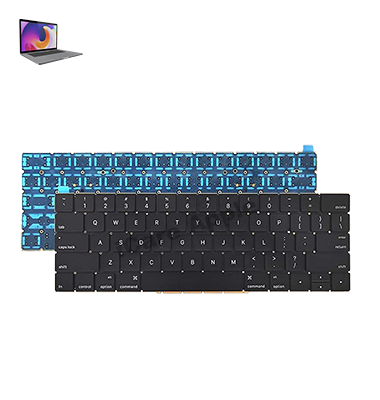
MacBook Pro (2016) A1707 Keyboard
At iCare Apple, we provide expert MacBook Pro (2016) A1707 Keyboard replacement services in Bangladesh. Our skilled technicians ensure a smooth and efficient process, replacing faulty Keyboards with high-quality parts to restore your MacBook’s functionality. Trust us for reliable, fast service and expert repairs. Contact us today!
How to Identify When Your MacBook Pro (2016) A1707 Keyboard Needs Replacement
Here are four signs your MacBook Pro (2016) A1707 Keyboard needs replacement:
Unresponsive Keys:
Some or all keys stop working, even after restarting the device.
Sticky Keys:
Keys feel sticky or difficult to press, impacting typing experience.
Erratic Typing:
Letters or characters repeat unexpectedly or don’t register when typed.
Physical Damage:
Visible cracks, spills, or debris affecting key functionality.
Our MacBook Pro (2016) A1707 Keyboard Replacement Process
1. Diagnosis:
We begin with a thorough assessment to confirm Keyboard issues and provide a solution.
2. Consultation:
We explain the problem, give an estimated cost, and confirm your approval.
3. Replacement:
Our technicians replace the faulty Keyboard with a high-quality, compatible part.
4. Testing:
We test the new Keyboard to ensure it functions perfectly and provide a warranty on the replacement.

Choose iCare Apple for MacBook Pro (2016) A1707 Keyboard replacement because we provide expert service, use high-quality parts, and ensure a fast, efficient repair process. Our skilled technicians deliver reliable solutions to restore your MacBook’s functionality. Trust us for professional care and excellent customer service.
✌️Top Benefits of MacBook Pro (2016) A1707 Keyboard Replacement at iCare Apple
Certified Technicians
Our technicians are certified and highly skilled, ensure repairs for your MacBook Pro (2016) A1707. We guarantee top-notch service for all Keyboard replacements.
Original & High-Quality Parts
We use genuine Apple parts for MacBook Keyboard replacements, ensuring optimal performance, durability, and preserving your MacBook's original quality for long-lasting results.
Quick and Efficient Service
At iCare Apple, we prioritize quick and efficient service, minimizing downtime. Our experienced team provides rapid, reliable Keyboard repairs, so you can get back to using your MacBook without delay.

Tips & Tricks for MacBook Pro (2016) A1707 Keyboard
👍 Regular Cleaning:
Keep your Keyboard clean by periodically removing dust, crumbs, and other debris that may accumulate between the keys. Use compressed air or a soft brush to gently clean the Keyboard and prevent keys from sticking or jamming.
👍 Adjust Keyboard Backlighting:
Customize the Keyboard backlighting settings to suit your preferences and lighting conditions. Use the brightness controls to adjust the intensity of the backlight or enable/disable automatic brightness adjustment in System Preferences.
👍 Keyboard Shortcuts:
Familiarize yourself with Keyboard shortcuts for common tasks and applications. Keyboard shortcuts can help you navigate your MacBook Pro more efficiently and perform tasks quickly without relying on the mouse or trackpad.
👍 Key Remapping:
Customize Keyboard shortcuts or remap keys to suit your workflow and preferences. You can use third-party software or built-in macOS features to remap keys and assign custom functions or shortcuts to specific keys.
👍 Use Function Keys:
Take advantage of the function keys (F1-F12) located at the top row of the Keyboard to access system controls, media playback, and other functions. Press the “Fn” key along with the corresponding function key to activate its secondary function.
👍 Enable Key Repeat:
Adjust the key repeat settings in System Preferences to control the speed and delay of key repeats when holding down a key. This can help improve typing efficiency and reduce fatigue when typing repetitive sequences of characters.
👍 Use Text Expansion:
Use text expansion tools or features built into macOS to create custom abbreviations or shortcuts for frequently used phrases or words. This can help speed up typing and reduce the need for repetitive keystrokes.
👍 Keyboard Language Settings:
Customize Keyboard language settings in System Preferences to switch between different Keyboard layouts or input methods. This can be useful for multilingual users or those who frequently switch between languages.
👍 External Keyboard Compatibility:
If you prefer using an external Keyboard with your MacBook Pro, ensure compatibility and adjust settings as needed. Some external Keyboards may require driver installation or configuration to work optimally with macOS.
👍 Keyboard Cover:
Consider using a Keyboard cover or skin to protect your MacBook Pro Keyboard from spills, dust, and wear. Keyboard covers are available in various materials and designs, offering protection while maintaining tactile feedback and key responsiveness.
By incorporating these tips and tricks into your daily usage, you can enhance your typing experience and productivity on the MacBook Pro (2016) A1707, Keyboard.
What Our Customers Are Saying About Our MacBook Pro (2016) A1707 Keyboard Replacement Service
Zubair Ahmed
iCare Apple replaced my MacBook’s Keyboard quickly and efficiently. The new keys work flawlessly now.
Rana Mondol
Excellent service! The Keyboard replacement process was smooth, and my MacBook feels brand new.
Md Zisan
Very satisfied with iCare Apple’s Keyboard replacement service. My MacBook is back to full functionality.
Rahul Rafin
iCare Apple handled my MacBook’s Keyboard issue with professionalism. Highly recommend their service!
Your Trust is Our Strength
Why Timely MacBook Keyboard Replacement is Essential
Timely MacBook Pro (2016) A1707 Keyboard replacement is essential to prevent further damage and ensure smooth functionality. Delaying replacement can lead to more severe issues, such as malfunctioning keys or connectivity problems, which can impact productivity. A quick fix restores performance and prevents additional repair costs.
Visit iCare Apple in Dhaka for Professional MacBook Repairs
Located at the heart of Dhaka, iCare Apple offers top-notch repair services for all MacBook models. Our team is committed to providing quality repairs, and we stand by our work. So, if your MacBook Pro (2016) A1707 needs a Keyboard replacement, visit iCare Apple and experience professional service from trusted experts.
Ensure the longevity and performance of your MacBook Pro (2016) A1707 by opting for quality Keyboard replacement services at iCare Apple.
FAQ
1. What if my MacBook’s Keyboard has liquid damage?
If there’s liquid damage, additional repairs may be required before the Keyboard replacement.
2. How do I ensure my Keyboard stays in good condition after replacement?
Avoid spills, dust accumulation, and physical damage to prolong the life of the new Keyboard.
3. Can you fix individual keys instead of replacing the entire Keyboard?
It’s usually more efficient to replace the full Keyboard, especially if multiple keys are damaged.
4. How long does the MacBook Pro A1707 Keyboard replacement take?
It typically takes few hours, depending on part availability.
5. Do you use original replacement parts?
We use high-quality, compatible replacement parts for your MacBook.
6. How much does the Keyboard replacement cost?
Please contact us for an accurate quote based on diagnosis.
7. Will my MacBook be tested after the Keyboard replacement?
Yes, we thoroughly test the Keyboard after replacement to ensure proper function.
8. How much does the keyboard replacement cost?
The cost varies; please contact us for the exact Price.