

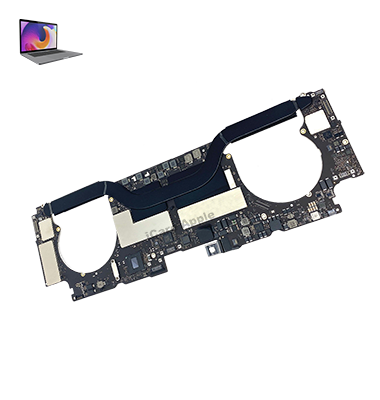
MacBook Pro (2016) A1707 Motherboard
At iCare Apple, we offer professional MacBook Pro (2016) A1707 Motherboard repair and replacement services in Bangladesh. Our experts ensure quality diagnostics and efficient repairs, using high-quality parts to restore your device’s performance. Trust us for reliable, fast, and cost-effective solutions for your MacBook Pro Motherboard issues.
How to Identify When Your MacBook Pro (2016) A1707 Motherboard Needs Replacement
Here are four signs that your MacBook Pro (2016) A1707 Motherboard needs replacement:
Frequent System Crashes:
Unexpected shutdowns or system errors that occur frequently can indicate Motherboard issues.
No Power or Boot Failure:
The MacBook won’t power on or fails to boot up properly despite charging.
Overheating:
Consistent overheating, even with minimal usage, might be caused by Motherboard failure.
Unresponsive Ports:
USB or other ports not working properly, signaling potential Motherboard damage.
Our MacBook Pro (2016) A1707 Motherboard Replacement Process
1. Diagnosis:
We perform a thorough diagnostic check to identify the Motherboard issue.
2. Backup Recommendation:
We advise customers to back up important data as Motherboard repairs may result in data loss.
3. Part Replacement:
We replace the damaged Motherboard with a high-quality, compatible part.
4. Testing:
After the replacement, we thoroughly test the MacBook to ensure it is functioning perfectly.

Choose iCare Apple for your MacBook Pro (2016) A1707 Motherboard repair & replacement because we offer expert technicians, original parts, affordable pricing, and a quick turnaround. Our customer-first approach ensures reliable and professional service, providing you with a seamless experience and optimal device performance.
✌️Top Benefits of MacBook Pro (2016) A1707 Motherboard Repair & Replacement at iCare Apple
Certified Technicians
Our technicians are certified and highly skilled, ensure repairs for your MacBook Pro M2 (2022) A2338. We guarantee top-notch service for all Motherboard replacements.
Original & High-Quality Parts
We use genuine Apple parts for MacBook Motherboard replacements, ensuring optimal performance, durability, and preserving your MacBook's original quality for long-lasting results.
Quick and Efficient Service
At iCare Apple, we prioritize quick and efficient service, minimizing downtime. Our experienced team provides rapid, reliable Motherboard repairs, so you can get back to using your MacBook without delay.

Tips & Tricks for MacBook Pro (2016) A1707 Motherboard
• Regular Software Updates:
Keep your macOS up-to-date to ensure the motherboard functions properly with the latest drivers and optimizations.
• Monitor Battery Health:
Check the battery’s health to avoid strain on the motherboard from a failing battery.
• Use Surge Protectors:
To protect your motherboard from power surges, always use a surge protector or a stable power source.
• Avoid Overheating:
Ensure proper ventilation to avoid overheating, which can damage the motherboard and other internal components.
• Be Cautious with External Devices:
Disconnect peripherals when not in use to prevent potential motherboard damage from electrical shorts.
• Run Regular Diagnostics:
Use macOS diagnostic tools to check for any underlying motherboard issues early.
• Clean Ports & Fans:
Regularly clean your MacBook’s ports and cooling system to avoid motherboard damage caused by dust or debris.
• Use Proper Charging Habits:
Avoid overcharging your MacBook, as excessive charging cycles can affect motherboard longevity.
• Handle with Care:
Always handle your MacBook gently to avoid shocks or drops that could harm the motherboard.
• Backup Data Frequently:
In case of motherboard failure, always have recent backups of your important files to avoid data loss.
Proper care and maintenance of your MacBook Pro (2016) A1707 motherboard can significantly extend its lifespan and performance.
What Our Customers Are Saying About Our MacBook Pro (2016) A1707 Motherboard Replacement Service
Rashid Khan
The team at iCare Apple quickly diagnosed and replaced my MacBook’s Motherboard. Excellent service and attention to detail.
Fariha Alam
My MacBook’s Motherboard was fixed perfectly. iCare Apple provided professional service, and the replacement was completed in no time.
Pintu Roy
I had a smooth experience with my MacBook’s Motherboard replacement. iCare Apple delivered exceptional service and great results.
Shamsher Haque
iCare Apple efficiently replaced my MacBook’s Motherboard. I’m happy with their prompt service and excellent customer support.
Your Trust is Our Strength
Why Timely MacBook Motherboard Repair & Replacement is Essential
Timely repair and replacement of your MacBook Pro (2016) A1707 Motherboard is essential to prevent further damage, avoid costly repairs, and maintain system performance. Delaying repairs can lead to data loss, reduced functionality, and long-term performance issues, making prompt service crucial for the longevity of your device.
Visit iCare Apple in Dhaka for Professional MacBook Repairs
Located at the heart of Dhaka, iCare Apple offers top-notch repair services for all MacBook models. Our team is committed to providing quality repairs, and we stand by our work. So, if your MacBook Pro (2016) A1707 needs a Motherboard repair & replacement, visit iCare Apple and experience professional service from trusted experts.
Ensure the longevity and performance of your MacBook Pro (2016) A1707 by opting for quality Motherboard repair & replacement services at iCare Apple.
Ensure the longevity and performance of your MacBook Pro (2016) A1707 by opting for quality Motherboard repair & replacement services at iCare Apple.
FAQ
1. How long does Motherboard replacement take for MacBook Pro (2016) A1707?
It typically takes few hours, depending on parts availability.
2. Can the motherboard be repaired if it’s completely dead?
Yes, we can attempt repairs if the damage is partial and not too severe.
3. Do you offer a warranty for Motherboard replacement?
Yes, we provide a warranty on the replacement parts and service for a certain period.
4. What is the cost of Motherboard replacement for MacBook Pro (2016) A1707?
The cost varies depending on the extent of the damage and part availability; we provide an estimate after diagnostics.
5. Can I get my Motherboard repaired instead of replaced?
In some cases, Motherboard repair may be possible, depending on the damage extent.
6. Will the repair affect the performance of my MacBook after replacement?
Our technicians ensure that the replacement restores your MacBook’s performance to optimal levels.
7. How do I know if my MacBook Pro (2016) A1707 Motherboard is defective?
Symptoms include freezing, failure to power on, or random shutdowns despite a charged battery.
8. What parts are replaced during the Motherboard replacement process?
The entire Motherboard is replaced, which includes essential components like the CPU, RAM slots, and connectors.