

MacBook Pro M1 (2021) A2485 Motherboard
iCare Apple offers expert repair and replacement services for MacBook Pro M1 (2021) A2485 motherboards in Bangladesh. We use original parts for reliable and fast repairs. Our technicians ensure top-quality service, making us your trusted choice for MacBook repairs.
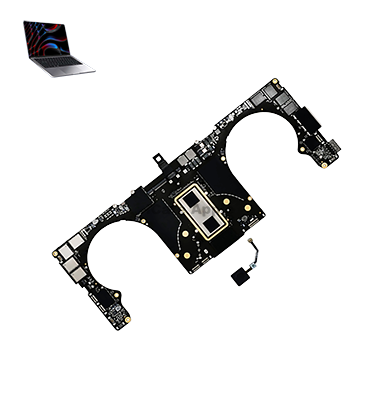
How to Identify When Your MacBook Pro M1 (2021) A2485 Motherboard Needs Replacement
Here are four signs that your MacBook Pro M1 (2021) A2485 Motherboard may need replacement:
No Power or Startup Issues:
Your MacBook doesn’t turn on, randomly shuts down, or shows no response even with a charged battery.
Frequent System Crashes:
Repeated freezing, sudden restarts, or getting stuck on the Apple logo often point to Motherboard failure.
Port and Connectivity Problems:
Charging issues, unresponsive USB-C ports, or Wi-Fi and Bluetooth malfunctions may indicate a damaged Motherboard.
Unusual Performance or Display Glitches:
Overheating, screen flickering, unresponsive keyboard or trackpad, and extreme slowness signal potential Motherboard issues.
Our MacBook Pro M1 (2021) A2485 Motherboard Repair & Replacement Process
1. Diagnosis:
We thoroughly inspect your MacBook to identify Motherboard issues and confirm whether repair or replacement is needed.
2. Cost Estimation:
After diagnosis, we provide a detailed cost estimate and timeline for the repair or replacement process.
3. Repair/Replacement:
Once approved, our skilled technicians carefully repair or replace the faulty Motherboard using quality parts.
4. Final Testing & Delivery:
We conduct rigorous testing to ensure optimal performance before handing your MacBook back, ready for use.

Why Choose iCare Apple for MacBook Pro M1 (2021) A2485 Motherboard Repair & Replacement 
Choose iCare Apple for your MacBook Pro M1 (2021) A2485 Motherboard repair and replacement for expert technicians, reliable service, and fast turnaround times. We ensure top-quality parts, meticulous diagnostics, and secure data handling, all with a customer-focused approach. Quality you can trust for your MacBook!
✌️Top Benefits of MacBook Pro M1 (2021) A2485 Motherboard Repair & Replacement at iCare Apple
Certified Technicians
Our technicians are certified and highly skilled, ensure repairs for your MacBook Pro M1 (2021) A2485. We guarantee top-notch service for all Motherboard repairs and replacements.
Original & High-Quality Parts
We use genuine Apple parts for MacBook Motherboard replacements, ensuring optimal performance, durability, and preserving your MacBook's original quality for long-lasting results.
Quick and Efficient Service
At iCare Apple, we prioritize quick and efficient service, minimizing downtime. Our experienced team provides rapid, reliable Motherboard repairs, so you can get back to using your MacBook without delay.

Tips & Tricks for MacBook Pro M1 (2021) A2485 Motherboard
• Avoid Overheating:
Ensure proper ventilation and use your MacBook Pro on a flat, hard surface to prevent overheating, which can damage the motherboard.
• Keep It Clean:
Regularly clean the vents and ports to prevent dust buildup, which can affect airflow and cause overheating.
• Use a Cooling Pad:
Consider using a cooling pad or external fan when using your MacBook for extended periods to keep the motherboard temperature in check.
• Avoid Physical Shocks:
Be gentle with your MacBook; sudden drops or impacts can cause internal motherboard damage.
• Keep the MacBook Updated:
Regularly update macOS and drivers to prevent software-related issues that can put extra strain on the motherboard.
• Use Surge Protectors:
Protect your MacBook from power surges by using a surge protector when charging, as electrical spikes can damage the motherboard.
• Properly Disconnect Peripherals:
Always eject and safely disconnect external devices (USB, external hard drives) to prevent damage to the motherboard’s ports.
• Unplug When Fully Charged:
Avoid leaving your MacBook plugged in once it’s fully charged, as overcharging can cause stress on the motherboard’s power circuit.
• Avoid Extreme Temperatures:
Don’t expose your MacBook to extreme heat or cold, as it can negatively impact the motherboard’s longevity.
• Use Battery Health Management:
Enable battery health management in macOS to prevent the battery from overcharging, which can reduce heat generation and protect the motherboard.
What Our Customers Are Saying About Our MacBook Pro M1 (2021) A2485 Motherboard Repair & Replacement Service
Rahman Hossain
I’m very satisfied with the Motherboard replacement service at iCare Apple. My MacBook Pro M1 (2021) is working perfectly now.
Farhana Ahmed
iCare Apple provided fast and reliable Motherboard repair for my MacBook Pro M1. Their service was professional and efficient.
Niaz Chowdhury
Great experience with iCare Apple! The Motherboard replacement process was smooth, and my device feels like new again.
Sadia Karim
I highly recommend iCare Apple for MacBook Pro M1 Motherboard repair. Their service quality and attention to detail are outstanding.
Your Trust is Our Strength
Why Timely MacBook Motherboard Repair & Replacement is Essential
Timely MacBook Pro M1 (2021) A2485 Motherboard repair and replacement prevent further damage and protect your device’s performance. Delaying service can lead to power issues, data loss, and hardware failure. Quick action ensures smooth operation, minimizes downtime, and helps avoid costly repairs in the future.
Visit iCare Apple in Dhaka for Professional MacBook Repairs
Located at the heart of Dhaka, iCare Apple offers top-notch repair services for all MacBook models. Our team is committed to providing quality repairs, and we stand by our work. So, if your MacBook Pro M1 (2021) A2485 needs a Motherboard repair and replacement, visit iCare Apple and experience professional service from trusted experts.
Ensure the longevity and performance of your MacBook Pro M1 (2021) A2485 by opting for quality Motherboard repair and replacement services at iCare Apple.
FAQ
1. How do I know if my MacBook Pro M1 needs a Motherboard replacement?
Symptoms like power failure, boot issues, or malfunctioning ports may indicate a problem.
2. How much does the Motherboard replacement cost?
The cost varies; we provide a detailed estimate after diagnosis.
3. Can the motherboard be repaired instead of replaced?
Depending on the damage, a repair might be possible, but in most cases, replacement is more effective.
4. Can you replace the Motherboard without affecting the software?
Unfortunately, software and data will be wiped during the Motherboard replacement.
5. What should I do if my MacBook doesn’t power on?
Bring it to us for diagnosis; a faulty Motherboard could be the issue.
6. Do you use original Apple parts for motherboard replacement?
We use high-quality, compatible parts that meet Apple’s performance standards.
7. Can I use my MacBook immediately after motherboard replacement?
After repair, you can use your MacBook immediately once it’s powered on and configured.
8. Can you repair a motherboard if my MacBook has been dropped or damaged physically?
Yes, we can assess and repair the motherboard, though physical damage may require additional repairs.