

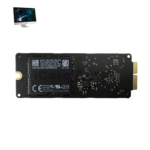
iMac 27 Inch 2020 SSD
At iCare Apple in Bangladesh, we offer professional iMac 27 Inch 2020 SSD replacement and upgrade services to boost speed and performance. Whether your iMac 27 Inch 2020 SSD is failing or you need more storage, we ensure fast, reliable service with expert care and genuine parts to keep your iMac running smoothly.
SSD
- 1 Year - Replacement Guaranty
- 30 Days - Money back Guaranty
- Replacement Time - 1 Hour
- Service Charge Included
- 24/7 support
How to Identify When Your iMac 27 Inch 2020 SSD Needs Replacement
Here are four signs that your iMac 27 Inch 2020 SSD may need replacement:
Slow Boot and App Load Times:
If your iMac takes unusually long to start or open applications, the SSD might be failing
Frequent Freezing or Crashes:
Sudden system hangs or restarts during regular tasks often indicate SSD health issues.
Files Failing to Save or Open:
Corrupted or disappearing files suggest that your SSD may be struggling to read/write data properly.
SSD Not Detected in Disk Utility:
If your drive doesn’t appear in Disk Utility, it’s a clear sign the SSD might need replacement.
Our iMac 27 Inch 2020 SSD Replacement or Upgrading Process
Diagnosis:
We begin with a thorough diagnosis to determine whether the SSD is failing or if an upgrade is needed for better performance.
Client Approval:
After identifying the issue, we explain the condition, cost, estimated timeline, and whether reinstalling macOS might help or if SSD replacement/upgrading is necessary.
Replacement or Upgrade:
Upon approval, we proceed with original SSD replacement or capacity upgrade while maintaining system integrity.
Final Testing:
We complete macOS installation, ensure proper data access (if recoverable), and test system speed to confirm the upgrade is successful.

Why Choose iCare Apple for iMac 27 Inch 2020 SSD Replacement or Upgrading!?
Choose iCare Apple for iMac 27 Inch 2020 SSD replacement or upgrading because we offer expert diagnostics, original SSD options, and careful handling. Our experienced technicians ensure smooth performance restoration with proper testing and backup guidance. Trust us for reliable service and timely delivery across Bangladesh.
Top Benefits of iMac 27 Inch 2020 SSD Replacement or Upgrading at iCare Apple
Certified Technicians
Our iMac replacements are handled by certified technicians who ensure precision, safe handling, and expert service, delivering reliable performance and long-term satisfaction for every repair.
Original & High-Quality Parts
We use original parts for all iMac replacements, ensuring durability, perfect compatibility, and optimal performance to restore your device just like the factory standard.
Quick and Efficient Service
Our quick and efficient service ensures your iMac SSD is Replaced or Upgraded promptly, minimizing downtime while maintaining the highest quality and performance standards.

Tips & Tricks
• Avoid Filling Your SSD Completely
Keep at least 20% free space to ensure optimal performance and avoid slowdowns. Full drives reduce write speed and lifespan.
• Enable TRIM Support
TRIM helps your SSD manage deleted data efficiently and prolongs its life. macOS usually enables TRIM automatically on Apple SSDs.
• Limit Large File Transfers
Frequent heavy writes can wear down your SSD faster. Use external drives for bulky files when possible.
• Keep Your System Updated
Regular macOS updates include SSD optimizations and bug fixes. Updated software helps maintain SSD health.
• Avoid Defragmenting Your SSD
Defragmentation is unnecessary and can damage SSDs. macOS handles data management without manual defragmenting.
• Use Disk Monitoring Tools
Apps like DriveDx help track SSD health and alert you to potential issues early. Early detection prevents data loss.
• Limit Virtual Memory Usage
Excessive swap file use increases SSD wear. Consider upgrading RAM to reduce reliance on virtual memory.
• Turn Off Hibernation
Disabling hibernation avoids large sleep image writes to the SSD. This reduces unnecessary write cycles.
• Backup Regularly
Always keep backups to protect your data in case of SSD failure. Use Time Machine or cloud services for safety.
• Avoid Sudden Power Loss
Use a surge protector or UPS to prevent abrupt shutdowns. Power interruptions can damage SSD data.
Proper care and smart usage habits can greatly extend your iMac SSD’s lifespan and maintain peak performance.
What Our Customers Are Saying About Our iMac 27 Inch 2020 SSD Replacement or Upgrading Service
Adnan Rahman
I upgraded my iMac 27 Inch 2020 SSD at iCare Apple and the speed boost is amazing. Their service was fast, clear, and professional.
Sadia Mahmood
The team diagnosed my SSD issue quickly and replaced it with a better one. Now my iMac works smoother than ever.
Kazi Noman
I visited iCare Apple for an SSD upgrade and was impressed by their detailed explanation and smooth process. Highly recommend their service.
Farzana Kabir
My iMac was running slow due to SSD issues. iCare Apple upgraded it efficiently, and now everything runs super fast.
Your Trust is Our Strength
Why Timely iMac SSD Replacement or Upgrading is Essential
Timely SSD replacement or upgrading in your iMac 27 Inch 2020 is essential to maintain optimal speed, performance, and data reliability. Delaying the process can lead to system slowdowns, crashes, or even data loss. At iCare Apple, we ensure your iMac stays fast, responsive, and ready for demanding tasks.
Visit iCare Apple in Dhaka for Professional iMac Repairs
Located at the heart of Dhaka, iCare Apple offers top-notch repair services for all iMac models. Our team is committed to providing quality repairs, and we stand by our work. So, if your iMac 27 Inch 2020 needs a SSD Replacement or Upgrading, visit iCare Apple and experience professional service from trusted experts.
Ensure the longevity and performance of your iMac 27 Inch 2020 by opting for quality SSD Replacement or Upgrading services at iCare Apple.
FAQ
1. What are the signs that my iMac 27 Inch 2020 SSD needs replacement?
Slow performance, frequent crashes, long boot times, or error messages can indicate a failing SSD.
2. How long does the SSD replacement or upgrade take?
The process usually takes few hours or 1-3 working days, depending on SSD availability and the device’s condition.
3. Do you use original SSDs for replacement?
Yes, we use original or certified compatible SSDs to ensure reliability and performance.
4. Will my data be safe during SSD repair?
Data safety depends on the issue; we recommend backing up before service.
5. Can software fixes resolve SSD issues?
Some issues may be software-related, but most of the physical SSD problems require replacement.
6. Is SSD upgrade possible during replacement?
Yes, we can upgrade your SSD to higher capacity models if desired.
7. Can a failing SSD cause data corruption?
Yes, a faulty SSD can lead to corrupted files and unstable system behavior.
8. What causes SSD failure in iMacs?
Common causes include wear from heavy use, sudden power loss, and physical damage.