

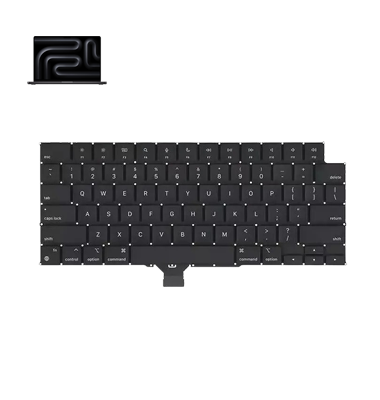
MacBook Pro M3 (2024) A2991 Keyboard
We offer professional MacBook Pro M2 (2023) A2780 Keyboard replacement service in Bangladesh. If your Keyboard has unresponsive keys, typing issues, or physical damage, we ensure a quick and efficient solution. Trust our expert technicians for genuine parts and quality service, bringing your MacBook’s performance back to life.
KeyBoard
- 1 Year - Replacement Guaranty
- 30 Days - Money back Guaranty
- Replacement Time - 1 Hour
- Service Charge Included
- 24/7 support
How to Identify When Your MacBook Pro M2 (2023) A2780 Keyboard Needs Replacement
Here are four signs that your MacBook Pro M2 (2023) A2780 Keyboard may need replacement:
Unresponsive Keys:
If some keys stop responding or require excessive pressure to work, your Keyboard likely needs replacement.
Repeated or Stuck Keys:
When keys type multiple times with one press or stay stuck, it’s a clear sign of Keyboard damage.
Physical Damage:
Visible cracks, missing keys, or liquid spills can lead to long-term Keyboard issues.
Inconsistent Backlight:
If your Keyboard’s backlight flickers or certain areas stay dark, it may signal internal damage.
Our MacBook Pro M2 (2023) A2780 Keyboard Replacement Process
1. Diagnosis:
We carefully inspect your MacBook’s Keyboard to identify the exact issue.
2. Quotation:
Once diagnosed, we provide a clear cost estimate for the replacement.
3. Replacement:
Our expert technicians replace the faulty Keyboard with a high-quality, compatible part.
4. Testing:
After installation, we thoroughly test the Keyboard to ensure optimal performance.

Why Choose iCare Apple for MacBook Pro M2 (2023) A2780 Keyboard Replacement 
At iCare Apple, we offer expert MacBook Pro M2 (2023) A2780 Keyboard replacement with genuine parts and professional service. Our skilled technicians ensure precise installation, and we prioritize customer satisfaction with fast turnaround times and competitive pricing. Trust us for reliable and efficient MacBook Keyboard replacement in Bangladesh.
✌️Top Benefits of MacBook Pro M2 (2023) A2780 Keyboard Replacement at iCare Apple
Certified Technicians
Our technicians are certified and highly skilled, ensure repairs for your MacBook Pro M2 (2023) A2780. We guarantee top-notch service for all Keyboard replacements.
Original & High-Quality Parts
We use genuine Apple parts for MacBook Keyboard replacements, ensuring optimal performance, durability, and preserving your MacBook's original quality for long-lasting results.
Quick and Efficient Service
At iCare Apple, we prioritize quick and efficient service, minimizing downtime. Our experienced team provides rapid, reliable Keyboard repairs, so you can get back to using your MacBook without delay.

Tips & Tricks for MacBook Pro M2 (2023) A2780 Keyboard
• Keep it clean:
Regularly remove dust and debris using a soft brush or compressed air to prevent keys from sticking.
• Avoid eating near your MacBook:
Crumbs and spills can damage the keyboard’s internal components, leading to long-term issues.
• Use a keyboard cover:
A thin, high-quality cover can protect against dust, dirt, and accidental spills without affecting typing.
• Handle with care:
Press keys gently and avoid excessive force to prevent wear and damage over time.
• Keep liquids away:
Even a small spill can cause serious damage, so always use your MacBook in a dry environment.
• Update macOS regularly:
Software updates often include keyboard performance enhancements and bug fixes.
• Avoid sharp objects:
Keep pens, clips, and other sharp items away from the keyboard to prevent scratching and key damage.
• Shut down properly:
Avoid slamming the lid shut, as sudden pressure can damage the keyboard and screen.
• Store in a clean space:
When not in use, keep your MacBook in a dust-free environment to prevent particles from settling in the keys.
• Address issues early:
If keys become unresponsive or feel unusual, get them checked immediately to avoid bigger problems later.
Taking proper care of your MacBook Pro M2 (2023) A2780 keyboard ensures a longer lifespan and smoother performance.
What Our Customers Are Saying About Our MacBook Pro M2 (2023) A2780 Keyboard Replacement Service
Rafiq Hasan
Got my MacBook Pro M2 (2023) A2780 Keyboard replaced at iCare Apple. The service was fast, and my Keyboard feels brand new.
Mehedi Alam
iCare Apple did a great job replacing my faulty Keyboard. The team was professional, and the pricing was reasonable.
Shamima Akter
The Keyboard on my MacBook Pro M2 was not working properly, but iCare Apple fixed it perfectly. Highly recommended for quality service.
Tariqul Islam
Excellent service for MacBook Keyboard replacement at iCare Apple. The process was smooth, and now my Keyboard works flawlessly.
Your Trust is Our Strength
Why Timely MacBook Keyboard Replacement is Essential
Timely MacBook Pro M2 (2023) A2780 Keyboard replacement is essential to maintain smooth performance and avoid further damage. Ignoring faulty keys can lead to typing errors, system issues, and productivity loss. Quick replacement ensures your MacBook stays efficient, responsive, and comfortable for daily use.
Visit iCare Apple in Dhaka for Professional MacBook Repairs
Located at the heart of Dhaka, iCare Apple offers top-notch repair services for all MacBook models. Our team is committed to providing quality repairs, and we stand by our work. So, if your MacBook Pro M2 (2023) A2780 needs a Keyboard replacement, visit iCare Apple and experience professional service from trusted experts.
Ensure the longevity and performance of your MacBook Pro M2 (2023) A2780 by opting for quality Keyboard replacement services at iCare Apple.
FAQ
1. What if my MacBook’s Keyboard has liquid damage?
If there’s liquid damage, additional repairs may be required before the Keyboard replacement.
2. How do I ensure my Keyboard stays in good condition after replacement?
Avoid spills, dust accumulation, and physical damage to prolong the life of the new Keyboard.
3. Can you fix individual keys instead of replacing the entire Keyboard?
It’s usually more efficient to replace the full Keyboard, especially if multiple keys are damaged.
4. How long does the MacBook Keyboard replacement take?
It typically takes few hours, depending on part availability.
5. How much does the Keyboard replacement cost?
The cost varies; please contact us for an accurate quote based on diagnosis.
6. Will my MacBook be tested after the Keyboard replacement?
Yes, we thoroughly test the Keyboard after replacement to ensure proper function.
7. Do you use original replacement parts?
We use high-quality, compatible replacement parts for your MacBook.
8. Will the keyboard replacement affect my MacBook's performance?
No, the replacement will restore keyboard functionality without affecting performance.