

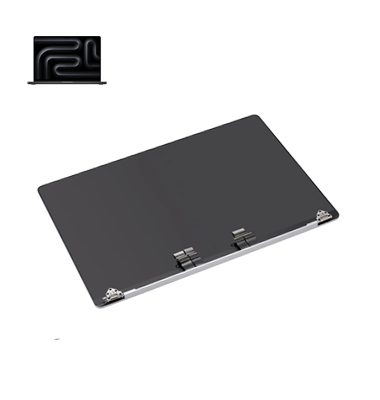
MacBook Pro M2 (2023) A2780 Display
At iCare Apple in Bangladesh, we offer expert MacBook Pro M2 (2023) A2780 Display repair and replacement services. Our skilled technicians use high-quality parts to restore your screen to perfect condition. Trust us to bring your MacBook’s Display back to life with fast, reliable, and professional service.
Display
- 1 Year - Replacement Guaranty
- 30 Days - Money back Guaranty
- Replacement Time - 1 Hour
- Service Charge Included
- 24/7 support
How to Identify When Your MacBook Pro M2 (2023) A2780 Display Needs Replacement
Here are four signs that your MacBook Pro M2 (2023) A2780 Display may need replacement:
Cracked or Broken Screen:
Visible cracks or damage on the screen that impairs visibility.
Flickering or Dead Pixels:
Persistent flickering, or clusters of dead pixels that don’t go away.
Color Distortion:
Abnormal colors or dimming affecting screen clarity.
Touchscreen Malfunction:
Unresponsive touch functions or inability to interact with the screen.
Our MacBook Pro M2 (2023) A2780 Display Repair & Replacement Process
1. Diagnosis:
Our technicians perform a detailed diagnostic to determine the extent of the damage.
2. Display Evaluation:
We check for issues like cracks, dead pixels, and color distortion that require repair.
3. Replacement or Repair:
Depending on the assessment, we either repair the Display or replace it with a high-quality OEM part.
4. Testing and Quality Check:
After the repair or replacement, we thoroughly test the Display to ensure it functions perfectly before returning your MacBook.

Choose iCare Apple for MacBook Pro M2 (2023) A2780 Display repair and replacement for expert service, high-quality parts, and efficient solutions. Our experienced technicians ensure your Display is restored to perfect condition, offering reliable, fast, and professional repairs with a focus on customer satisfaction and quality.
✌️Top Benefits of MacBook Pro M2 (2023) A2780 Display Repair & Replacement at iCare Apple
Certified Technicians
Our technicians are certified and highly skilled, ensure repairs for your MacBook Pro M2 (2023) A2780. We guarantee top-notch service for all Display repairs and replacements.
Original & High-Quality Parts
We use genuine Apple parts for MacBook Display replacements, ensuring optimal performance, durability, and preserving your MacBook's original quality for long-lasting results.
Quick and Efficient Service
At iCare Apple, we prioritize quick and efficient service, minimizing downtime. Our experienced team provides rapid, reliable Display repairs, so you can get back to using your MacBook without delay.

Tips & Tricks for MacBook Pro M2 (2023) A2780 Display
• Use a Screen Protector
Apply a screen protector to shield the screen from scratches and dust buildup. This simple step can help preserve Display clarity.
• Keep it Clean
Regularly clean the screen with a soft, lint-free cloth to avoid smudges. This will maintain a clear, vibrant Display without streaks.
• Avoid Direct Pressure
Do not apply pressure on the screen when opening, closing, or using the MacBook. This prevents potential cracks or screen malfunctions.
• Close the Lid Gently
When closing the MacBook, avoid slamming or forcing it. Gently closing the lid helps prevent strain and damage to the Display.
• Use in Proper Lighting
Avoid using your MacBook in direct sunlight for extended periods. Excessive heat exposure can cause Display issues or discoloration.
• Avoid Extreme Temperatures
Keep your MacBook in a temperature-controlled environment. Extreme heat or cold can negatively impact Display functionality.
• Prevent Liquid Exposure
Keep liquids far from your MacBook’s screen. Even small spills can cause irreversible water damage to the Display.
• Use a Safe Cleaning Solution
Always use screen-safe cleaning products. Harsh chemicals can damage the Display coating, causing permanent issues.
• Store Properly
When not in use, store your MacBook in a protective case. This ensures the screen is safe from dust, scratches, or accidental drops.
• Calibrate the Display
Regularly calibrate your Display for optimal color accuracy and brightness. Calibration helps maintain the best viewing experience.
By following these tips, you can ensure the longevity and optimal performance of your MacBook Pro M2 (2023) A2780 Display.
What Our Customers Are Saying About Our MacBook Pro M2 (2023) A2780 Display Repair & Replacement Service
Arif Hossain
The Display replacement on my MacBook Pro M2 was quick and flawless. iCare Apple exceeded my expectations!
Nirob Ahsan
I’m really satisfied with the Display repair service. My MacBook looks brand new, thanks to iCare Apple!
Shahin Alam
Excellent service! My MacBook Pro M2’s screen is perfect now. iCare Apple is highly recommended for Display repairs.
Rasheda Begum
iCare Apple did an amazing job with my MacBook Pro M2 Display replacement. Very professional and fast service!
Your Trust is Our Strength
Why Timely MacBook Display Repair & Replacement is Essential
Timely MacBook Pro M2 (2023) A2780 Display repair and replacement is essential to avoid further damage, such as screen malfunctions or data loss. Addressing Display issues early prevents potential disruptions to your workflow, ensures optimal performance, and extends the lifespan of your MacBook, saving you from costly future repairs.
Visit iCare Apple in Dhaka for Professional MacBook Repairs
Located at the heart of Dhaka, iCare Apple offers top-notch repair services for all Macbook models. Our team is committed to providing quality repairs, and we stand by our work. So, if your MacBook Pro M2 (2023) A2780 needs a Display repair and replacement, visit iCare Apple and experience professional service from trusted experts.
Ensure the longevity and performance of your MacBook Pro M2 (2023) A2780 by opting for quality Display repair and replacement services at iCare Apple.
FAQ
1. How do I know if my MacBook Pro A2780 Display needs replacement?
If you see dead pixels, flickering, discoloration, or cracks, it’s time for a replacement.
2. How much does it cost for a Display replacement?
The cost varies depending on the issue, so we provide a quote after inspection.
3. Is it better to repair or replace the Display?
Replacing the Display is often more cost-effective and ensures better long-term performance.
4. What if my MacBook Pro’s Display is still under warranty?
If it’s under Apple’s warranty, we suggest contacting an authorized service provider for repairs.
5. Is the replacement Display original?
Yes, we use high-quality, original parts for all MacBook Pro Display replacements.
6. Can the screen be repaired instead of replaced?
Depending on the damage, we may be able to repair the screen, but replacement is often the best solution.
7. Will I lose any settings or apps after the Display replacement?
No, replacing the Display doesn’t affect your settings or applications.
8. Can the Display replacement fix color issues or image distortion?
Yes, a new Display can resolve color issues, flickering, or image distortion.