

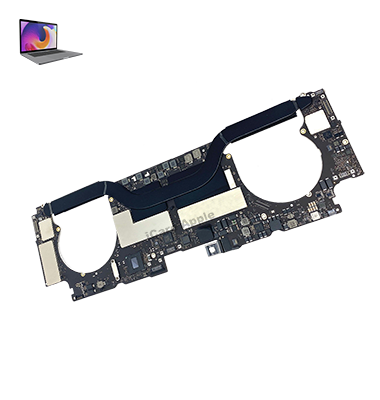
MacBook Pro (2016) A1706 Motherboard
At iCare Apple, we specialize in MacBook Pro (2016) A1706 Motherboard repair and replacement. Our expert technicians diagnose issues accurately and provide high-quality, reliable solutions. Whether it’s a power failure or connectivity issue, we ensure your device is restored to optimal condition with fast, professional service in Bangladesh.
How to Identify When Your MacBook Pro (2016) A1706 Motherboard Needs Replacement
Here are four signs that your MacBook Pro (2016) A1706 Motherboard may need replacement:
Frequent Crashes or Freezing:
If your MacBook consistently freezes or crashes without a clear cause, it could indicate Motherboard failure.
Power Issues:
If your MacBook won’t power on or shuts down unexpectedly, the Motherboard might be damaged.
Overheating:
Persistent overheating despite cooling systems working properly can be a sign of Motherboard failure.
Hardware Malfunctions:
If multiple hardware components (USB ports, camera, Wi-Fi) stop working simultaneously, the Motherboard could be the issue.
Our MacBook Pro (2016) A1706 Motherboard Replacement Process
1. Diagnosis:
Our technicians thoroughly inspect the Motherboard to identify the issue.
2. Customer Approval:
We provide a detailed estimate and seek your approval before proceeding with repairs.
3. Motherboard Repair/Replacement:
We carefully repair or replace the Motherboard with high-quality, compatible parts.
4. Testing & Quality Check:
After the replacement, we rigorously test your MacBook to ensure all components function properly.

Why Choose iCare Apple for MacBook Pro (2016) A1706 Motherboard Repair & Replacement 
Choose iCare Apple for your MacBook Pro (2016) A1706 Motherboard repair and replacement because we offer expert diagnostics, high-quality parts, and professional service. Our skilled technicians ensure quick, reliable repairs, restoring your MacBook to optimal performance. We prioritize customer satisfaction and provide a warranty for peace of mind.
✌️Top Benefits of MacBook Pro (2016) A1706 Motherboard Repair & Replacement at iCare Apple
Certified Technicians
Our technicians are certified and highly skilled, ensure repairs for your MacBook Pro (2016) A1706. We guarantee top-notch service for all Motherboard replacements.
Original & High-Quality Parts
We use genuine Apple parts for MacBook Motherboard replacements, ensuring optimal performance, durability, and preserving your MacBook's original quality for long-lasting results.
Quick and Efficient Service
At iCare Apple, we prioritize quick and efficient service, minimizing downtime. Our experienced team provides rapid, reliable Motherboard repairs, so you can get back to using your MacBook without delay.

Tips & Tricks for MacBook Pro (2016) A1706 Motherboard
• Regular Backups:
Always back up important data to prevent loss in case of Motherboard failure.
• Keep Your MacBook Cool:
Overheating can damage the Motherboard. Ensure proper ventilation while using your MacBook.
• Avoid Spills:
Liquids can quickly damage the Motherboard. Always keep your MacBook away from water and other liquids.
• Use a Surge Protector:
Protect your MacBook’s Motherboard from electrical surges by using a surge protector when charging.
• Perform Software Maintenance:
Regularly update macOS and software to reduce unnecessary stress on the Motherboard.
• Limit Intensive Processes:
Avoid overloading your MacBook with too many high-performance tasks to protect the Motherboard.
• Check for Physical Damage:
Inspect the Motherboard for visible damage, such as corrosion or burn marks, which may require professional repair.
• Clean Your MacBook Regularly:
Dust and debris can accumulate and cause overheating or other issues. Clean your MacBook with compressed air.
• Avoid DIY Repairs:
Do not attempt Motherboard repairs yourself; it requires professional expertise to avoid further damage.
• Get Professional Diagnostics:
If you suspect Motherboard issues, take your MacBook to a professional for accurate diagnostics and repair services.
These tips can help you prolong your MacBook Pro’s Motherboard life and prevent costly repairs.
What Our Customers Are Saying About Our MacBook Pro (2016) A1706 Motherboard Repair & Replacement Service
Shahidul Islam
iCare Apple fixed my MacBook’s Motherboard quickly. Excellent service and my device is running like new again.
Shamoly Shuva
The team at iCare Apple was fantastic in diagnosing and repairing my MacBook Pro A1706 Motherboard. I highly recommend their service!
Rajib Hossain
I had a Motherboard issue with my MacBook Pro A1706 and iCare Apple handled it with expertise. Very satisfied with the result!
Hridoy Ahmed
My MacBook Pro A1706 Motherboard replacement was smooth and efficient at iCare Apple. Great service and fast turnaround!
Your Trust is Our Strength
Why Timely MacBook Motherboard Repair & Replacement is Essential
Timely MacBook Pro (2016) A1706 Motherboard repair and replacement is essential to prevent further damage and restore functionality. Ignoring issues like power failure or overheating can lead to more severe problems, including data loss. Prompt repair ensures your device performs optimally and avoids expensive repairs in the future.
Visit iCare Apple in Dhaka for Professional MacBook Repairs
Located at the heart of Dhaka, iCare Apple offers top-notch repair services for all MacBook models. Our team is committed to providing quality repairs, and we stand by our work. So, if your MacBook Pro (2016) A1706 needs a Motherboard repair & replacement, visit iCare Apple and experience professional service from trusted experts.
Ensure the longevity and performance of your MacBook Pro (2016) A1706 by opting for quality Motherboard repair & replacement services at iCare Apple.
FAQ
1. How long does the Motherboard replacement take?
Typically, it takes few hours depending on the parts availability.
2. Will replacing the Motherboard fix all issues?
Yes, replacing the Motherboard resolves power and performance-related issues caused by Motherboard failure.
3. Is the Motherboard replacement covered under warranty?
We offer a warranty on parts and labor after the replacement.
4. How much does the Motherboard replacement cost?
The cost depends on the specific issue and parts; we provide a detailed estimate after diagnosis.
5. Can you repair the Motherboard, or does it need to be replaced?
In most cases, Motherboard damage is beyond repair and requires full replacement for optimal performance.
6. What types of issues indicate Motherboard failure?
Common issues include the MacBook not powering on, random shutdowns, and system instability.
7. Will the replacement Motherboard be a new or refurbished part?
We use high-quality, compatible parts that restore your MacBook’s original functionality.
8. Is data recovery possible if the Motherboard is damaged?
Data recovery can be performed if the Motherboard is salvageable; otherwise, we recommend having backups.