

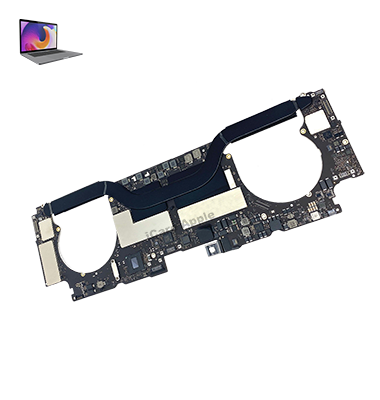
MacBook Pro (2017) A1706 Motherboard
We offer expert MacBook Pro (2017) A1706 Motherboard repair and replacement services at iCare Apple in Bangladesh. If you experience performance issues, random shutdowns, or hardware failures, our skilled technicians will restore your MacBook’s functionality using high-quality parts for a reliable, efficient repair process.
How to Identify When Your MacBook Pro (2017) A1706 Motherboard Needs Replacement
Here are four signs that your MacBook Pro (2017) A1706 Motherboard may need replacement:
Frequent System Crashes
Random shutdowns, restarts, or freezes indicate possible Motherboard failure.
Unresponsive Hardware
Non-functioning USB ports, keyboard, or display issues may point to Motherboard problems.
Overheating
If your MacBook gets excessively hot, the Motherboard could be damaged.
Booting Issues
Difficulty in starting up your MacBook or a blank screen can signal Motherboard damage.
Our MacBook Pro (2017) A1706 Motherboard Replacement Process
1. Diagnosis
We thoroughly inspect your MacBook to identify Motherboard issues such as performance failures or hardware malfunctions.
2. Disassembly
Our technicians carefully disassemble your MacBook, ensuring no further damage during the repair process.
3. Motherboard Repair/Replacement
We either repair the faulty Motherboard or replace it with a high-quality, compatible part for improved performance.
4. Testing & Quality Assurance
After the repair, we test the MacBook to ensure all components are working flawlessly and restore its full functionality.

At iCare Apple, we specialize in MacBook Pro (2017) A1706 Motherboard repair and replacement with expert technicians, high-quality parts, and reliable service. We ensure efficient, affordable repairs, restoring your MacBook’s performance. Trust us to deliver fast, professional solutions for your Motherboard issues in Bangladesh.
✌️Top Benefits of MacBook Pro (2017) A1706 Motherboard Repair andm Replacement at iCare Apple
Certified Technicians
Our technicians are certified and highly skilled, ensure repairs for your MacBook Pro (2017) A1706. We guarantee top-notch service for all Motherboard replacements.
Original & High-Quality Parts
We use genuine Apple parts for MacBook Motherboard replacements, ensuring optimal performance, durability, and preserving your MacBook's original quality for long-lasting results.
Quick and Efficient Service
At iCare Apple, we prioritize quick and efficient service, minimizing downtime. Our experienced team provides rapid, reliable Motherboard repairs, so you can get back to using your MacBook without delay.

Tips & Tricks for MacBook Pro (2017) A1706 Motherboard
• Regular Software Updates:
Keep your system software up to date to avoid compatibility issues with the Motherboard and prevent potential hardware malfunctions.
• Monitor Battery Health:
Ensure your Motherboard’s health by regularly checking your battery condition. Navigate to System Preferences > Battery for diagnostics and health insights.
• Avoid Overheating:
Prevent Motherboard damage by maintaining optimal temperatures. Clean your MacBook’s vents and use it on hard, flat surfaces to improve airflow.
• Use Disk Utility for Repairs:
Run the Disk Utility app periodically to check for disk errors that could affect the Motherboard’s performance.
• Upgrade RAM for Performance:
If your Motherboard allows for upgrades, boost your MacBook’s speed by installing additional RAM for better multitasking.
• Perform PRAM and SMC Reset:
Resetting PRAM and SMC helps resolve Motherboard-related issues like display or power problems. Hold Option + Command + P + R at startup.
• Run Apple Diagnostics:
Test your MacBook’s Motherboard health by running Apple Diagnostics (Restart and hold D during startup) to identify hardware issues.
• Avoid Physical Damage:
Protect the Motherboard from physical harm by ensuring your MacBook is safely stored in padded cases, especially during travel.
• Back Up Regularly:
Avoid Motherboard-related data loss by setting up automatic Time Machine backups or using cloud storage solutions for critical files.
• Professional Maintenance:
Schedule periodic professional checks for your MacBook Pro’s Motherboard to prevent long-term damage, especially after accidental spills or drops.
These tips can extend the lifespan of your MacBook Pro (2017) A1706 Motherboard, ensuring reliable performance and protecting against unexpected failures.
What Our Customers Are Saying About Our MacBook Pro (2017) A1706 Motherboard Replacement Service
Rana Ahmed
iCare Apple quickly identified the issue with my MacBook Motherboard and had it replaced efficiently. I’m impressed with their professionalism.
Shama Islam
My MacBook was shutting down randomly, and after visiting iCare Apple, the Motherboard was replaced, restoring its performance. Excellent service!
Tariq Reza
After facing constant freezing issues, iCare Apple fixed my MacBook Pro by replacing the Motherboard. Now it's working perfectly!
Jubair Hossain
iCare Apple provided top-notch service in replacing my MacBook Motherboard. It was quick, and my device is running smoothly again.
Your Trust is Our Strength
Why Timely MacBook Motherboard Repair and Replacement is Essential
Timely MacBook Pro (2017) A1706 Motherboard repair and replacement is crucial to avoid further damage, system instability, and data loss. Delayed repairs can lead to more complex issues, increasing repair costs. Addressing Motherboard problems early ensures your MacBook operates efficiently and prevents potential disruptions to your work.
Visit iCare Apple in Dhaka for Professional MacBook Repairs
Located at the heart of Dhaka, iCare Apple offers top-notch repair services for all MacBook models. Our team is committed to providing quality repairs, and we stand by our work. So, if your MacBook Pro (2017) A1706 needs a Motherboard replacement, visit iCare Apple and experience professional service from trusted experts.
Ensure the longevity and performance of your MacBook Pro (2017) A1706 by opting for quality Motherboard replacement services at iCare Apple.
FAQ
1. How long does it take to repair or replace the Motherboard of a MacBook Pro (2017) A1706?
It typically takes 3-5 business days, depending on part availability and the complexity of the repair.
2. Will my data be lost during the Motherboard replacement?
Yes, you will lost data during Motherboard replacement; we recommend backing up your data beforehand.
3. Is the replacement Motherboard original?
We use high-quality, compatible Motherboards for replacements to ensure optimal performance.
4. How much does the Motherboard replacement cost?
Pricing varies; please contact us for an accurate quote based on your specific repair needs.
5. Do you offer a warranty on the Motherboard replacement?
Yes, we provide a limited warranty on the Motherboard replacement and associated repairs.
6. Can I get a quick repair for my MacBook Pro (2017) A1706 Motherboard?
While we strive for efficient service, repair time depends on the availability of parts and the issue’s complexity.
7. How do I know if I need a Motherboard replacement?
Common signs include system crashes, random shutdowns, unresponsive hardware, or booting problems.
8. Do you offer free diagnostics for the Motherboard issue?
No, there is a diagnostic fee for assessing your MacBook’s Motherboard issue.