

MacBook Pro (2016) A1707 Battery
We offer professional MacBook Pro (2016) A1707 Battery replacement service at iCare Apple in Bangladesh. If your MacBook’s Battery drains quickly or shows warning signs, our expert technicians provide fast and efficient replacements with high-quality parts, ensuring your device stays powered and performs at its best.
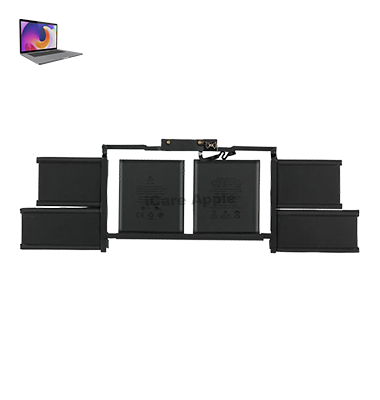
How to Identify When Your MacBook Pro (2016) A1707 Battery Needs Replacement
Here are four signs that your MacBook Pro (2016) A1707 Battery may need replacement:
Rapid Battery Drain:
The Battery depletes quickly, even with minimal usage.
Unexpected Shutdowns:
Your MacBook turns off suddenly, despite showing a remaining charge.
Battery Health Warning:
macOS displays a “Service Battery” or “Replace Soon” notification.
Swollen Battery:
A bloated Battery causes the trackpad or keyboard to lift or misalign.
Our MacBook Pro (2016) A1707 Battery Replacement Process
1. Diagnosis:
We thoroughly check your MacBook’s Battery health to confirm the need for replacement.
2. Approval:
Once the issue is identified, we discuss the solution and cost with you.
3. Replacement:
Our skilled technicians carefully replace the faulty Battery with a high-quality one.
4. Testing:
We ensure your MacBook works perfectly with the new Battery before handing it back.

We offer expert MacBook Pro (2016) A1707 Battery replacement with high-quality parts and skilled technicians. Our fast service ensures your device runs smoothly without long delays. With professional care and customer-focused support, we make sure your MacBook gets the best treatment in Bangladesh.
✌️Top Benefits of MacBook Pro (2016) A1707 Battery Replacement at iCare Apple
Certified Technicians
Our technicians are certified and highly skilled, ensure repairs for your MacBook Pro (2016) A1707. We guarantee top-notch service for all Battery replacements.
Original & High-Quality Parts
We use genuine Apple parts for MacBook Battery replacements, ensuring optimal performance, durability, and preserving your MacBook's original quality for long-lasting results.
Quick and Efficient Service
At iCare Apple, we prioritize quick and efficient service, minimizing downtime. Our experienced team provides rapid, reliable Battery repairs, so you can get back to using your MacBook without delay.

Tips & Tricks for MacBook Pro (2016) A1707 Battery
👍 Calibrate Your Battery:
Periodically calibrate your MacBook Pro’s Battery to ensure accurate reporting of Battery life. To do this, fully charge your laptop, then use it until it shuts down due to low Battery. Charge it back to full capacity without interruption.
👍 Avoid Extreme Temperatures:
Avoid exposing your MacBook Pro to extreme temperatures, both hot and cold. High temperatures can degrade Battery health, while cold temperatures can reduce Battery efficiency temporarily. Store and use your laptop in a moderate temperature environment whenever possible.
👍 Optimize Energy Settings:
Adjust your MacBook Pro’s energy settings to optimize Battery life. Lower the screen brightness, set shorter sleep and idle times, and disable unnecessary background processes and notifications to conserve power.
👍 Use Battery Saving Modes:
Take advantage of macOS’s built-in Battery Saver mode to extend Battery life when you’re on the go. Battery Saver mode reduces background activity and optimizes system performance to maximize Battery efficiency.
👍 Monitor Battery Usage:
Keep an eye on your MacBook Pro’s Battery usage to identify apps and processes that consume the most power. Use macOS’s Activity Monitor or third-party utilities to monitor Battery usage and identify power-hungry applications.
👍 Reduce Screen Brightness:
Lower the screen brightness on your MacBook Pro to conserve Battery power. Dimming the screen can significantly extend Battery life, especially when you’re working in low-light environments.
👍 Limit Background Activity:
Close unnecessary apps and browser tabs to reduce background activity and conserve Battery power. Background processes can drain Battery life, so keeping your workload light can help extend Battery longevity.
👍 Avoid Full Discharges:
Avoid fully discharging your MacBook Pro’s Battery on a regular basis. Lithium-ion batteries prefer partial discharge cycles over full discharge cycles, so aim to keep your Battery level between 20% and 80% for optimal longevity.
👍 Unplug Peripherals:
Disconnect any external peripherals or accessories when you’re not using them to conserve Battery power. USB devices, external drives, and accessories like printers can draw power from your MacBook Pro, draining the Battery faster.
👍 Update macOS Regularly:
Keep your MacBook Pro’s operating system up to date with the latest macOS updates and patches. Apple often releases updates that include Battery optimizations and performance improvements, so updating regularly can help improve Battery life.
By following these tips and tricks, you can maximize the performance and lifespan of the Battery in your MacBook Pro (2016) A1707, ensuring that you get the most out of your laptop’s Battery power while on the go.
What Our Customers Are Saying About Our MacBook Pro (2016) A1707 Battery Replacement Service
Farhan Ahmed
The Battery replacement service was quick and efficient. My MacBook Pro A1707 now works like new.
Nadia Rahman
I’m impressed with the professional service at iCare Apple. My MacBook’s Battery life is fully restored.
Rifat Hossain
Great experience! The team replaced my MacBook Pro A1707 Battery perfectly and on time.
Samiul Islam
iCare Apple provided excellent service with genuine parts. My MacBook’s performance has improved a lot.
Your Trust is Our Strength
Why Timely MacBook Battery Replacement is Essential
Timely MacBook Pro (2016) A1707 Battery replacement is essential to avoid sudden shutdowns, overheating, and potential damage to internal components. A faulty Battery can affect performance and productivity. Replacing it on time ensures better efficiency, longer device lifespan, and a safer, more reliable MacBook experience.
Visit iCare Apple in Dhaka for Professional MacBook Repairs
Located at the heart of Dhaka, iCare Apple offers top-notch repair services for all MacBook models. Our team is committed to providing quality repairs, and we stand by our work. So, if your MacBook Pro (2016) A1707 needs a Battery replacement, visit iCare Apple and experience professional service from trusted experts.
Ensure the longevity and performance of your MacBook Pro (2016) A1707 by opting for quality Battery replacement services at iCare Apple.
FAQ
1. How do I know if my MacBook Pro (2016) A1707 Battery needs replacement?
Rapid Battery drain, unexpected shutdowns, and Battery health warnings indicate a need for replacement.
2. How do I maintain my new Battery's lifespan?
Avoid extreme temperatures and charge your Battery between 20% to 80% for longer Battery health.
3. How much does MacBook Pro A1707 Battery replacement cost?
Please contact us directly for the most up-to-date pricing.
4. Do you offer any warranty on the replacement Battery?
Yes, we offer a limited-time warranty on battery replacement.
5. What if my MacBook has other issues besides the Battery?
We diagnose and fix all MacBook issues with professional care.
6. Is it better to replace the Battery sooner or wait until it dies?
It’s best to replace the Battery sooner to avoid performance issues or damage to the MacBook.
7. Will the new Battery affect the performance of my MacBook?
After replacing the Battery, your MacBook will perform like new, with better Battery life.
8. What should I do if my Battery isn't charging properly?
Bring your MacBook to us for a thorough diagnosis and replacement if necessary.