

MacBook Pro (2018) A1989 Keyboard
At iCare Apple in Bangladesh, we offer expert MacBook Pro (2018) A1989 Keyboard replacement services. If your keys are unresponsive, sticky, or malfunctioning, our skilled technicians will replace your Keyboard with a high-quality part. Visit us for fast, reliable service and restore your MacBook’s typing experience!
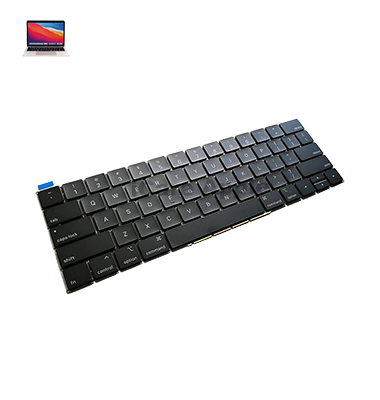
How to Identify When Your MacBook Pro (2018) A1989 Keyboard Needs Replacement
Here are four signs that your MacBook Pro (2018) A1989 Keyboard may need replacement:
Unresponsive Keys
Certain keys do not register when pressed, making typing difficult.
Sticky or Jammed Keys
Keys feel sticky or get stuck, affecting smooth typing.
Repeated Characters
Keys produce multiple characters with a single press or miss certain ones.
Visible Damage
Physical damage like cracks or debris under the keys that prevents proper function.
Our MacBook Pro (2018) A1989 Keyboard Replacement Process
1. Diagnosis
We begin by diagnosing the Keyboard issue, whether it’s unresponsive, sticky, or damaged.
2. Disassembly
Our technicians carefully disassemble your MacBook to access the Keyboard without causing damage to other components.
3. Replacement
A high-quality, genuine replacement Keyboard is installed, ensuring optimal functionality.
4. Testing & Final Check
We test the new Keyboard to ensure all keys are working properly, providing a seamless typing experience.

Choose iCare Apple for MacBook Pro (2018) A1989 Keyboard replacement for expert technicians, high-quality parts, and fast service. We ensure that your new Keyboard functions like the original, restoring your typing experience. Trust us for efficient, reliable repairs and a smooth, hassle-free replacement process!
✌️Top Benefits of MacBook Pro (2018) A1989 Keyboard Replacement at iCare Apple
Certified Technicians
Our technicians are certified and highly skilled, ensure repairs for your MacBook Pro (2018) A1989. We guarantee top-notch service for all Keyboard replacements.
Original & High-Quality Parts
We use genuine Apple parts for MacBook Keyboard replacements, ensuring optimal performance, durability, and preserving your MacBook's original quality for long-lasting results.
Quick and Efficient Service
At iCare Apple, we prioritize quick and efficient service, minimizing downtime. Our experienced team provides rapid, reliable Keyboard repairs, so you can get back to using your MacBook without delay.

Tips & Tricks for MacBook Pro (2018) A1989 Keyboard
👍 Customize Keyboard Shortcuts:
Take advantage of macOS’s built-in Keyboard shortcut customization feature. Navigate to System Preferences > Keyboard > Shortcuts to assign custom Keyboard shortcuts for frequently used commands or applications.
👍 Enable Key Repeat:
Adjust the key repeat rate and delay to match your typing speed and preferences. Go to System Preferences > Keyboard and adjust the Key Repeat and Delay Until Repeat sliders to your liking.
👍 Learn Text Expansion:
Use macOS’s text expansion feature to create shortcuts for commonly used phrases or snippets of text. Navigate to System Preferences > Keyboard > Text and add your custom text expansions for increased typing efficiency.
👍 Master Keyboard Navigation:
Learn Keyboard navigation shortcuts to navigate macOS without using a mouse or trackpad. Memorize shortcuts for switching between applications, opening menus, and navigating within applications to speed up your workflow.
👍 Utilize Function Keys:
Familiarize yourself with the functions of the function keys (F1-F12) and their secondary functions (brightness, volume, media controls, etc.). Hold down the Fn key to access the standard function keys or customize their behavior in System Preferences > Keyboard.
👍 Practice Touch Typing:
Improve your typing speed and accuracy by practicing touch typing. Learn to type without looking at the Keyboard and use proper finger placement for faster and more efficient typing.
👍 Use Keyboard Viewer:
Enable the Keyboard Viewer tool to visualize Keyboard layouts and shortcuts. Go to System Preferences > Keyboard > Keyboard and enable “Show Keyboard & Character Viewers in menu bar.” Then, click the Keyboard Viewer icon in the menu bar to access it.
👍 Master Keyboard Shortcuts:
Memorize commonly used Keyboard shortcuts for tasks like copy, paste, undo, save, and find. These shortcuts can significantly speed up your workflow and reduce reliance on the mouse or trackpad.
👍 Clean the Keyboard Regularly:
Keep your Keyboard clean by regularly removing dust, debris, and fingerprints. Use a soft, lint-free cloth or compressed air to gently clean the keys and Keyboard surface to maintain optimal performance.
👍 Enable Accessibility Features:
Explore macOS’s accessibility features to customize the Keyboard for your specific needs. Features like Sticky Keys, Slow Keys, and Key Repeat can assist users with mobility or dexterity issues in typing more comfortably and accurately.
By incorporating these tips and tricks into your daily use, you can maximize your productivity and efficiency when using the Keyboard on your MacBook Pro (2018) A1989.
What Our Customers Are Saying About Our MacBook Pro (2018) A1989 Keyboard Replacement Service
Mokhlesur Rahman
iCare Apple quickly replaced my MacBook Keyboard with a high-quality part. The new keys work perfectly, and typing is smooth again.
Israt Jahan
Excellent service! My MacBook Pro Keyboard was replaced in no time, and it feels like new. Highly recommend their services.
Nadia Hasan
The Keyboard replacement was done efficiently, and now my MacBook is fully functional. I'm impressed with the professional service at iCare Apple.
Nazmul Karim
iCare Apple replaced my MacBook Keyboard in a timely manner. Now my keys are responsive, and the whole process was hassle-free.
Your Trust is Our Strength
Why Timely MacBook Keyboard Replacement is Essential
Timely MacBook Pro (2018) A1989 Keyboard replacement is essential to prevent further damage and ensure smooth performance. Unresponsive or sticky keys can disrupt productivity, while ignoring issues may lead to more costly repairs. Replacing the Keyboard promptly restores typing functionality and extends your device’s lifespan.
Visit iCare Apple in Dhaka for Professional MacBook Repairs
Located at the heart of Dhaka, iCare Apple offers top-notch repair services for all MacBook models. Our team is committed to providing quality repairs, and we stand by our work. So, if your MacBook Pro (2018) A1989 needs a Keyboard replacement, visit iCare Apple and experience professional service from trusted experts.
Ensure the longevity and performance of your MacBook Pro (2018) A1989 by opting for quality Keyboard replacement services at iCare Apple.
FAQ
1. How long does the Keyboard replacement take?
The replacement typically takes a few hours to a day, depending on the issue.
2. Is the replacement Keyboard genuine?
Yes, we use high-quality, genuine parts for Keyboard replacement.
3. Can I replace the Keyboard myself?
We recommend professional replacement to avoid damage to internal components.
4. Will I lose my data during the Keyboard replacement?
No, the Keyboard replacement process does not affect your data.
5. How much does the Keyboard replacement cost?
The cost varies, so please contact us for a precise estimate.
6. Does iCare Apple offer a warranty on the Keyboard replacement?
Yes, we offer a warranty on both the replacement part and our services.
7. Can I replace the Keyboard if only a few keys are not working?
Yes, we replace the entire Keyboard to ensure consistent performance.
8. Do I need an appointment for the Keyboard replacement?
Appointments are recommended, but walk-ins are also accepted.