

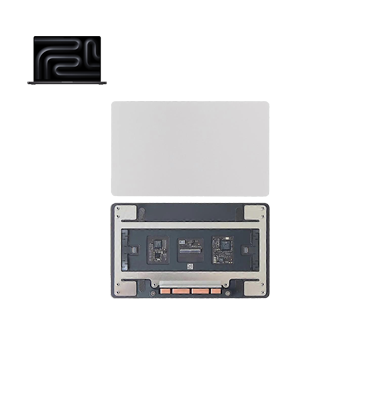
MacBook Pro M3 (2024) A2991 Track Pad
At iCare Apple, we offer professional MacBook Pro M2 (2023) A2780 Track Pad replacement services. Our expert technicians use genuine parts to restore your Track Pad’s functionality, ensuring smooth navigation. With a quick turnaround time and a warranty on repairs, we provide reliable service for your MacBook’s Track Pad issues.
Track Pad
- 1 Year - Replacement Guaranty
- 30 Days - Money back Guaranty
- Replacement Time - 1 Hour
- Service Charge Included
- 24/7 support
How to Identify When Your MacBook Pro M2 (2023) A2780 Track Pad Needs Replacement
Here are four signs that your MacBook Pro M2 (2023) A2780 Track Pad may need replacement:
Unresponsive or Inconsistent Touch:
The Track Pad does not respond or skips gestures, even after restarting the device.
Physical Damage:
Visible cracks, dents, or any physical damage affecting the surface of the Track Pad.
Erratic Cursor Movement:
The cursor jumps or moves erratically when using the Track Pad.
Frequent Click Malfunctions:
The Track Pad click function is unreliable or not working at all.
Our MacBook Pro M2 (2023) A2780 Track Pad Replacement Process
1. Diagnosis:
We start by diagnosing the Track Pad to confirm the issue and assess any underlying problems.
2. Disassembly:
Our technicians carefully disassemble the MacBook to access the Track Pad without damaging other components.
3. Track Pad Replacement:
We replace the faulty Track Pad with a genuine, high-quality part, ensuring perfect compatibility.
4. Testing & Calibration:
After installation, we test the new Track Pad to ensure it functions properly and calibrate it for smooth, accurate performance.

Choose iCare Apple for your MacBook Pro M2 (2023) A2780 Track Pad replacement for expert service, genuine parts, and quick repairs. Our skilled technicians ensure precise replacements, restoring smooth functionality. We offer a warranty on our services, providing reliable, long-lasting results. Visit iCare Apple for top-quality Track Pad replacement!
✌️Top Benefits of MacBook Pro M2 (2023) A2780 Track Pad Replacement at iCare Apple
Certified Technicians
Our technicians are certified and highly skilled, ensure repairs for your MacBook Pro M2 (2023) A2780. We guarantee top-notch service for all Track Pad replacements.
Original & High-Quality Parts
We use genuine Apple parts for MacBook Track Pad replacements, ensuring optimal performance, durability, and preserving your MacBook's original quality for long-lasting results.
Quick and Efficient Service
At iCare Apple, we prioritize quick and efficient service, minimizing downtime. Our experienced team provides rapid, reliable Track Pad repairs, so you can get back to using your MacBook without delay.

Tips & Tricks for MacBook Pro M2 (2023) A2780 Track Pad
• Keep It Clean:
Gently wipe the Track Pad regularly with a soft, lint-free cloth to prevent dust and dirt buildup.
• Avoid Using Sharp Objects:
Use your fingers only — avoid pens, nails, or any pointed objects that could scratch the surface.
• Protect from Liquids:
Keep drinks and liquids away to prevent accidental spills and internal damage.
• Use Light Touch:
The Track Pad is highly sensitive — tapping lightly reduces unnecessary pressure and wear.
• Avoid Heavy Pressure:
Pressing too hard can damage the Track Pad’s click mechanism over time.
• Update macOS Regularly:
Keeping your system updated ensures smooth performance and responsiveness.
• Keep Hands Clean:
Oils, dirt, and moisture from your fingers can affect the Track Pad’s sensitivity.
• Use a Protective Skin:
A Track Pad cover or skin can prevent scratches and add an extra layer of protection.
• Avoid Dropping or Impact:
Physical shocks can damage the Track Pad’s internal components.
• Calibrate Trackpad Settings:
Adjust sensitivity and click pressure in macOS settings to reduce unnecessary strain.
Following these steps will help keep your MacBook’s Track Pad responsive and in excellent condition for years.
What Our Customers Are Saying About Our MacBook Pro M2 (2023) A2780 Track Pad Replacement Service
Rafiq Ullah
iCare Apple replaced my MacBook’s Track Pad quickly and efficiently. Now it works perfectly, just like new!
Shaila Parveen
I’m impressed with the smooth Track Pad replacement process at iCare Apple. The team was professional and fast!
Imran Chowdhury
The Track Pad replacement at iCare Apple was hassle-free. My MacBook is functioning flawlessly now, and I’m very satisfied!
Mahin Sarker
Excellent service at iCare Apple for my Track Pad replacement. The new Track Pad is responsive, and I’m thrilled with the results!
Your Trust is Our Strength
Why Timely MacBook Track Pad Replacement is Essential
Timely MacBook Pro M2 (2023) A2780 Track Pad replacement is essential to maintain smooth and accurate functionality. Delaying the replacement can cause further damage, resulting in unresponsiveness or malfunctioning gestures. Addressing Track Pad issues early ensures optimal performance and prevents unnecessary strain on other components, extending the overall lifespan of your MacBook.
Visit iCare Apple in Dhaka for Professional MacBook Repairs
Located at the heart of Dhaka, iCare Apple offers top-notch repair services for all MacBook models. Our team is committed to providing quality repairs, and we stand by our work. So, if your MacBook Pro M2 (2023) A2780 needs a Track Pad replacement, visit iCare Apple and experience professional service from trusted experts.
Ensure the longevity and performance of your MacBook Pro M2 (2023) A2780 by opting for quality Track Pad replacement services at iCare Apple.
FAQ
1. Can a damaged Track Pad be repaired instead of replaced?
In most cases, a damaged Track Pad needs replacement for optimal functionality.
2. What causes Track Pad issues on MacBook Pro M2 (2023) A2780?
Track Pad issues can stem from hardware damage, faulty connections, or wear and tear.
3. What should I do if my Track Pad stops responding?
We recommend bringing your MacBook to iCare Apple for a diagnostic check and potential replacement.
4. Is the replacement Track Pad an original part?
We use high-quality replacement parts that match the performance of original components.
5. Will replacing the Track Pad improve the overall performance of my MacBook?
Yes, replacing a faulty Track Pad restores its responsiveness, improving the overall user experience.
6. What happens if I don’t replace the Track Pad?
Delaying the replacement can affect the overall performance and may lead to other device malfunctions.
7. Can I still use my MacBook while the Track Pad is malfunctioning?
It’s best to avoid using the Track Pad to prevent further damage; we recommend timely repairs.
8. How much does the Track Pad replacement cost?
The cost varies based on the severity of the issue; we provide an estimate after diagnosing the problem.