

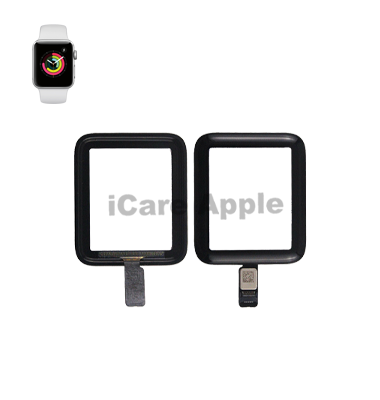
Apple Watch Series 2 Touch Screen
At iCare Apple, we provide expert Touch Screen replacement services for your Apple Watch Series 2 in Bangladesh. Our skilled technicians ensure a quick and efficient repair, restoring your watch to perfect functionality. Trust us for high-quality replacement with a focus on customer satisfaction. Visit us today!
Touch Screen
- 1 Year - Replacement Guaranty
- 30 Days - Money back Guaranty
- Replacement Time - 1 Hour
- Service Charge Included
- 24/7 support
How to Identify When Your Apple Watch Series 2 Touch Screen Needs Replacement
Here are four signs that your Apple Watch Series 2 Touch Screen may need replacement:
Unresponsive Touch:
If the Touch Screen becomes unresponsive or registers inaccurate touches, it may be time for a replacement.
Visible Cracks or Damage:
Cracks or chips on the screen can affect its functionality and may require a replacement to avoid further damage.
Display Malfunctions:
Flickering, color distortion, or dead pixels indicate potential issues with the Touch Screen that might need repair or replacement.
Water Damage:
If your watch has been exposed to water and the screen shows issues such as fogging, you may need a replacement to prevent further malfunctions.

Our Apple Watch Series 2 Touch Screen Replacement Process
Diagnosis:
We inspect your device to confirm the need for Touch Screen replacement.
Quote and Approval:
A detailed cost estimate is provided, and work proceeds only after your approval.
Replacement:
Our experts use high-quality parts and advanced tools to replace the Touch Screen.
Testing:
After the replacement, we rigorously test the device to ensure perfect functionality and performance.

Why Choose iCare Apple for Apple Watch Series 2 Touch Screen Replacement 
Choose iCare Apple for your Apple Watch Series 2 Touch Screen replacement because we offer expert technicians, high-quality parts, and a quick, reliable service. We prioritize customer satisfaction, ensuring your device is restored to its optimal performance with a warranty on our replacement services for your peace of mind.
✌️Top Benefits of Apple Watch Series 2 Touch Screen Replacement at iCare Apple
Certified Technicians
Our technicians are certified and highly skilled, ensure repairs for your Apple Watch Series 2. We guarantee top-notch service for all Apple Watch Touch Screen replacements.
Original & High-Quality Parts
We use genuine Apple parts for Apple Watch Touch Screen replacements, ensuring optimal performance, durability, and preserving your Apple Watch’s original quality for long-lasting results.
Quick and Efficient Service
At iCare Apple, we prioritize quick and efficient service, minimizing downtime. Our experienced team provides rapid, reliable Touch Screen repairs, so you can get back to using your Apple Watch without delay.

Tips & Tricks
• Use a Screen Protector:
Protect your Apple Watch’s Touch Screen from scratches and cracks by using a high-quality screen protector. This prevents damage from everyday use and accidental drops.
• Avoid Excessive Force:
Don’t press too hard on the screen when interacting with apps or notifications. Light taps will reduce wear and tear on the Touch Screen.
• Clean Regularly:
Gently clean the screen with a microfiber cloth to remove dirt, dust, and fingerprints. This helps maintain screen clarity and responsiveness.
• Avoid Extreme Temperatures:
Protect your watch from extreme heat or cold, as these can damage the screen’s sensitivity over time. Store it in a moderate environment.
• Keep the Screen Dry:
Excess moisture can penetrate the Touch Screen, causing damage. Ensure the screen stays dry by wiping it off after exposure to water.
• Turn Off Unnecessary Features:
Disable features like “Raise to Wake” if you’re not using them. This can help reduce constant activation of the screen.
• Avoid Using Sharp Objects:
Avoid using sharp objects that could scratch the screen. Only use your finger or an appropriate stylus for navigation.
• Store Properly:
When not in use, store your Apple Watch in a safe place, away from rough surfaces. This helps prevent accidental scratches and screen damage.
• Use Auto-Lock Feature:
Set your Apple Watch to lock after a short period of inactivity. This reduces screen-on time and decreases the chances of accidental touches.
• Update Software Regularly:
Keep your Apple Watch software up-to-date. System updates often come with optimizations that can help the Touch Screen function better.
Following these simple tips will extend the longevity of your Apple Watch Series 2’s Touch Screen and keep it in excellent condition.
What Our Customers Are Saying About Our Apple Watch Series 2 Touch Screen Replacement Service
Sharmin Akter
The Apple Watch Series 2 Touch Screen replacement at iCare Apple was flawless. My watch works perfectly again.
Ahsan Rahman
Great service and quick replacement of my Apple Watch Series 2 Touch Screen. Highly recommend!
Rafiul Islam
iCare Apple did an excellent job replacing my Apple Watch Series 2 Touch Screen. It's like new again!
Neha Chowdhury
Fast and reliable Touch Screen replacement for my Apple Watch Series 2. Very satisfied with the service.
Your Trust is Our Strength
Why Timely Apple Watch Touch Screen Replacement is Essential
Timely replacement of the Apple Watch Series 2 Touch Screen is essential to maintain the device’s functionality. A cracked or unresponsive screen can hinder touch sensitivity, affecting performance and usability. Prompt repairs prevent further damage and ensure the device continues to function smoothly, prolonging its lifespan.
Visit iCare Apple in Dhaka for Professional Apple Watch Repairs
Located at the heart of Dhaka, iCare Apple offers top-notch repair services for all Apple Watch models. Our team is committed to providing quality repairs, and we stand by our work. So, if your Apple Watch Series 2 needs a Touch Screen replacement, visit iCare Apple and experience professional service from trusted experts.
Ensure the longevity and performance of your Apple Watch Series 2 by opting for quality Touch Screen replacement services at iCare Apple.
FAQ
1. How long does the Touch Screen replacement take?
It typically takes few hours for the replacement, depending on the condition of the device.
2. Can the Apple Watch Series 2 still be used with a cracked screen?
It is not recommended as it can lead to further damage and impact functionality.
3. What is the cost of Touch Screen replacement?
The cost varies; please contact us for an accurate estimate.
4. Will the Touch Screen replacement affect my Apple Watch’s performance?
No, the replacement will restore the screen’s functionality without affecting overall performance.
5. How do I know if I need a Touch Screen replacement?
Common signs include unresponsiveness, visible cracks, or flickering on the screen.
6. Do you offer repairs for Apple Watches with water damage?
Yes, we offer repair services for water-damaged Apple Watches, including Touch Screen replacements.
7. Can you replace the Touch Screen if the Apple Watch has a bent casing?
We may be able to repair the screen, but a bent casing may affect the overall repair quality.
8. Will the Touch Screen replacement affect the water resistance of my Apple Watch?
No, the replacement will be done carefully to maintain the water resistance of your device.