

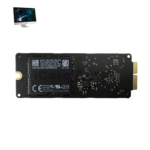
iMac 27 Inch 2019 SSD
At iCare Apple, we provide expert iMac 27 Inch 2019 SSD replacement and upgrading services in Bangladesh. We use original, compatible SSDs and ensure professional installation for improved speed and storage. Trust us for fast, reliable, and affordable service to enhance your iMac’s performance.
SSD
- 1 Year - Replacement Guaranty
- 30 Days - Money back Guaranty
- Replacement Time - 1 Hour
- Service Charge Included
- 24/7 support
How to Identify When Your iMac 27 Inch 2019 SSD Needs Replacement
Here are four signs that your iMac 27 Inch 2019 SSD may need replacement:
Slow Performance and Long Load Times
If your iMac takes much longer to boot or open files, the SSD may be failing and losing speed.
Frequent System Freezes or Crashes
Unexpected freezes or crashes during file access often indicate SSD health issues needing replacement.
Corrupted Files or Data Loss
If files become corrupted or disappear without reason, it’s a sign the SSD might be deteriorating.
Error Messages Related to Storage
Receiving disk errors or warnings during startup or use signals possible SSD failure and need for replacement.
Our iMac 27 Inch 2019 SSD Replacement Process
Diagnosis
We begin by checking your iMac’s current SSD condition and storage performance to determine upgrade or replacement needs.
Client Approval
After diagnosis, we explain the condition, cost, estimated timeline, and options for SSD replacement or upgrading.
Professional Installation
Our technicians replace or upgrade the SSD using original, compatible parts with careful handling to ensure system stability.
Testing & Delivery
We thoroughly test the SSD’s performance, boot speed, and data integrity before delivering your iMac in top condition.

Why Choose iCare Apple for iMac 27 Inch 2019 SSD Replacement or Upgrading!?
Choose iCare Apple for iMac 27 Inch 2019 SSD replacement or upgrading because we use original SSDs, ensure expert installation, and provide reliable diagnostics. Our experienced team delivers fast, affordable service with a focus on performance and data safety. Trust us to enhance your iMac’s speed and storage efficiency.
Top Benefits of iMac 27 Inch 2019 SSD Replacement or Upgrading at iCare Apple
Certified Technicians
Our iMac replacements are handled by certified technicians who ensure precision, safe handling, and expert service, delivering reliable performance and long-term satisfaction for every repair.
Original & High-Quality Parts
We use original parts for all iMac replacements, ensuring durability, perfect compatibility, and optimal performance to restore your device just like the factory standard.
Quick and Efficient Service
Our quick and efficient service ensures your iMac SSD is Replaced or upgraded promptly, minimizing downtime while maintaining the highest quality and performance standards.

Tips & Tricks
• Avoid Frequent Full Disk Usage
Keep some free space on your SSD to maintain optimal performance. A nearly full drive slows down read/write speeds.
• Regularly Update macOS
Updates include improvements to SSD management and security. Staying current helps prevent potential software-related issues.
• Enable TRIM Support
TRIM helps maintain SSD speed and longevity by efficiently managing deleted data. Ensure it’s enabled on your iMac.
• Avoid Sudden Power Loss
Use a reliable power source or UPS to prevent abrupt shutdowns. Power interruptions can corrupt SSD data or firmware.
• Backup Your Data Regularly
Regular backups protect your files in case of SSD failure. Use Time Machine or other backup solutions frequently.
• Limit Heavy Write Operations
Avoid unnecessary large file transfers or constant writing to extend SSD lifespan. Spread out heavy usage when possible.
• Disable Unneeded Startup Programs
Too many startup apps increase SSD activity on boot. Disable unused programs to reduce workload on your SSD.
• Keep Your iMac Cool
Overheating affects SSD performance and longevity. Ensure proper ventilation and avoid placing your iMac in hot environments.
• Avoid Disk Defragmentation
Unlike HDDs, SSDs don’t benefit from defragmentation. It can reduce SSD lifespan by causing unnecessary writes.
• Monitor SSD Health
Use macOS or third-party tools to check SSD status. Early detection of issues helps prevent data loss.
Proper SSD care ensures fast, reliable performance and extends your iMac’s storage lifespan effectively.
What Our Customers Are Saying About Our iMac 27 Inch 2019 SSD Replacement or Upgrading Service
Sajid Mahmud
iCare Apple upgraded my iMac’s SSD and the speed improvement is amazing. Their service was fast and professional.
Mouree Alam
The team at iCare Apple replaced my faulty SSD smoothly. Now my iMac works like new and loads everything quickly.
Rifat Hossain
iCare Apple helped me upgrade to a larger SSD. The process was clear, and the performance boost is noticeable.
Nadia Karim
I’m very satisfied with the SSD replacement service from iCare Apple. They handled everything efficiently and returned my iMac on time.
Your Trust is Our Strength
Why Timely iMac SSD Replacement or Upgrading is Essential
Timely iMac 27 Inch 2019 SSD replacement or upgrading is essential to maintain fast performance, prevent data loss, and avoid system crashes. A failing or outdated SSD can slow down your workflow and reduce reliability. Upgrading early ensures smoother operation, better storage capacity, and extended life of your iMac.
Visit iCare Apple in Dhaka for Professional iMac Repairs
Located at the heart of Dhaka, iCare Apple offers top-notch repair services for all iMac models. Our team is committed to providing quality repairs, and we stand by our work. So, if your iMac 27 Inch 2019 needs a SSD Replacement or Upgrading Service, visit iCare Apple and experience professional service from trusted experts.
Ensure the longevity and performance of your iMac 27 Inch 2019 by opting for quality SSD Replacement or Upgrading Services at iCare Apple.
FAQ
1. What are the signs that my iMac 27 Inch 2019 SSD needs replacement?
Slow performance, frequent crashes, long boot times, or error messages can indicate a failing SSD.
2. How long does the SSD replacement or upgrade take?
The process usually takes few hours or 1-3 working days, depending on SSD availability and the device’s condition.
3. Do you use original SSDs for replacement?
Yes, we use original or compatible SSDs to ensure reliability and performance.
4. Will my data be safe during SSD repair?
Data safety depends on the issue; we recommend backing up before service.
5. Can software fixes resolve SSD issues?
Some issues may be software-related, but most of the physical SSD problems require replacement.
6. Is SSD upgrade possible during replacement?
Yes, we can upgrade your SSD to higher capacity models if desired.
7. Can a failing SSD cause data corruption?
Yes, a faulty SSD can lead to corrupted files and unstable system behavior.
8. What causes SSD failure in iMacs?
Common causes include wear from heavy use, sudden power loss, and physical damage.