

MacBook Pro (2015) A1398 Display
At iCare Apple, we offer expert MacBook Pro (2015) A1398 Display repair and replacement services in Bangladesh. Our skilled technicians use high-quality parts to restore your screen’s clarity and performance. We ensure quick, reliable service so your MacBook looks and works like new again.
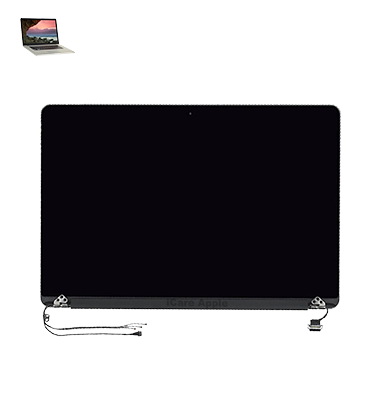
How to Identify When Your MacBook Pro (2015) A1398 Display Needs Replacement
Here are four signs that your MacBook Pro (2015) A1398 Display may need replacement:
Screen Flickering:
Frequent flickering or sudden blackouts indicate Display issues.
Dead Pixels or Lines:
Visible dead pixels, horizontal or vertical lines suggest Display damage.
Dim or Discolored Screen:
Unusual brightness issues or color distortion signal a failing Display.
Physical Damage:
Cracks, scratches, or visible impact damage require immediate screen replacement.
Our MacBook Pro (2015) A1398 Display Repair & Replacement Process
1. Diagnosis:
We thoroughly inspect your MacBook’s Display to identify the issue.
2. Estimate & Approval:
We provide a cost estimate and proceed only after your approval.
3. Display Replacement:
Our skilled technicians carefully replace the damaged Display with a high-quality screen.
4. Testing & Delivery:
We test the new Display for clarity, touch response, and performance before delivering your fully functional MacBook.

Choose iCare Apple for MacBook Pro (2015) A1398 Display repair and replacement because we offer expert service, high-quality parts, and quick turnaround times. Our skilled technicians ensure your MacBook’s screen looks and performs like new, providing reliable repairs with a focus on customer satisfaction and device longevity.
✌️Top Benefits of MacBook Pro (2015) A1398 Display Repair & Replacement at iCare Apple
Certified Technicians
Our technicians are certified and highly skilled, ensure repairs for your MacBook Pro (2015) A1398. We guarantee top-notch service for all Display repairs and replacements.
Original & High-Quality Parts
We use genuine Apple parts for MacBook Display replacements, ensuring optimal performance, durability, and preserving your MacBook's original quality for long-lasting results.
Quick and Efficient Service
At iCare Apple, we prioritize quick and efficient service, minimizing downtime. Our experienced team provides rapid, reliable Display repairs, so you can get back to using your MacBook without delay.

Tips & Tricks for MacBook Pro (2015) A1398 Display
👍 Adjust Display Brightness:
Use the brightness controls on your MacBook Pro (usually located in the F1 and F2 keys) to adjust the brightness of the Display according to your preferences and ambient lighting conditions. Lowering the brightness can help conserve battery life, especially when working in dimly lit environments.
👍 Customize Display Resolution:
Explore the Display settings in System Preferences to adjust the resolution of your MacBook Pro’s Display. Depending on your needs, you can choose between different resolution options to optimize screen real estate and clarity.
👍 Enable Night Shift:
Night Shift is a feature available in macOS that reduces the amount of blue light emitted by the Display, making it easier on the eyes during evening hours. Enable Night Shift in System Preferences > Displays > Night Shift, and customize the schedule and intensity to your liking.
👍 Calibrate Color Accuracy:
Use built-in color calibration tools or third-party software to calibrate the color accuracy of your MacBook Pro’s Display. Proper calibration ensures accurate color representation for tasks such as photo editing and graphic design.
👍 Use True Tone (if available):
If your MacBook Pro supports True Tone technology, consider enabling it in System Preferences > Displays > True Tone. True Tone adjusts the color temperature of the Display based on ambient lighting conditions, providing a more natural viewing experience.
👍 Clean the Display Regularly:
Keep your MacBook Pro’s Display clean and free of dust, smudges, and fingerprints by wiping it gently with a soft, lint-free cloth. Regular cleaning helps maintain clarity and visibility.
👍 Adjust Refresh Rate:
If your MacBook Pro supports it, consider adjusting the Display refresh rate for smoother motion and reduced screen tearing during tasks such as video playback or gaming. Explore the Display settings or third-party utilities for options to adjust refresh rate.
👍 Use External Displays:
Take advantage of your MacBook Pro’s ability to connect to external Displays for expanded screen real estate or enhanced productivity. Configure external Displays in System Preferences > Displays > Arrangement to optimize your workspace layout.
👍 Avoid Direct Sunlight:
Avoid exposing your MacBook Pro’s Display to direct sunlight or harsh glare, as this can cause visibility issues and potential damage to the screen. Position your laptop away from windows or use blinds to control sunlight exposure.
👍 Use Screen Savers or Sleep Mode:
When not in use, consider using screen savers or putting your MacBook Pro to sleep to prevent screen burn-in and prolong the lifespan of the Display. Configure screen saver options in System Preferences > Desktop & Screen Saver.
By incorporating these tips and tricks into your usage of the Display on your MacBook Pro (2015) A1398, you can optimize its performance, clarity, and longevity for a better overall user experience.
What Our Customers Are Saying About Our MacBook Pro (2015) A1398 Display Repair & Replacement Service
Nafis Chowdhury
iCare Apple did an amazing job replacing my MacBook Pro’s Display. The screen looks brand new and works perfectly.
Samia Rahman
I’m really happy with the fast and professional Display replacement service. My MacBook’s screen is crystal clear now.
Arman Ali
The Display repair at iCare Apple was smooth and hassle-free. My MacBook Pro looks and feels like new again.
Tahsin Jahan
Excellent service and great quality parts! My MacBook Pro’s Display was replaced quickly, and the results are perfect.
Your Trust is Our Strength
Why Timely MacBook Display Repair & Replacement is Essential
Timely MacBook Pro (2015) A1398 Display repair and replacement is essential to prevent further damage and maintain optimal device performance. A cracked, flickering, or unresponsive screen can worsen over time, affecting usability and productivity. Quick replacement ensures a clear, fully functional Display, protecting your MacBook’s longevity and your user experience.
Visit iCare Apple in Dhaka for Professional MacBook Repairs
Located at the heart of Dhaka, iCare Apple offers top-notch repair services for all MacBook models. Our team is committed to providing quality repairs, and we stand by our work. So, if your MacBook Pro (2015) A1398 needs a Display repair and replacement, visit iCare Apple and experience professional service from trusted experts.
Ensure the longevity and performance of your MacBook Pro (2015) A1398 by opting for quality Display repair and replacement services at iCare Apple.
FAQ
1. Do you use original Apple Displays for replacement?
We use high-quality, compatible Displays that meet Apple’s standards.
2. How much does MacBook Pro (2015) A1398 Display replacement cost?
The cost varies; please contact us for an accurate estimate.
3. Can a flickering screen be repaired without replacing the Display?
Sometimes, but a detailed diagnosis will determine if replacement is needed.
4. What if my Display shows vertical or horizontal lines?
Lines on the screen usually indicate a damaged Display that needs replacement.
5. How can I tell if my Display needs replacement?
Flickering, lines, dimness, discoloration, and physical damage are clear signs.
6. Do you offer same-day Display replacement service?
If the part is in stock then same-day service is possible.
7. What if my screen goes black but the MacBook is on?
This likely indicates Display failure, requiring repair or replacement.
8. Can a water-damaged screen be repaired?
In most cases, water damage requires a complete Display replacement.