

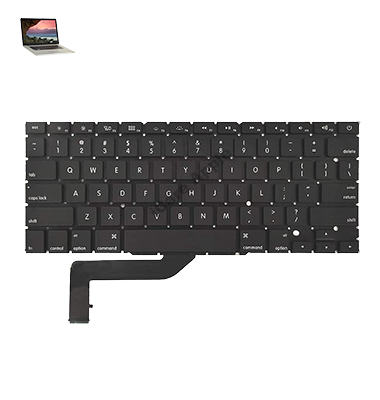
MacBook Pro (2015) A1398 Keyboard
At iCare Apple, we offer expert MacBook Pro (2015) A1398 Keyboard replacement services in Bangladesh. Our technicians provide quick and reliable repairs, ensuring your MacBook’s Keyboard functions like new. We use high-quality parts to restore your device efficiently, offering great service with minimal downtime.
How to Identify When Your MacBook Pro (2015) A1398 Keyboard Needs Replacement
Here are four signs that your MacBook Pro (2015) A1398 Keyboard may need replacement:
Unresponsive Keys:
Some keys may not register when pressed, or the entire Keyboard could become unresponsive.
Sticky or Jammed Keys:
Keys feel sticky or are difficult to press, making typing uncomfortable.
Erratic Typing Behavior:
Random letters or characters appear when typing, or multiple keys register with a single press.
Visible Damage:
Physical damage such as cracks, broken keys, or water exposure can require a Keyboard replacement.
Our MacBook Pro (2015) A1398 Keyboard Replacement Process
1. Diagnosis:
We start by diagnosing the Keyboard issue to confirm if a replacement is necessary.
2. Parts Sourcing:
Once confirmed, we source high-quality replacement parts to ensure long-lasting results.
3. Replacement:
Our skilled technicians carefully replace the faulty Keyboard, ensuring all connections are properly secured.
4. Testing:
After installation, we thoroughly test the new Keyboard to ensure it works flawlessly before handing your MacBook back to you.

Choose iCare Apple for your MacBook Pro (2015) A1398 Keyboard replacement due to our expert technicians, high-quality replacement parts, and efficient service. We ensure minimal downtime, reliable repairs, and a seamless experience, restoring your device to optimal performance. Trust us for top-notch, affordable MacBook repairs in Bangladesh.
✌️Top Benefits of MacBook Pro (2015) A1398 Keyboard Replacement at iCare Apple
Certified Technicians
Our technicians are certified and highly skilled, ensure repairs for your MacBook Pro (2015) A1398. We guarantee top-notch service for all Keyboard replacements.
Original & High-Quality Parts
We use genuine Apple parts for MacBook Keyboard replacements, ensuring optimal performance, durability, and preserving your MacBook's original quality for long-lasting results.
Quick and Efficient Service
At iCare Apple, we prioritize quick and efficient service, minimizing downtime. Our experienced team provides rapid, reliable Keyboard repairs, so you can get back to using your MacBook without delay.

Tips & Tricks for MacBook Pro (2015) A1398 Keyboard
👍 Customize Keyboard Shortcuts:
Take advantage of macOS’s ability to customize Keyboard shortcuts. Go to System Preferences > Keyboard > Shortcuts to assign custom shortcuts for various tasks, applications, and system functions, making your workflow more efficient.
👍 Enable Key Repeat:
Customize the Keyboard’s key repeat rate to your preference. Go to System Preferences > Keyboard and adjust the Key Repeat slider to control how quickly a key repeats when held down.
👍 Use Text Expansion:
Utilize macOS’s built-in text expansion feature to create shortcuts for frequently used phrases or sentences. Go to System Preferences > Keyboard > Text and add your desired shortcuts and corresponding expansions.
👍 Learn Special Characters:
Familiarize yourself with Keyboard shortcuts for special characters and symbols. Press and hold a key to see related options, or use the Keyboard Viewer (accessible through the Input Sources menu) to explore available characters.
👍 Navigate Efficiently:
Utilize Keyboard shortcuts for efficient navigation within applications and the operating system. Learn common shortcuts such as Command + Tab to switch between applications and Command + Space to open Spotlight search.
👍 Master Trackpad Gestures:
Combine Keyboard input with trackpad gestures for enhanced productivity. Learn gestures like swiping with three fingers to switch between fullscreen apps or using pinch-to-zoom for a closer look at content.
👍 Customize Function Keys:
Customize the behavior of the function keys (F1-F12) to suit your needs. Go to System Preferences > Keyboard > Shortcuts > Function Keys and assign specific functions or actions to each key.
👍 Enable Accessibility Features:
Explore macOS’s accessibility features to enhance Keyboard usability. Enable features like Sticky Keys, Slow Keys, or Keyboard Accessibility shortcuts in System Preferences > Accessibility > Keyboard.
👍 Master Mission Control:
Use Mission Control to organize and navigate through open windows and desktop spaces efficiently. Learn Keyboard shortcuts like Control + Up Arrow to enter Mission Control or Control + Left/Right Arrow to switch between desktop spaces.
👍 Practice Keyboard Security:
Protect your MacBook Pro by enabling password protection and practicing good Keyboard security habits. Set up a strong login password and consider enabling FileVault encryption for added security.
By implementing these tips and tricks, you can optimize your Keyboard usage on the MacBook Pro (2015) A1398.
What Our Customers Are Saying About Our MacBook Pro (2015) A1398 Keyboard Replacement Service
Zihan Ahmed
The Keyboard replacement process at iCare Apple was smooth and quick. My MacBook feels as good as new!
Shahirul Hasan
Excellent service for my MacBook Pro Keyboard replacement. The technicians were professional, and everything works perfectly now.
Shamsul Alam
iCare Apple provided efficient and reliable service for my MacBook Pro Keyboard. I'm very happy with the results!
Mahira Akter
Quick turnaround and great service for my MacBook Pro Keyboard replacement. Highly recommend iCare Apple for all repairs!
Your Trust is Our Strength
Why Timely MacBook Keyboard Replacement is Essential
Timely MacBook Pro (2015) A1398 Keyboard replacement is essential to prevent further damage and maintain productivity. Ignoring faulty keys can lead to more extensive issues, such as system errors or more costly repairs. Prompt replacement ensures your device functions properly, extending its lifespan and minimizing downtime.
Visit iCare Apple in Dhaka for Professional MacBook Repairs
Located at the heart of Dhaka, iCare Apple offers top-notch repair services for all MacBook models. Our team is committed to providing quality repairs, and we stand by our work. So, if your MacBook Pro (2015) A1398 needs a Keyboard replacement, visit iCare Apple and experience professional service from trusted experts.
Ensure the longevity and performance of your MacBook Pro (2015) A1398 by opting for quality Keyboard replacement services at iCare Apple.
FAQ
1. How long does the MacBook Pro (2015) A1398 Keyboard replacement take?
It typically takes few hours, depending on availability.
2. How much does the Keyboard replacement cost?
The cost varies depending on the condition of the device; please contact us for a quote.
3. Can I replace only some keys instead of the whole Keyboard?
Yes, you can but we will suggest you to replace the entire Keyboard for better functionality and longevity.
4. What if my MacBook's Keyboard has water damage?
Water damage may require further assessment to determine if additional repairs are needed.
5. Is the Keyboard replacement done with original Apple parts?
We use high-quality, compatible parts to ensure optimal performance and durability.
6. What if my MacBook has other issues besides the Keyboard?
We will diagnose all issues and inform you of any additional repairs needed.
7. How do I know if my Keyboard needs to be replaced?
Signs like unresponsive or stuck keys, erratic typing, or visible damage may indicate the need for replacement.
8. Can I continue using my MacBook with a broken Keyboard?
It’s possible, but using a broken Keyboard can cause further issues and affect your workflow.