

MacBook Pro (2016) A1706 Display
If your MacBook Pro (2016) A1706 Display is cracked or malfunctioning, we offer expert repair and replacement services at iCare Apple in Bangladesh. Our skilled technicians use high-quality parts to restore your Display’s functionality, ensuring clear visuals and optimal performance. Contact us today for efficient and reliable service!
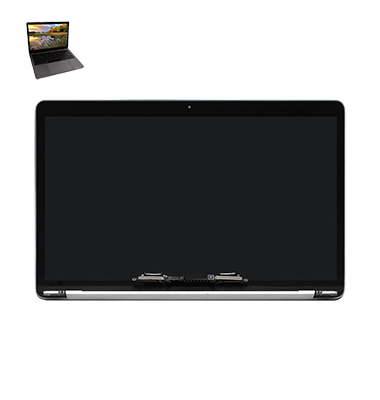
How to Identify When Your MacBook Pro (2016) A1706 Display Needs Replacement
Here are four signs that your MacBook Pro (2016) A1706 Display may need replacement:
Cracked or Shattered Screen:
Physical damage, such as cracks or shattered glass, requires immediate Display replacement for safe usage.
Flickering or Distorted Display:
If the screen flickers, shows lines, or distorts colors, it’s a sign of internal Display damage.
Unresponsive Display:
When the screen remains black or unresponsive to touch or movement, the Display might be faulty.
Backlight Issues:
If the screen dims or the backlight doesn’t function properly, the Display may need to be replaced.
Our MacBook Pro (2016) A1706 Display Replacement Process
1. Diagnosis:
Our technicians assess the Display issue and confirm whether it requires repair or full replacement.
2. Customer Approval:
After providing an estimate, we obtain your approval to proceed with the repair or replacement.
3. Display Repair/Replacement:
We replace the damaged Display with a high-quality, compatible part or repair the existing one.
4. Testing and Quality Check:
We ensure the Display functions perfectly by testing brightness, touch response, and visuals before returning your MacBook.

Choose iCare Apple for your MacBook Pro (2016) A1706 Display repair and replacement because we offer expert service with high-quality parts. Our skilled technicians ensure quick, reliable repairs, restoring your Display to its original condition. We prioritize customer satisfaction and deliver professional, efficient service at competitive prices.
✌️Top Benefits of MacBook Pro (2016) A1706 Display Repair & Replacement at iCare Apple
Certified Technicians
Our technicians are certified and highly skilled, ensure repairs for your MacBook Pro (2016) A1706. We guarantee top-notch service for all Display replacements.
Original & High-Quality Parts
We use genuine Apple parts for MacBook Display replacements, ensuring optimal performance, durability, and preserving your MacBook's original quality for long-lasting results.
Quick and Efficient Service
At iCare Apple, we prioritize quick and efficient service, minimizing downtime. Our experienced team provides rapid, reliable Display repairs, so you can get back to using your MacBook without delay.

Tips & Tricks for MacBook Pro (2016) A1706 Display
👍 Adjust Display Brightness:
Use the brightness controls on the keyboard or adjust the brightness manually in System Preferences to set the display brightness to a comfortable level for your environment. Lower brightness settings can help conserve battery life.
👍 Enable Night Shift:
Use Night Shift in System Preferences to adjust the color temperature of the display to reduce blue light exposure during the evening or nighttime hours. This can help reduce eye strain and improve sleep quality.
👍 Calibrate Color Accuracy:
Use built-in calibration tools or third-party software to calibrate the display for accurate color reproduction. Proper calibration ensures that colors appear as intended for tasks such as photo editing or graphic design.
👍 Use True Tone:
Enable True Tone in System Preferences to automatically adjust the color temperature of the display based on ambient lighting conditions. True Tone provides a more natural viewing experience by matching the display’s color temperature to the surrounding environment.
👍 Clean the Display Regularly:
Keep the display clean by wiping it gently with a soft, lint-free cloth to remove dust, fingerprints, and smudges. Avoid using harsh chemicals or abrasive materials that may damage the display.
👍 Avoid Direct Sunlight:
Minimize exposure to direct sunlight, as prolonged exposure can cause glare and potentially damage the display. Position your MacBook Pro A1706 away from windows or use window shades to reduce glare.
👍 Customize Display Resolution:
Adjust the display resolution in System Preferences to match your preferences or workflow requirements. Higher resolutions provide sharper images and more screen real estate, while lower resolutions may improve performance and readability.
👍 Utilize Split View:
Use Split View to multitask and work with two apps side by side on the display. This feature maximizes productivity by allowing you to view and interact with multiple apps simultaneously.
👍 Enable Screen Saver:
Use a screen saver to prevent image persistence or burn-in on the display when the MacBook Pro A1706 is idle for an extended period. Choose from built-in screen savers or customize settings in System Preferences.
👍 Connect External Displays:
Expand your workspace and productivity by connecting external displays to the MacBook Pro A1706. Use the built-in Thunderbolt 3 ports to connect compatible displays and configure display settings in System Preferences.
By implementing these tips and tricks, you can enhance the usability, performance, and longevity of the display on your MacBook Pro (2016) A1706.
What Our Customers Are Saying About Our MacBook Pro (2016) A1706 Display Replacement Service
Asif Hossain
The Display replacement service at iCare Apple was quick and professional. My MacBook Pro looks and works like new again.
Nadia Ahmed
I had a cracked screen, and iCare Apple replaced it in no time. The Display is perfect, and my laptop is as good as new.
Shamsul Alam
iCare Apple provided excellent service for my MacBook Pro A1706 Display. They replaced it with a high-quality screen, and it works flawlessly.
Laila Rahman
I’m very impressed with iCare Apple’s Display replacement service. The process was smooth, and my MacBook Pro’s Display is crystal clear now.
Your Trust is Our Strength
Why Timely MacBook Display Repair & Replacement is Essential
Timely MacBook Pro (2016) A1706 Display repair and replacement is essential to prevent further damage, such as screen malfunction or internal issues. Delaying the repair can worsen the problem, affecting the overall performance. A prompt fix ensures a fully functional Display, maintaining productivity and protecting your investment in the device.
Visit iCare Apple in Dhaka for Professional MacBook Repairs
Located at the heart of Dhaka, iCare Apple offers top-notch repair services for all MacBook models. Our team is committed to providing quality repairs, and we stand by our work. So, if your MacBook Pro (2016) A1706 needs a Display repair & replacement, visit iCare Apple and experience professional service from trusted experts.
Ensure the longevity and performance of your MacBook Pro (2016) A1706 by opting for quality Display repair & replacement services at iCare Apple.
Ensure the longevity and performance of your MacBook Pro (2016) A1706 by opting for quality Display repair & replacement services at iCare Apple.
FAQ
1. How do I know if my MacBook Pro A1706 Display needs repair?
If your screen is cracked, flickering, or unresponsive, it’s time for a repair.
2. Is there any risk of further damage during the Display replacement?
Our technicians follow precise procedures, minimizing the risk of further damage.
3. Is the Display replacement part original?
We use high-quality, compatible parts that restore original Display performance.
4. Will my data be affected during the Display replacement?
No, your data remains safe as the Display replacement does not impact storage.
5. Can you fix a cracked MacBook Pro A1706 Display?
Yes, we can repair or replace cracked screens quickly and efficiently.
6. Do I need an appointment for Display replacement?
Appointments are not required, but they help us serve you faster.
7. How much does the Display replacement cost?
The cost varies depending on the damage and replacement parts; we provide a quote after diagnosis.
8. What causes a MacBook Pro A1706 Display to malfunction?
Common causes include physical damage, overheating, or internal connection issues.