

MacBook Pro (2016) A1707 Track Pad
If you’re experiencing issues with your MacBook Pro (2016) A1707 Track Pad, we offer expert replacement services at iCare Apple in Bangladesh. Our skilled technicians ensure a quick and efficient replacement using high-quality parts, restoring your device’s functionality. Contact us today for reliable and professional service!
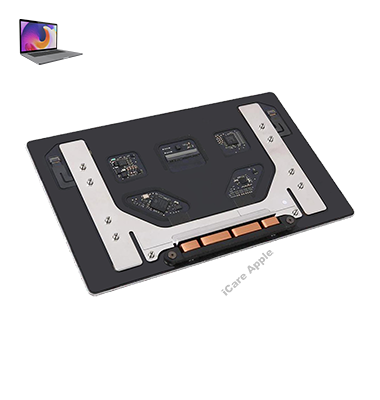
How to Identify When Your MacBook Pro (2016) A1707 Track Pad Needs Replacement
Here are four signs that your MacBook Pro (2016) A1707 Track Pad may need replacement:
Unresponsive Track Pad:
If the Track Pad doesn’t register clicks or gestures, it may be damaged and needs replacement.
Erratic Cursor Movement:
When the cursor moves inconsistently or jumps around the screen, it could indicate Track Pad malfunction.
Physical Damage:
Cracks, dents, or other visible damage on the Track Pad surface may require a replacement.
Frequent Freezing:
If your MacBook frequently freezes when using the Track Pad, it could point to a faulty Track Pad connection or failure.
Our MacBook Pro (2016) A1707 Track Pad Replacement Process
1. Diagnosis :
We perform a thorough inspection to confirm the Track Pad issue and ensure it’s the only problem.
2. Customer Consultation:
After the diagnosis, we discuss the Track Pad replacement cost and obtain your approval to proceed.
3. Track Pad Replacement:
Our expert technicians replace the faulty Track Pad with a high-quality, compatible part to restore full functionality.
4. Quality Testing:
Once the replacement is complete, we rigorously test the new Track Pad to ensure smooth, responsive performance before returning your device.

Choose iCare Apple for your MacBook Pro (2016) A1707 Track Pad replacement due to our skilled technicians, fast service, and high-quality parts. We ensure precise replacements, restoring your MacBook’s functionality with minimal downtime. Trust us for reliable, professional service and customer satisfaction, backed by our extensive experience.
✌️Top Benefits of MacBook Pro (2016) A1707 Track Pad Replacement at iCare Apple
Certified Technicians
Our technicians are certified and highly skilled, ensure repairs for your MacBook Pro (2016) A1707. We guarantee top-notch service for all Track Pad replacements.
Original & High-Quality Parts
We use genuine Apple parts for MacBook Track Pad replacements, ensuring optimal performance, durability, and preserving your MacBook's original quality for long-lasting results.
Quick and Efficient Service
At iCare Apple, we prioritize quick and efficient service, minimizing downtime. Our experienced team provides rapid, reliable Track Pad repairs, so you can get back to using your MacBook without delay.

Tips & Tricks for MacBook Pro (2016) A1707 Track Pad
👍 Clean the Track Pad Regularly:
Keep the Track Pad clean by wiping it with a soft, lint-free cloth dampened with water. Avoid using harsh chemicals or abrasive materials that could damage the surface.
👍 Adjust Tracking Speed:
Customize the tracking speed of the Track Pad to suit your preferences. You can adjust the tracking speed in System Preferences under “Trackpad” settings to make cursor movement faster or slower.
👍 Enable Tap to Click:
Enable the “Tap to Click” option in System Preferences to perform a click by tapping on the Track Pad, instead of physically pressing down on it. This can reduce strain on your fingers and improve usability.
👍 Learn Multi-Touch Gestures:
Familiarize yourself with multi-touch gestures supported by the Track Pad, such as swiping, scrolling, pinching, and zooming. These gestures can help you navigate macOS more efficiently and perform tasks more quickly.
👍 Customize Gesture Settings:
Customize gesture settings in System Preferences to tailor the Track Pad experience to your preferences. You can adjust gesture sensitivity, enable or disable specific gestures, and customize gesture shortcuts for different actions.
👍 Use Force Touch:
Take advantage of Force Touch capabilities on the Track Pad to access additional features and shortcuts. Press firmly on the Track Pad to activate Force Touch and reveal context-sensitive options, such as Quick Look previews or dictionary definitions.
👍 Experiment with Three-Finger Drag:
Enable the “Three-Finger Drag” option in System Preferences to use three fingers to drag windows, select text, or perform other dragging actions on the Track Pad. This can be a convenient alternative to traditional click-and-drag gestures.
👍 Practice Palm Rejection:
Practice proper palm rejection techniques to prevent accidental cursor movements or clicks while typing. Keep your palms slightly elevated above the Track Pad surface to minimize interference with typing.
👍 Adjust Force Click Sensitivity:
Customize the sensitivity of Force Click actions in System Preferences to ensure that they activate reliably without requiring excessive force. You can adjust Force Click sensitivity under “Trackpad” settings in System Preferences.
👍 Keep Software Updated:
Regularly update macOS and trackpad drivers to ensure compatibility, stability, and performance improvements. Check for updates in System Preferences or enable automatic updates to stay up to date with the latest software releases.
By following these tips and tricks, you can enhance your productivity and usability with the Track Pad on the MacBook Pro (2016) A1707.
What Our Customers Are Saying About Our MacBook Pro (2016) A1707 Track Pad Replacement Service
Shakil Ahmed
iCare Apple replaced my MacBook Pro Track Pad quickly and efficiently. Great service and smooth performance afterward.
Arif Hasan
Excellent Track Pad replacement service! My MacBook Pro feels brand new again after iCare Apple’s repair.
Farah Sultana
iCare Apple did a fantastic job replacing my MacBook Pro's Track Pad. Fast, reliable, and efficient service!
Nabila Rahman
My MacBook's Track Pad is working perfectly again, thanks to iCare Apple. Highly recommend their professional service.
Your Trust is Our Strength
Why Timely MacBook Track Pad Replacement is Essential
Timely replacement of your MacBook Pro (2016) A1707 Track Pad is essential to prevent further damage and ensure smooth functionality. Delaying replacement can lead to more significant issues, affecting productivity and performance. A quick replacement restores your device’s responsiveness, improving user experience and extending the lifespan of your MacBook.
Visit iCare Apple in Dhaka for Professional MacBook Repairs
Located at the heart of Dhaka, iCare Apple offers top-notch repair services for all MacBook models. Our team is committed to providing quality repairs, and we stand by our work. So, if your MacBook Pro (2016) A1707 needs a Track Pad replacement, visit iCare Apple and experience professional service from trusted experts.
Ensure the longevity and performance of your MacBook Pro (2016) A1707 by opting for quality Track Pad replacement services at iCare Apple.
FAQ
1. Can a damaged Track Pad be repaired instead of replaced?
In most cases, a damaged Track Pad needs replacement for optimal functionality.
2. What causes Track Pad issues on MacBook Pro (2016) A1707?
Track Pad issues can stem from hardware damage, faulty connections, or wear and tear.
3. What should I do if my Track Pad stops responding?
We recommend bringing your MacBook to iCare Apple for a diagnostic check and potential replacement.
4. Is the replacement Track Pad an original part?
We use high-quality replacement parts that match the performance of original components.
5. Will replacing the trackpad improve the overall performance of my MacBook?
Yes, replacing a faulty trackpad restores its responsiveness, improving the overall user experience.
6. What happens if I don’t replace the Track Pad?
Delaying the replacement can affect the overall performance and may lead to other device malfunctions.
7. Can I still use my MacBook while the Track Pad is malfunctioning?
It’s best to avoid using the Track Pad to prevent further damage; we recommend timely repairs.
8. How much does the Track Pad replacement cost?
The cost varies based on the severity of the issue; we provide an estimate after diagnosing the problem.