

MacBook Pro (2019) A2141 Keyboard
At iCare Apple in Bangladesh, we offer reliable MacBook Pro (2019) A2141 Keyboard replacement services. Whether keys are unresponsive or the Keyboard is damaged, our skilled technicians ensure high-quality repairs with original parts. Experience fast, efficient service that restores your MacBook’s performance to its best.
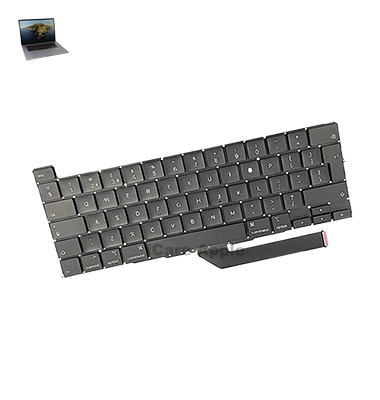
How to Identify When Your MacBook Pro (2019) A2141 Keyboard Needs Replacement
Here are four signs that your MacBook Pro (2019) A2141 Keyboard may need replacement:
Unresponsive Keys
Some or all keys fail to register when pressed.
Sticky or Jammed Keys
Keys get stuck or don’t return to their normal position.
Frequent Double Key Presses
You notice repeated characters even when typing one key.
Erratic Typing Behavior
The Keyboard types characters randomly without input.
Our MacBook Pro (2019) A2141 Keyboard Replacement Process
1. Diagnosis
Our experts assess your Keyboard issue to confirm if a replacement is necessary.
2. Quote
We provide a clear cost estimate before proceeding.
3. Replacement
Our certified technicians replace your damaged Keyboard with high-quality parts.
4. Testing
After replacement, we thoroughly test the Keyboard to ensure optimal functionality.

Choose iCare Apple for your MacBook Pro (2019) A2141 Keyboard replacement because we offer expert service with high-quality parts, fast turnaround times, and a warranty on repairs. Our team ensures precise repairs, bringing your Keyboard back to full functionality for a smooth, efficient typing experience.
✌️Top Benefits of MacBook Pro (2019) A2141 Keyboard Replacement at iCare Apple
Certified Technicians
Our technicians are certified and highly skilled, ensure repairs for your MacBook Pro (2019) A2141. We guarantee top-notch service for all Keyboard replacements.
Original & High-Quality Parts
We use genuine Apple parts for MacBook Keyboard replacements, ensuring optimal performance, durability, and preserving your MacBook's original quality for long-lasting results.
Quick and Efficient Service
At iCare Apple, we prioritize quick and efficient service, minimizing downtime. Our experienced team provides rapid, reliable Keyboard repairs, so you can get back to using your MacBook without delay.

Tips & Tricks for MacBook Pro (2019) A2141 Keyboard
👍 Regular Cleaning:
Keep the Keyboard clean by regularly removing dust, crumbs, and debris using compressed air or a soft brush. This prevents keys from sticking or becoming unresponsive due to debris buildup.
👍 Use Keyboard Covers:
Consider using a Keyboard cover to protect the keys from dust, spills, and debris. Keyboard covers are available in silicone or plastic materials and can be easily removed for cleaning.
👍 Adjust Keyboard Sensitivity:
Customize Keyboard sensitivity settings in System Preferences to adjust key response according to your typing preference. You can adjust key repeat rate and delay to match your typing speed and accuracy.
👍 Enable Key Repeat:
Enable key repeat functionality in System Preferences to allow for rapid typing by holding down a key to repeat the character. Adjust the key repeat rate and delay to suit your typing style and preferences.
👍 Learn Keyboard Shortcuts:
Familiarize yourself with Keyboard shortcuts for common tasks and applications to increase productivity. Mac OS offers a wide range of Keyboard shortcuts for navigating menus, controlling windows, and performing various functions without using the mouse.
👍 Use Touch Bar Customization:
Customize the Touch Bar to add frequently used shortcuts, functions, or controls for quick access. You can customize the Touch Bar layout and add or remove buttons according to your workflow and preferences.
👍 Avoid Eating and Drinking Near Keyboard:
To prevent spills and debris from entering the Keyboard, avoid eating or drinking near your MacBook Pro (2019) A2141. Accidental spills can damage the Keyboard and affect its performance.
👍 Practice Proper Typing Technique:
Practice proper typing technique to minimize strain on your fingers and wrists. Use light keystrokes and maintain a relaxed posture to prevent fatigue and discomfort during extended typing sessions.
👍 Adjust Keyboard Backlighting:
Customize Keyboard backlighting settings in System Preferences to adjust brightness and color according to ambient lighting conditions. Dim the backlight in low-light environments to conserve battery and reduce eye strain.
👍 Perform Keyboard Diagnostic Tests:
Use built-in diagnostic tools or third-party software to perform Keyboard diagnostic tests and check for any hardware or software issues. Address any identified problems promptly to ensure optimal Keyboard performance.
What Our Customers Are Saying About Our MacBook Pro (2019) A2141 Keyboard Replacement Service
Shahid Muktadir
I was impressed by the swift and efficient Keyboard replacement process at iCare Apple. My MacBook feels brand new now!
Shahina Kabir
The team at iCare Apple did an excellent job replacing my MacBook's Keyboard. Highly satisfied with the service!
Shafayet Hossain
iCare Apple’s service for my MacBook Pro Keyboard replacement was top-notch. The process was quick and professional.
Progoti Sarker
I had a great experience with iCare Apple for my Keyboard replacement. The team was helpful and my MacBook works perfectly now.
Your Trust is Our Strength
Why Timely MacBook Keyboard Replacement is Essential
Timely Keyboard replacement for your MacBook Pro (2019) A2141 is essential to prevent further damage, ensure smooth functionality, and maintain productivity. A faulty Keyboard can cause input issues, affect typing speed, and lead to additional repairs if ignored. Quick action ensures optimal performance and a hassle-free user experience.
Visit iCare Apple in Dhaka for Professional MacBook Repairs
Located at the heart of Dhaka, iCare Apple offers top-notch repair services for all Macbook models. Our team is committed to providing quality repairs, and we stand by our work. So, if your MacBook Pro (2019) A2141
needs a Keyboard replacement, visit iCare Apple and experience professional service from trusted experts.
Ensure the longevity and performance of your MacBook Pro (2019) A2141
by opting for quality Keyboard replacement services at iCare Apple.
FAQ
1. How long does it take to replace the Keyboard on a MacBook Pro (2019) A2141?
It typically takes a few hours to complete the replacement process.
2. Do I need an appointment for the Keyboard replacement?
While appointments are recommended, walk-ins are also welcome.
3. Is the replacement Keyboard genuine?
Yes, we use genuine Apple parts for the replacement.
4. How much does the Keyboard replacement cost?
The cost varies depending on the service, but we offer competitive pricing.
5. Will my data be affected during the replacement?
No, your data remains safe during the replacement process.
6. Can I replace the Keyboard myself?
We strongly recommend professional replacement to avoid damage to your device.
7. Do you offer a warranty on the Keyboard replacement?
Yes, we provide a warranty on the replacement parts and service.
8. How do I know if my Keyboard needs replacement?
If keys are unresponsive, sticky, or malfunctioning, it may require replacement.