

MacBook Pro (2019) A2159 Keyboard
At iCare Apple, we provide professional MacBook Pro (2019) A2159 Keyboard replacement services in Bangladesh. Our skilled technicians ensure quick and reliable repairs using high-quality parts. Whether you’re facing unresponsive keys or damaged Keyboards, trust us for a seamless replacement experience and improved performance.
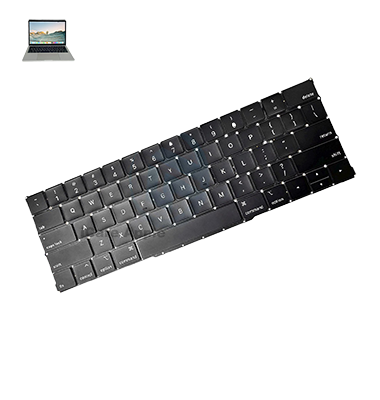
How to Identify When Your MacBook Pro (2019) A2159 Keyboard Needs Replacement
Here are four signs to identify when your MacBook Pro (2019) A2159 Keyboard needs replacement:
Unresponsive Keys:
Certain keys stop working or fail to register presses.
Sticky Keys:
Keys become uncomfortably sticky or feel slow to respond.
Repeated Keypresses:
Pressing a key results in multiple characters appearing.
Physical Damage:
Visible damage or physical wear, such as cracked keys or broken components.
Our MacBook Pro (2019) A2159 Keyboard Replacement Process
1. Diagnosis:
We assess the Keyboard issue and confirm the need for replacement.
2. Quote:
We provide an estimate for the replacement cost and time.
3. Replacement:
Our skilled technicians replace the Keyboard with genuine parts.
4. Testing:
After installation, we test the Keyboard to ensure it functions perfectly.

Choose iCare Apple for your MacBook Pro (2019) A2159 Keyboard replacement for reliable service, expert technicians, and genuine replacement parts. We ensure fast, professional repairs, providing you with a fully functioning Keyboard that restores your MacBook’s performance. Trust us for quality service and customer satisfaction in Bangladesh.
✌️Top Benefits of MacBook Pro (2019) A2159 Keyboard Replacement at iCare Apple
Certified Technicians
Our technicians are certified and highly skilled, ensure repairs for your MacBook Pro (2019) A2159. We guarantee top-notch service for all Keyboard replacements.
Original & High-Quality Parts
We use genuine Apple parts for MacBook Keyboard replacements, ensuring optimal performance, durability, and preserving your MacBook's original quality for long-lasting results.
Quick and Efficient Service
At iCare Apple, we prioritize quick and efficient service, minimizing downtime. Our experienced team provides rapid, reliable Keyboard repairs, so you can get back to using your MacBook without delay.

Tips & Tricks for MacBook Pro (2019) A2159 Keyboard
👍 Regular Cleaning:
Keep your Keyboard clean by gently wiping it with a soft, lint-free cloth to remove dust, crumbs, and other debris that can accumulate between the keys.
👍 Keyboard Cover:
Consider using a Keyboard cover to protect your MacBook Pro (2019) A2159 Keyboard from spills, dust, and scratches. Be sure to choose a cover specifically designed for your model to ensure a proper fit.
👍 Keyboard Shortcuts:
Learn and utilize Keyboard shortcuts to increase productivity and efficiency when navigating through applications and performing tasks on your MacBook Pro (2019) A2159.
👍 Adjust Keyboard Backlight:
Customize the brightness of the Keyboard backlight to suit your preferences and lighting conditions. Use the Keyboard shortcuts or adjust settings in System Preferences > Keyboard > Keyboard Backlight.
👍 Key Sensitivity:
Adjust the Keyboard sensitivity settings to your liking in System Preferences > Keyboard > Key Repeat and Delay until you find the optimal balance for your typing style.
👍 Touch Bar Customization:
Customize the Touch Bar to display shortcuts and controls that are most relevant to your workflow. You can customize the Touch Bar settings in System Preferences > Keyboard > Customize Control Strip.
👍 Enable Key Repeat:
Enable key repeat functionality to allow for rapid text input by pressing and holding a key. Adjust the key repeat settings in System Preferences > Keyboard > Key Repeat.
👍 Use Function Keys:
Familiarize yourself with the function keys (F1-F12) and their respective shortcuts for controlling display brightness, volume, media playback, and other functions on your MacBook Pro (2019) A2159.
👍 Disable Caps Lock:
Prevent accidental activation of the Caps Lock key by disabling it or enabling a warning indicator in System Preferences > Keyboard > Keyboard.
👍 Keyboard Replacement Program:
Stay informed about any Keyboard replacement programs or recalls initiated by Apple for the MacBook Pro (2019) A2159. If you experience Keyboard issues covered by the program, take advantage of the free repair or replacement services offered by Apple.
What Our Customers Are Saying About Our MacBook Pro (2019) A2159 Keyboard Replacement Service
Arif Rahman
The Keyboard replacement process was smooth and quick. iCare Apple exceeded my expectations with their professional service.
Shanta Begum
I’m impressed with how fast and efficient the Keyboard replacement was. Highly recommend iCare Apple for MacBook repairs.
Rashed Khan
Great experience at iCare Apple. They replaced my MacBook Keyboard flawlessly and in no time.
Nabila Rahman
Exceptional service at iCare Apple. My MacBook Keyboard works perfectly now after the replacement. Very happy with the result.
Your Trust is Our Strength
Why Timely MacBook Keyboard Replacement is Essential
Timely MacBook Pro (2019) A2159 Keyboard replacement is essential to avoid further damage, improve typing efficiency, and ensure smooth performance. Ignoring Keyboard issues can lead to functionality loss, difficulty typing, and more expensive repairs. A quick replacement restores usability and prolongs the lifespan of your device.
Visit iCare Apple in Dhaka for Professional MacBook Repairs
Located at the heart of Dhaka, iCare Apple offers top-notch repair services for all Macbook models. Our team is committed to providing quality repairs, and we stand by our work. So, if your MacBook Pro (2019) A2159
needs a Keyboard replacement, visit iCare Apple and experience professional service from trusted experts.
Ensure the longevity and performance of your MacBook Pro (2019) A2159
by opting for quality Keyboard replacement services at iCare Apple.
FAQ
1. How long does the MacBook Pro (2019) A2159 Keyboard replacement take at iCare Apple?
It typically takes 1-2 hours, depending on availability and the extent of the issue.
2. Is the Keyboard replacement covered by a warranty?
Yes, we offer a warranty on the replaced Keyboard and service.
3. What is the cost of MacBook Pro (2019) A2159 Keyboard replacement?
The cost varies; please contact us for a detailed quote based on your device’s condition.
4. Do I need to make an appointment for Keyboard replacement?
While appointments are recommended, walk-ins are welcome.
5. Can you replace the Keyboard for MacBook Pro (2019) A2159 on the same day?
Yes, if parts are available, the replacement can be done on the same day.
6. Will the Keyboard replacement affect my MacBook’s data?
No, the Keyboard replacement does not affect your data or settings.
7. Do you use original parts for the replacement?
Yes, we use high-quality, compatible, and original-like parts for all replacements.
8. What if my Keyboard issue is not a hardware problem?
We can diagnose and offer solutions for software-related issues affecting the Keyboard.