

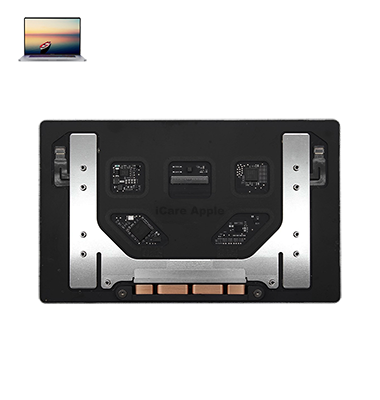
MacBook Pro (2020) A2289 Track Pad
We offer professional MacBook Pro (2020) A2289 Track Pad replacement service in Bangladesh. If your Track Pad is unresponsive, erratic, or damaged, visit iCare Apple for a quick and reliable fix. Our skilled technicians ensure smooth performance using high-quality parts. Get your MacBook Track Pad replaced today for the best experience!
How to Identify When Your MacBook Pro (2020) A2289 Track Pad Needs Replacement
Here are four signs that your MacBook Pro (2020) A2289 Track Pad may need replacement:
Unresponsive or Delayed Touch
The Track Pad doesn’t respond properly or has noticeable delays when clicking or swiping.
Physical Damage or Cracks
Visible cracks, dents, or uneven surfaces affect usability.
Erratic Cursor Movement
The cursor moves unpredictably or registers unintended clicks.
No Click Functionality
The Track Pad fails to register clicks or loses its tactile feedback.
Our MacBook Pro (2020) A2289 Track Pad Replacement Process
1. Diagnosis
Our experts assess your MacBook’s Track Pad to identify issues and confirm the need for replacement.
2. Genuine Part Installation
We use high-quality replacement parts to ensure smooth performance and durability.
3. Precision Fitting
Our skilled technicians carefully install the new Track Pad, ensuring proper alignment and functionality.
4. Final Testing
We conduct thorough testing to verify responsiveness and accuracy before handing it back to you.

Choose iCare Apple for your MacBook Pro (2020) A2289 Track Pad replacement in Bangladesh for expert service, original parts, and quick turnaround. We ensure precise installation, competitive pricing, and a seamless experience to restore your MacBook’s functionality. Trust our skilled technicians for a reliable and professional repair service.
✌️Top Benefits of MacBook Pro (2020) A2289 Track Pad Replacement at iCare Apple
Certified Technicians
Our technicians are certified and highly skilled, ensure repairs for your MacBook Pro (2020) A2289 Track Pad. We guarantee top-notch service for all Track Pad replacements.
Original & High-Quality Parts
We use genuine Apple parts for MacBook Track Pad replacements, ensuring optimal performance, durability, and preserving your MacBook's original quality for long-lasting results.
Quick and Efficient Service
At iCare Apple, we prioritize quick and efficient service, minimizing downtime. Our experienced team provides rapid, reliable Track Pad repairs, so you can get back to using your MacBook without delay.

Tips & Tricks for MacBook Pro (2020) A2289 Track Pad
👍 Adjust Sensitivity Settings:
Customize Track Pad sensitivity in macOS System Preferences to suit your preferences. Experiment with different sensitivity levels to find the optimal setting for precise and comfortable navigation.
👍 Master Multi-Touch Gestures:
Familiarize yourself with a variety of multi-touch gestures supported by the MacBook Pro A2289 Track Pad. Practice gestures such as two-finger scrolling, pinch-to-zoom, and three-finger swiping to enhance productivity and efficiency.
👍 Enable Tap to Click:
Enable the “Tap to Click” option in Track Pad settings to perform a click by tapping on the Track Pad surface, eliminating the need for physical button presses. This feature offers a faster and more ergonomic alternative to clicking.
👍 Explore Force Touch:
Take advantage of Force Touch technology on the MacBook Pro 2020 – A2289 Track Pad to access additional features and functionality. Experiment with pressure-sensitive gestures to preview content, access context menus, and perform other actions with precision.
👍 Utilize Trackpad Preferences:
Explore trackpad preferences in macOS System Preferences to customize gesture behavior, enable or disable specific gestures, and adjust tracking speed. Tailor the Track Pad experience to your liking for optimal comfort and efficiency.
👍 Practice Palm Rejection:
Practice proper palm rejection techniques to prevent accidental Track Pad input while typing. Position your hands comfortably on the keyboard and avoid resting your palms on the Track Pad surface to minimize unintended cursor movements.
👍 Clean the Track Pad Surface:
Keep the Track Pad surface clean and free of dirt, debris, and oils to maintain optimal responsiveness. Use a soft, lint-free cloth to gently wipe the Track Pad surface and remove any buildup that may affect performance.
👍 Use Accessibility Features:
Explore accessibility features in macOS to customize Track Pad behavior for users with specific needs or preferences. Adjust settings such as dwell control, pointer size, and cursor color to enhance usability and accessibility.
👍 Experiment with Third-Party Apps:
Explore third-party applications and utilities available for macOS to extend the functionality of the Track Pad. Look for apps that offer advanced gesture customization, gesture mapping, or additional gesture-based controls.
👍 Troubleshoot Issues Promptly:
If you encounter any Track Pad issues on your MacBook Pro A2289, troubleshoot the problem promptly to identify and resolve the underlying cause. Restart the laptop, update macOS and drivers, reset Track Pad settings, or seek assistance from Apple Support if needed.
Incorporate these tips and tricks into your usage of the Track Pad on the MacBook Pro 2020 – A2289 to enhance navigation, productivity, and overall user experience.
What Our Customers Are Saying About Our MacBook Pro (2020) A2289 Track Pad Replacement Service
Joti Akter
Got my MacBook Pro A2289 Track Pad replaced at iCare Apple. The service was quick, and now it works perfectly.
Md Sajib
iCare Apple provided excellent Track Pad replacement for my MacBook Pro 2020. Smooth process and great customer service.
Khairul Bashir
Highly satisfied with the Track Pad replacement at iCare Apple. My MacBook Pro feels like new again.
Meherima Mahi
Fast and reliable service for my MacBook Pro A2289 Track Pad issue. iCare Apple did a great job fixing it.
Your Trust is Our Strength
Why Timely MacBook Track Pad Replacement is Essential
Timely MacBook Pro (2020) A2289 Track Pad replacement is essential to maintain smooth navigation and prevent further internal damage. A faulty Track Pad can affect productivity, cause erratic cursor movements, and lead to hardware issues. Replacing it on time ensures optimal performance, enhances usability, and extends your MacBook’s lifespan.
Visit iCare Apple in Dhaka for Professional MacBook Repairs
Located at the heart of Dhaka, iCare Apple offers top-notch repair services for all Macbook models. Our team is committed to providing quality repairs, and we stand by our work. So, if your MacBook Pro (2020) A2289 needs a Track Pad replacement, visit iCare Apple and experience professional service from trusted experts.
Ensure the longevity and performance of your MacBook Pro (2020) A2289 by opting for quality Track Pad replacement services at iCare Apple.
FAQ
1. When should I replace my MacBook Pro (2020) A2289 Track Pad?
If the Track Pad is unresponsive, lagging, or physically damaged, replacement is needed.
2. How long does the Track Pad replacement take?
We usually complete the replacement within a few hours.
3. Do you use original Track Pads for replacement?
We provide high-quality compatible parts for the best performance.
4. Will replacing the Track Pad affect my MacBook’s warranty?
Since we are not an authorized service provider, it will void the Apple warranty.
5. What is the cost of Track Pad replacement?
The cost depends on availability; contact us for current pricing.
6. Can I get same-day Track Pad replacement service?
Yes, we offer same-day service based on stock availability.
7. Do you offer a warranty on the replacement Track Pad?
Yes, we provide a limited warranty on our replacement service.
8. Where is iCare Apple located for Track Pad replacement?
Visit us at 68/69 Concept Tower, 3rd Floor, Green Road, Dhaka-1205.