

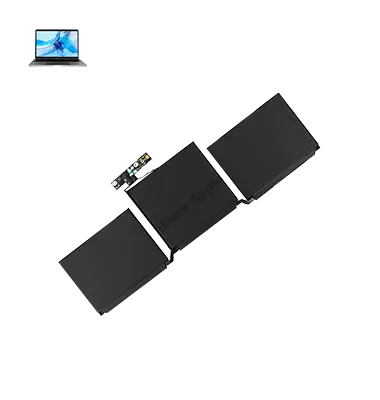
MacBook Pro M2 (2022) A2338 Battery
We offer expert MacBook Pro M2 (2022) A2338 Battery replacement services in Bangladesh. If your Battery drains quickly or no longer holds a charge, our skilled technicians provide a fast and reliable solution using genuine parts. Enjoy extended Battery life and optimal performance. Contact us today for professional Battery replacement!
Battery
- 1 Year - Replacement Guaranty
- 30 Days - Money back Guaranty
- Replacement Time - 1 Hour
- Service Charge Included
- 24/7 support
How to Identify When Your MacBook Pro M2 (2022) A2338 Battery Needs Replacement
Here are four signs that your MacBook Pro M2 (2022) A2338 Battery may need replacement:
Rapid Battery Drain:
If your MacBook Pro M2 (2022) A2338 Battery depletes quickly even with minimal usage, it may need replacement.
Charging Issues:
Difficulty charging or the Battery not holding a charge indicates deterioration.
Overheating:
An aging Battery can cause excessive heating, affecting performance.
Swelling or Physical Damage:
A swollen or bulging Battery is a serious sign that requires immediate replacement.
Our MacBook Pro M2 (2022) A2338 Battery Replacement Process
i. Diagnosis & Consultation
We inspect your MacBook Pro M2 (2022) A2338 Battery to confirm the issue and discuss the best replacement solution.
ii. Genuine Parts &
Expert Handling
Our skilled technicians use authentic Battery replacements for safe and long-lasting performance.
iii. Fast & Efficient Replacement
The old Battery is carefully removed, and a new one is installed with precision to ensure flawless functionality.
iv. Final Testing & Warranty Support
We conduct thorough testing to verify performance and provide warranty support for peace of mind.

Why Choose iCare Apple for MacBook Pro M2 (2022) A2338 Battery Replacement
At iCare Apple, we offer expert MacBook Pro M2 (2022) A2338 Battery replacement using genuine parts and skilled technicians. Our fast, reliable, and affordable service ensures optimal performance and longevity. Trust us for a hassle-free repair experience with professional care and warranty support. Your Apple device is in safe hands!
✌️Top Benefits of MacBook Pro M2 (2022) A2338 Battery Replacement at iCare Apple
Certified Technicians
Our technicians are certified and highly skilled, ensure repairs for your MacBook Pro M2 (2022) A2338. We guarantee top-notch service for all Battery replacements.
Original & High-Quality Parts
We use genuine Apple parts for MacBook Battery replacements, ensuring optimal performance, durability, and preserving your MacBook's original quality for long-lasting results.
Quick and Efficient Service
At iCare Apple, we prioritize quick and efficient service, minimizing downtime. Our experienced team provides rapid, reliable Battery repairs, so you can get back to using your MacBook without delay.

Tips & Tricks for MacBook Pro M2 (2022) A2338 Battery
• Optimize Battery Settings:
Turn on “Battery Health Management” in your settings to extend your battery’s lifespan by reducing peak charging capacity.
• Use Low Power Mode:
Enable Low Power Mode to reduce energy consumption and improve battery life during prolonged use.
• Adjust Screen Brightness:
Lowering your screen brightness can significantly improve battery performance.
• Disable Unnecessary Background Apps:
Close apps you don’t need running, as they drain battery life in the background.
• Turn Off Bluetooth When Not in Use:
Keeping Bluetooth off when it’s not needed helps conserve energy.
• Check Battery Usage:
Use the “Battery” section in System Preferences to see which apps are using the most power.
• Use Safari Instead of Chrome:
Safari is optimized for MacBooks, offering better battery efficiency than other browsers.
• Avoid Overcharging:
Don’t keep your MacBook plugged in all the time.
Charge it when needed to avoid overloading the battery.
• Keep macOS Updated:
Install the latest software updates, as they often include battery performance improvements.
• Calibrate the Battery:
Periodically run your MacBook’s battery down to about 10%, then fully charge it to 100% to recalibrate for more accurate battery readings.
Proper care ensures your device remains reliable and efficient for years.
What Our Customers Are Saying About Our MacBook Pro M2 (2022) A2338 Battery Replacement Service
Rashed Alam
The Battery replacement for my MacBook Pro M2 was smooth and quick. iCare Apple provided great service, and my MacBook is running like new now.
Sharif Islam
iCare Apple’s team replaced my MacBook Pro M2 Battery efficiently. The service was top-notch, and I’m happy with the performance of my laptop now.
Reza Khondokar
Excellent experience with iCare Apple for my MacBook Pro M2 Battery replacement. The repair was done quickly, and the Battery life has been amazing since.
Shahrin Noor
I’m extremely satisfied with the MacBook Pro M2 Battery replacement service. iCare Apple fixed it in no time, and my MacBook is performing better than before!
Your Trust is Our Strength
Why Timely MacBook Battery Replacement is Essential
Timely replacement of your MacBook Pro M2 Battery is essential to maintain optimal performance. A worn-out Battery can cause slow charging, poor Battery life, and unexpected shutdowns. Replacing it promptly ensures better efficiency, prolongs your laptop’s lifespan, and prevents further damage to other internal components.
Visit iCare Apple in Dhaka for Professional MacBook Repairs
Located at the heart of Dhaka, iCare Apple offers top-notch repair services for all Macbook models. Our team is committed to providing quality repairs, and we stand by our work. So, if your MacBook Pro M2 (2022) A2338 needs a Battery replacement, visit iCare Apple and experience professional service from trusted experts.
Ensure the longevity and performance of your MacBook Pro M2 (2022) A2338 by opting for quality Battery replacement services at iCare Apple.
FAQ
1. What are the signs that my MacBook Pro A2338 M2 (2022) Battery needs replacement?
If your MacBook is draining quickly, charging inconsistently, or not holding a charge at all, it’s time for a Battery replacement.
2. How long does the Battery replacement process take at iCare Apple?
The Battery replacement usually takes 1-2 hours, depending on the availability of parts and the service load.
3. Is iCare Apple using genuine parts for the Battery replacement?
Yes, we use genuine, high-quality Apple parts to ensure the best performance and longevity for your device.
4. Can I replace my MacBook Pro A2338 M2 (2022) Battery if it's under warranty?
If your MacBook is under warranty, we advise checking with Apple directly, as replacing the Battery outside their authorized service network may void the warranty.
5. How much does the Battery replacement cost at iCare Apple?
Battery replacement costs vary based on your device’s model. Contact us for an exact quote based on your MacBook’s condition.
6. Will replacing the Battery affect my MacBook’s performance?
Replacing the Battery improves performance, ensuring better power management, and providing a longer, more stable operation for your MacBook Pro.
7. Do you offer any warranty for the Battery replacement?
Yes, we provide a warranty on the Battery replacement service to ensure peace of mind and the quality of our work.
8. What should I do before bringing my MacBook for Battery replacement?
We recommend backing up your data before the service, as it’s always a good practice to protect your files during repairs.