

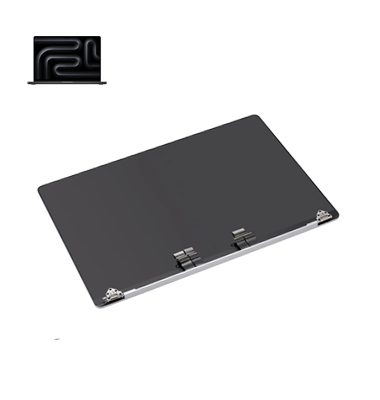
MacBook Pro M3 A2992 (2023) Display
At iCare Apple in Bangladesh, we offer expert MacBook Pro M3 A2992 (2023) Display repair and replacement services. Our skilled technicians use high-quality parts to restore your screen to perfect condition. Trust us to bring your MacBook’s Display back to life with fast, reliable, and professional service.
Display
- 1 Year - Replacement Guaranty
- 30 Days - Money back Guaranty
- Replacement Time - 1 Hour
- Service Charge Included
- 24/7 support
MacBook Pro M3 A2992 (2023) Display Repair & Replacement Service at Best Price in Bangladesh – Original Display
[Price – Service – Quality] Guaranteed for your MacBook Pro M3 A2992 (2023) Repair
We provide professional MacBook Pro M4 2024 A3112 Display repair and replacement service at iCare Apple. Our Original Display solutions help restore clear visuals, accurate colors, and reliable performance. Whether your display is cracked, damaged, flickering, showing lines, has dark spots, or is not working properly, our experienced technicians provide careful installation and complete quality testing. For the MacBook Pro M4 (2024) A3112 Display Price in Bangladesh, we offer transparent pricing and dependable repair service. We focus on quality workmanship and customer satisfaction throughout every repair. Choose iCare Apple for professional MacBook repair and trusted Display replacement service. Restore your MacBook Pro A3112 Display and enjoy a clear, smooth, and reliable viewing experience again.

Why Choose iCare Apple for MacBook Pro M3 A2992 (2023) Display Repair & Replacement?
🔬 23 Years of Apple Repair Service Experience
🧑🏼💻 Since 2003, Serving 80,000+ Apple users with trusted care❣️!
Choose iCare Apple for professional MacBook Pro M4 (2024) A3112 Display repair using Original Display solutions. We provide careful installation, advanced diagnostics, complete quality testing, experienced technicians, and transparent pricing. Our service helps restore clear visuals, accurate colors, smooth performance, and dependable display operation at a competitive price.
Expert Diagnosis & Reliable Service
At iCare Apple, we handle every display repair with skilled, certified technicians who understand the MacBook Pro M3 A2992 (2023) inside out. Our expertise ensures accurate diagnosis, safe handling, and flawless results.
Original Parts & Safe Replacement
We prioritize quality by using original display components for the MacBook Pro M3 A2992 (2023). Our goal is to restore your device to factory-like condition while keeping the MacBook Pro M3 A2992 (2023) Display Price in Bangladesh reasonable and transparent.
Quick & Efficient Service
We understand the urgency of display issues, so we offer fast and efficient repair service. Most display replacements are completed on the same day without compromising quality. Whether your device has a cracked screen, blank display, or touch problem, we ensure a smooth repair experience.
Our MacBook Pro M3 A2992 (2023) Display Repair Process
• Diagnosis
We start by checking cracks, colorful screen issues, or touch problems to understand whether your MacBook Pro M3 A2992 (2023) needs repair or a complete Display replacement.
• Transparent Pricing Details
Before any work begins, we explain the issue and provide the exact MacBook Pro M3 A2992 (2023) Display Price for your approval.
• Repair or Replacement
If the Display can be repaired, our technicians fix it with precision. But if replacement is required, we install an original Display to restore brightness, colour accuracy, and smooth touch response, ensuring your device feels brand new again.
• Final Quality Testing
After the Installing, we check touch response, brightness, colors, and overall performance to ensure your MacBook Pro M3 A2992 (2023) Display works flawlessly.
Why You Should Repair or Replace Your MacBook Pro M3 A2992 (2023) Display?
- Cracked or shattered screen
- Touch not working or unresponsive
- Display showing green lines or color distortion
- Low brightness or flickering screen
- Face ID not working due to display damage
- Ghost touch or random screen activities
What Our Customers Are Saying About Our MacBook Pro M3 A2992 (2023) Display Price & Service in Bangladesh
Sakib Hasan
I had my MacBook Pro M4 (2024) A3112 Display repaired at iCare Apple with excellent care. The service was professional, the installation was precise, and the pricing was fair.
Mahiya Rahman
My MacBook Pro M4 (2024) A3112 Display was replaced at iCare Apple smoothly and professionally. The display quality is excellent again, and I’m very satisfied with the service.
Nayeem Chowdhury
I chose iCare Apple for my MacBook Pro M4 (2024) A3112 Display service in Dhaka. The technicians were skilled, the pricing was transparent, and the repair was reliable.
Jannatul Ferdous
My MacBook Pro M4 (2024) A3112 Display repair experience at iCare Apple was excellent. Fast service, careful workmanship, and clear visuals made the result worth it.
Your Trust is Our Strength
Why Timely MacBook Pro M3 A2992 (2023) Display Repair & Replacement is Essential
Prompt repair or replacement of your MacBook Pro M3 A2992 (2023) Display is crucial to maintain device performance and prevent further damage. Cracked, dead, or colorful screens can lead to:
• Touch sensitivity issues
• Unresponsive or ghost touch
• Increased risk of internal damage
• Reduced device lifespan
At iCare Apple, timely Display repair ensures your MacBook Pro M3 A2992 (2023) functions flawlessly, protects internal components, and restores clear visuals for safe, smooth daily use.
Visit iCare Apple in Dhaka for MacBook Pro M3 A2992 (2023) Display Price in Bangladesh
Visit iCare Apple for professional MacBook Pro M4 (2024) A3112 Display repair and replacement in Bangladesh. We provide Original Display solutions, careful installation, advanced diagnostics, and complete quality testing. Get transparent pricing and dependable service when you need the MacBook Pro M4 (2024) A3112 Display Price in Bangladesh from experienced technicians.
FAQ
1. How long does the MacBook Pro M3 A2992 (2023) Display replacement take?
Most MacBook Pro M3 A2992 (2023) Display replacements are completed the same day. We aim to deliver fast, reliable, and smooth service without compromising quality.
2. Does replacing the MacBook Pro M3 A2992 (2023) Display affect water resistance?
Opening the MacBook Pro M3 A2992 (2023) Display reduces its water resistance. We reseal the device properly, but we always recommend keeping it away from liquid exposure afterward.
3. Do I need an appointment for MacBook Pro M3 A2992 (2023) Display repair?
No appointment is required. You can visit us anytime, and we will start diagnosing and repairing your MacBook Pro M3 A2992 (2023) immediately.
4.Why Should I Choose Professional MacBook Pro M4 (2024) A3112 Display Replacement?
A MacBook Pro M3 A2992 (2023) features an advanced high-resolution display, so improper repair can affect display quality and performance. Professional display replacement ensures proper installation, accurate testing, and reliable results. At iCare Apple, our experienced technicians carefully handle your MacBook and perform a complete display check after replacement.
5. Will my data be safe during the MacBook Pro M3 A2992 (2023) Display replacement?
Yes, your data stays completely safe. We only work on the MacBook Pro M3 A2992 (2023) Display and do not access or delete any personal files.
6. Do we provide emergency or quick MacBook Pro M3 A2992 (2023) Display replacement service?
Yes, we offer quick-service support for customers who need urgent MacBook Pro M3 A2992 (2023) Display repairs.
7. How do we confirm if your MacBook Pro M3 A2992 (2023) needs a full display replacement?
We run a complete diagnosis on your MacBook Pro M3 A2992 (2023) to check touch response, display quality, and internal damage before recommending a replacement.
8. Can water damage cause display issues on the MacBook Pro M3 A2992 (2023) ?
Yes, liquid exposure can affect touch and visibility on the MacBook Pro M3 A2992 (2023) . We inspect and treat internal corrosion before replacing the display if needed.